When we use ER/Studio Data Architect, we can create Submodels to document specific metadata.
For example, we can create Submodels
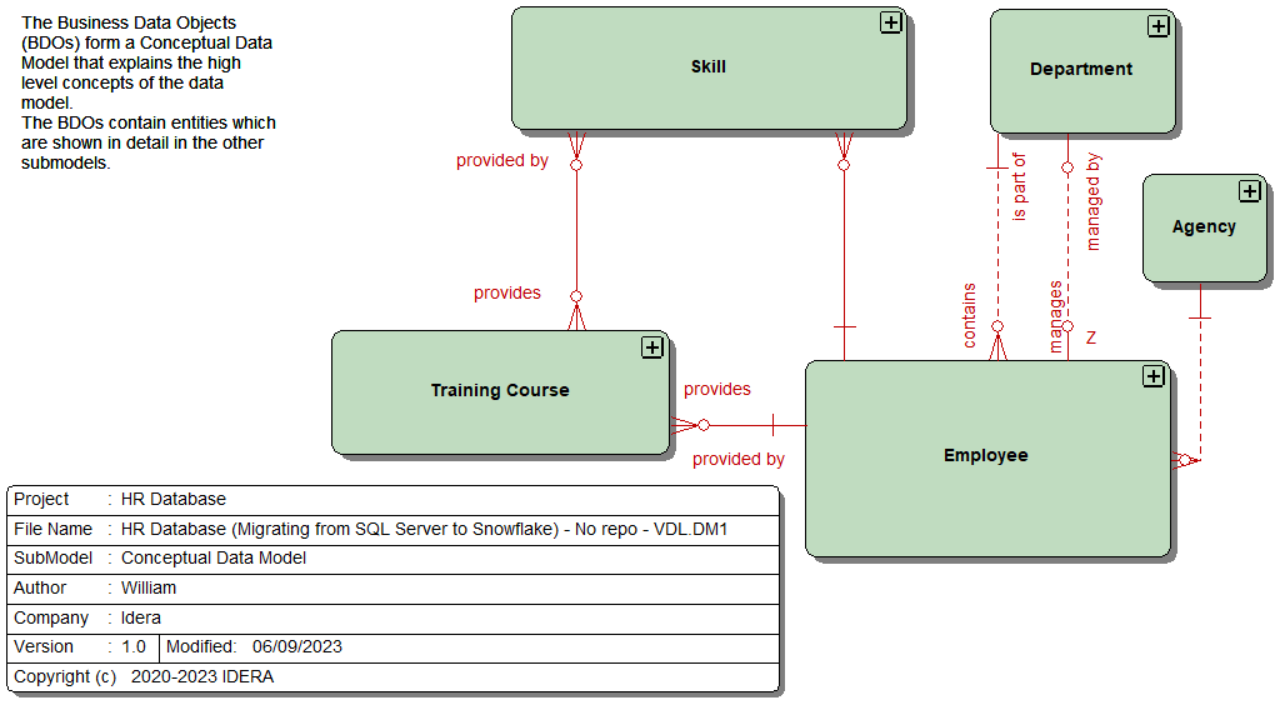
to display the datatypes and Null option
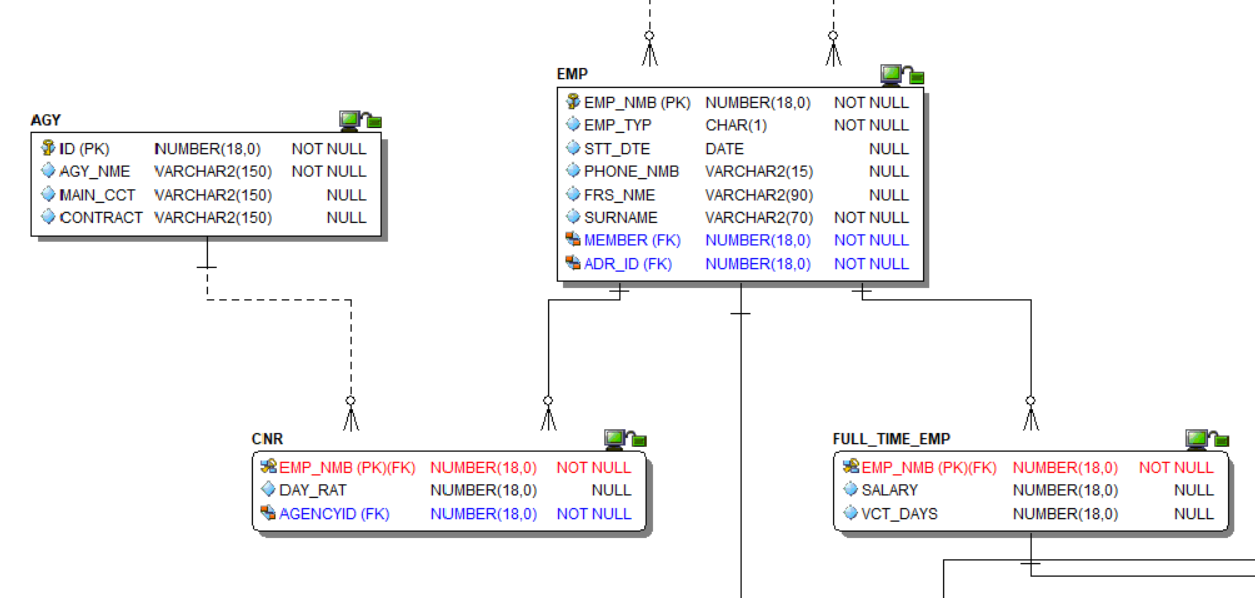
to show the Attachments and Data Security Information bound to the Entities | Tables
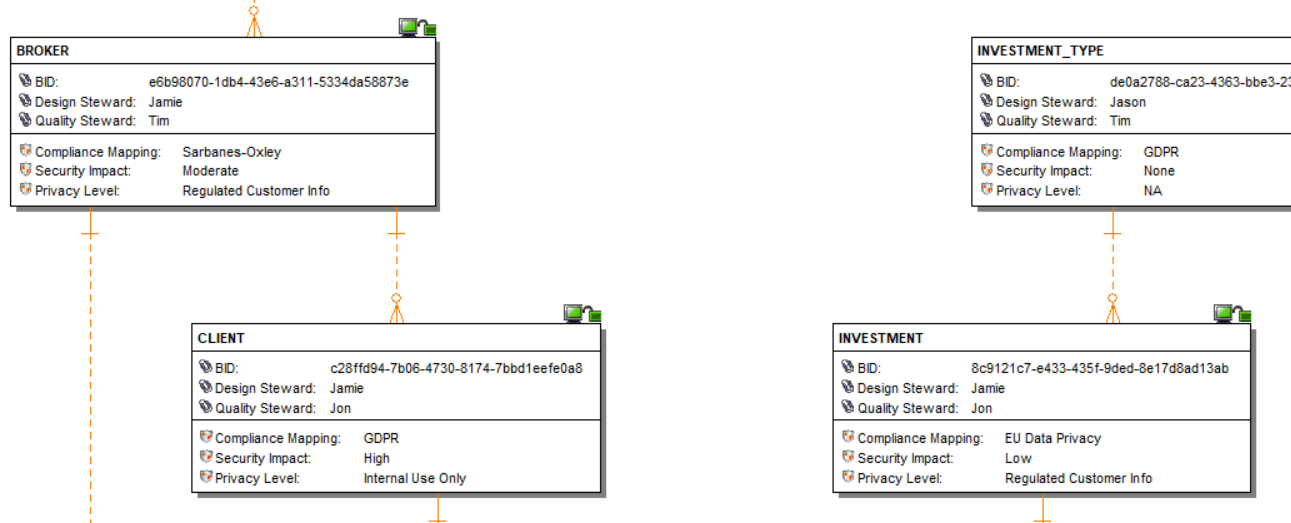
Sample macros are included with the installation of ER/Studio Data Architect.
These 2 macros are generating 1 row per Attribute ✖️ Attachment:
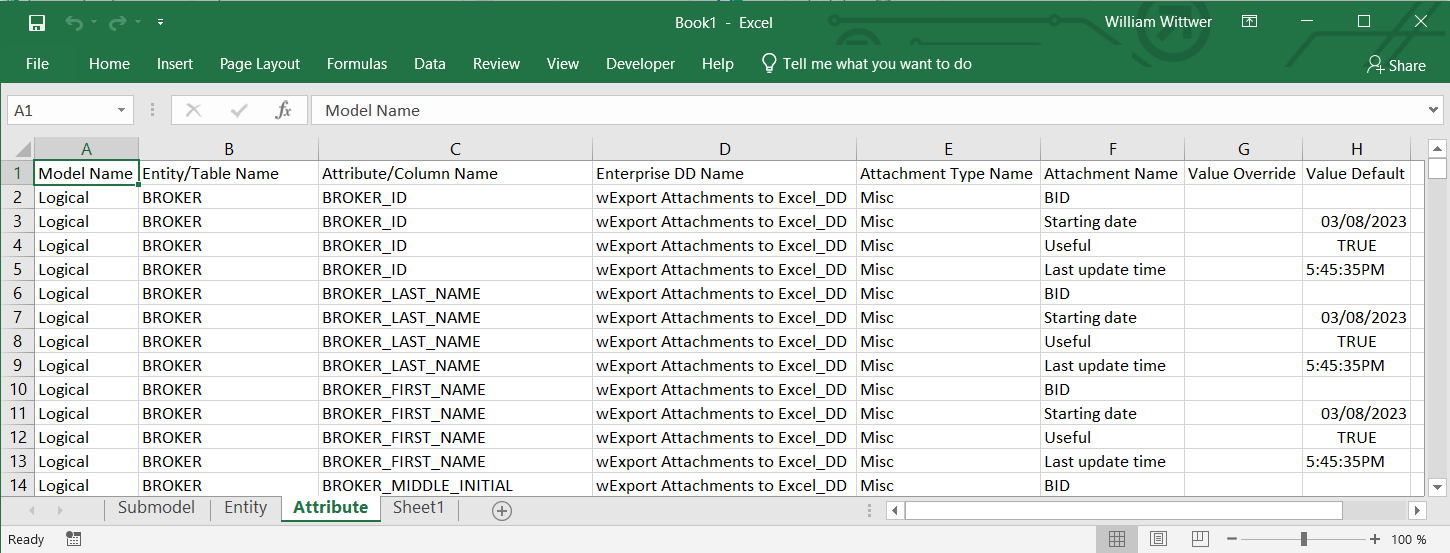
In this blog post, I’ll share 2 different macros which can also export|import the entity and attribute attachment binding information to|from Excel.
These macros don’t manage the submodels. They are displaying the metadata another way: it generates one row per Entity and Attribute, and it displays the different attachment properties in different columns:
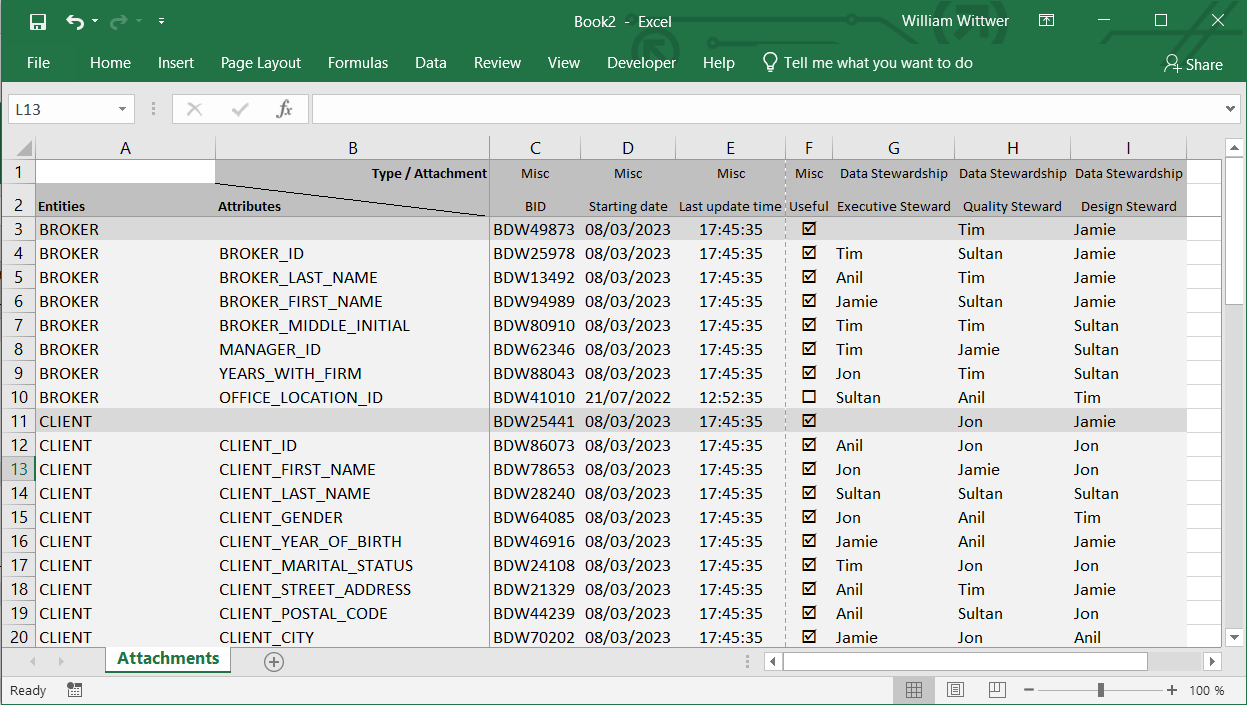
Firstly, the macro which allows us to export:
'#Language "WWB-COM"
''MACRO TITLE: wExport Attachments to Excel
' MACRO VERSION: 2.1
'This macro exports Attachments values for Entitys|Tables|Attributes|Columns
'
' Release notes
' 2.1: Add Excel comments for Text Lists
' 2.0: Add Excel optimizations
' 1.0: Initial version
'---------------------------------------------------------------------------

Option Explicit

Const TITLE As String = "wExport Attachments to Excel"
Const TIMESTAMPED As Boolean = True
Const USE_WINGDINGS As Boolean = True

Const FORMAT_FOR_DATE_WITH_EXCEL$ = "yyyy-mm-dd" ' Excel automatically changes it to the local settings
Const FORMAT_FOR_TIME_WITH_EXCEL$ = "hh:nn:ss"

Dim aLog$() ' Array of strings for the Logs

Dim MyDictionary As Dictionary
Dim dictionary_list$()

Dim MyDiagram As Diagram
Dim MyModel As Model
Dim IsLogical As Boolean
Dim MyEntityDisplay As EntityDisplay
Dim MyEntity As Entity
Dim MyAttribute As AttributeObj

Dim MyBoundAttachment As BoundAttachment
Dim MyAttachmentType As AttachmentType
Dim MyAttachment As Attachment

' Excel variables
Dim wb As Object
Dim sheet As Object
Dim excel As Object

Dim curRow%
Dim curCol%
Dim lastCol$

Dim XLColumns4Attachments As Object

' Constants
Const BOOLEAN_TYPE% = 1
Const DATE_TYPE% = 2
Const EXTERNAL_FILE_PATH_TYPE% = 3
Const NUMERIC_TYPE% = 4
Const TEXT_TYPE% = 5
Const TEXT_LIST_TYPE% = 6
Const TIME_TYPE% = 7

Const xlCenter% = -4108
Const xlBottom% = -4107
Const xlTop% = -4160
Const xlLeft% = -4131
Const xlRight% = -4152
Const xlCalculationAutomatic& = -4105
Const xlCalculationManual& = -4135
Const xlCalculationSemiautomatic& = 2

Sub Main

	Set XLColumns4Attachments = CreateObject("Scripting.Dictionary")
	If (XLColumns4Attachments Is Nothing) Then
		MsgBox("Cannot access [Scripting.Dictionary] object.", vbExclamation)
		Exit Sub
	End If

	Dim MyListMember As ListMember
	Dim sList$
	Dim iFrom%, iTo%

	Debug.Clear
	ReDim aLog(0)

	'Get the current diagram.
	Set MyDiagram = DiagramManager.ActiveDiagram

	'Get the current model.
	Set MyModel = MyDiagram.ActiveModel

	' Excel
	Set excel = CreateObject("excel.application")

	PrintHeader
	' Excel optimization
	excel.Application.ScreenUpdating = False
	excel.Application.EnableAnimations = False
	excel.Application.Calculation = xlCalculationManual
	sheet.DisplayPageBreaks = False

	curCol = 3

	If init_dictionary_list Then
		Set MyDictionary = MyDiagram.Dictionary
	Else
		Begin Dialog UserDialog 550,130,TITLE ' %GRID:10,7,1,1
			Text 30,21,120,14,"Select Dictionary: ",.Text3,1
			DropListBox 170,18,360,112,dictionary_list(),.dictionary_select
			OKButton 20,105,110,21
			CancelButton 420,105,110,21
		End Dialog

		Dim dlg As UserDialog
		If Dialog(dlg) = -1 Then
			If dictionary_list(dlg.dictionary_select) = "Local" Then
				Set MyDictionary = MyDiagram.Dictionary
			Else
				Set MyDictionary = MyDiagram.EnterpriseDataDictionaries.Item(dictionary_list(dlg.dictionary_select))
			End If
		Else
			Exit Sub
		End If
	End If

	If Not MyDictionary Is Nothing Then
		LogIt "Dictionary: " & MyDictionary.Name
		sheet.Cells(1,1).Value = If(dlg.dictionary_select = 0, "DD", "EDD") & vbCrLf & MyDictionary.Name
		' White on white
		With sheet.Cells(1,1).Font
	'		.colorindex = 15
			.ThemeColor = 1
			.TintAndShade = 0
		End With

		' Get all attachments
		For Each MyAttachmentType In MyDictionary.AttachmentTypes
			For Each MyAttachment In MyAttachmentType.Attachments
	'			LogIt MyAttachmentType.Name & " / " & MyAttachment.Name
				sheet.Cells(1, curCol).Value = MyAttachmentType.Name
				sheet.Cells(2, curCol).Value = MyAttachment.Name

				' Center if boolean(1), date(2) or time(7)
				Select Case MyAttachment.Datatype
					Case BOOLEAN_TYPE, DATE_TYPE, TIME_TYPE
						With sheet.Columns(Chr(64 + curCol) + ":" + Chr(64 + curCol))
							.HorizontalAlignment = xlCenter
						End With

					Case TEXT_LIST_TYPE
						sList = ""
						For Each MyListMember In MyAttachment.TextList
							If MyListMember.IsDefault Then
								iFrom = Len(sList)
							End If
							sList = sList & "- " & MyListMember.Text & vbLf
							If MyListMember.IsDefault Then
								iTo = Len(sList) - 1
							End If
						Next MyListMember
						sList = Left(sList, Len(sList) - 1)
						With sheet.Cells(2, curCol)
							.AddComment
							.Comment.Visible = False
							.Comment.Text Text:= sList
						End With
						With sheet.Cells(2, curCol).Comment.Shape.TextFrame
							  .Characters.Font.Bold = False
							  .Characters(iFrom, iTo).Font.Bold = True
							  .Characters((iTo + 1), Len(sList)).Font.Bold = False
						End With

				End Select

				If USE_WINGDINGS And (MyAttachment.Datatype = 1) Then
					With sheet.range(Chr(64 + curCol) & "3:" & Chr(64 + curCol) & "1048576")
						.Font.Name = "Wingdings"
					End With
				End If

				XLColumns4Attachments(MyAttachmentType.Name & "\" & MyAttachment.Name) = curCol
				LogIt MyAttachmentType.Name & "\" & MyAttachment.Name & " = Column " & Chr(64 + curCol)
				curCol = curCol + 1
			Next MyAttachment
		Next MyAttachmentType

		Comments_AutoSize(sheet)

		' Excel Style for the attachments
		lastCol = Chr(63 + curCol)
		With sheet.range("C1:" & lastCol & "2")
			.interior.colorindex = 15
			.font.Size = 9
			.horizontalalignment = xlCenter
		End With

		curRow = 3

		' Loop the Entities|Tables
		For Each MyEntity In MyModel.Entities

			LogIt If(MyModel.Logical, "Entity: " & MyEntity.EntityName, "Table: " & MyEntity.TableName)
			' Set the Object Name
			sheet.cells(curRow, 1).Value = If(MyModel.Logical, MyEntity.EntityName, MyEntity.TableName)
			' Set Object style
			With sheet.range("A" & curRow & ":" & lastCol & curRow).interior
				.colorindex = 15
				.ThemeColor = 1
				.TintAndShade = -0.15
			End With

			' Loop through the Object's attachments
			For Each MyBoundAttachment In MyEntity.BoundAttachments

				' Set attachment object to the base attachment from the data dictionary.
				Set MyAttachment = MyBoundAttachment.Attachment

				' Check if Attachment belongs to the chosen Dictionary
				If MyAttachment.AttachmentType.DictionaryName = MyDictionary.Name Then
					' Output Entity|Table Attachments to Excel
					sheet.cells(curRow, XLColumns4Attachments(MyAttachment.AttachmentType.Name & "\" & MyAttachment.Name)).Value = GetValueforAttachment(MyAttachment, MyBoundAttachment.ValueOverride)
				End If

			Next MyBoundAttachment

			curRow = curRow + 1

			' Loop through the Object's Attributes|Columns
			For Each MyAttribute In MyEntity.Attributes

				LogIt If(MyModel.Logical, "Attribute: " & MyAttribute.AttributeName, "Column: " & MyAttribute.ColumnName)
				' Set the Object Name
				sheet.cells(curRow, 1).Value = If(MyModel.Logical, MyEntity.EntityName, MyEntity.TableName)
				sheet.cells(curRow, 2).Value = If(MyModel.Logical, MyAttribute.AttributeName, MyAttribute.ColumnName)
				' Set Object style
				With sheet.range("A" & curRow & ":" & lastCol & curRow).interior
					.colorindex = 15
					.ThemeColor = 1
					.TintAndShade = -0.05
				End With

				' Loop through the Object's attachments
				For Each MyBoundAttachment In MyAttribute.BoundAttachments

					' Set attachment object to the base attachment from the data dictionary.
					Set MyAttachment = MyBoundAttachment.Attachment

					' Check if Attachment belongs to the chosen Dictionary
					If MyAttachment.AttachmentType.DictionaryName = MyDictionary.Name Then
						' Output Entity|Table Attachments to Excel
						sheet.cells(curRow, XLColumns4Attachments(MyAttachment.AttachmentType.Name & "\" & MyAttachment.Name)).Value = GetValueforAttachment(MyAttachment, MyBoundAttachment.ValueOverride)
					End If

				Next MyBoundAttachment

				curRow = curRow + 1

			Next MyAttribute

		Next MyEntity

		Debug.Print ""
		LogIt "Export completed"

		excel.Visible = True
		excel.Application.ScreenUpdating = True
		excel.Application.EnableAnimations = True
		excel.Application.Calculation = xlCalculationAutomatic
		sheet.DisplayPageBreaks = True
		AutofitAllUsed
		sheet.Rows("1:1").RowHeight = 14.4 '.EntireRow.AutoFit

		MsgBox "Export completed !", vbInformation, TITLE
	End If
End Sub

Private Function PrefixDT(txt As String) As String
	If TIMESTAMPED Then
		PrefixDT = CStr(Now) & Chr(9) & txt
	Else
		PrefixDT = txt
	End If
End Function

Private Sub LogIt(ByVal txt As String)
	Dim idx As Integer

	idx = UBound(aLog) + 1
	ReDim Preserve aLog(idx)
	aLog(idx) = PrefixDT(txt)

	Debug.Print PrefixDT(txt)
End Sub

Private Sub PrintHeader

	Set wb = excel.workbooks.Add
	Set sheet = wb.activesheet

	sheet.Name = "Attachments"

	With sheet.range("A2:B2")
		.interior.colorindex = 15
		.font.Bold = True
		.font.Size = 9
	End With

	With excel
		With .ActiveWindow
			.SplitColumn = 2
			.SplitRow = 2
		End With
		.ActiveWindow.FreezePanes = True
	End With

	sheet.cells(1,2).Value = "Type / Attachment"
	sheet.cells(2,2).Value = If(MyModel.Logical, "Attributes", "Columns")
	sheet.cells(2,1).Value = If(MyModel.Logical, "Entities", "Tables")

	With sheet.cells(2,2).Borders(5)
		.LineStyle = 1
		.ColorIndex = 0
		.TintAndShade = 0
		.Weight = 2
	End With

	sheet.Rows("2:2").RowHeight = 20

	With sheet.range("A:B")
		.verticalalignment = xlBottom
		.horizontalalignment = xlLeft
	End With

	With sheet.cells(1,2)
		.horizontalalignment = xlRight
		.interior.colorindex = 15
		.font.Bold = True
		.font.Size = 9
	End With

End Sub

Private Sub AutofitAllUsed
	Dim x As Long

	For x = 1 To Excel.ActiveSheet.UsedRange.Columns.Count
		excel.ActiveSheet.UsedRange.Columns(x).EntireColumn.AutoFit
	Next x
End Sub

Private Function GetValueforAttachment(theAttachment As Attachment, ByVal value As String) As String

	Dim dt, tm As Date
	Dim S As String

	GetValueforAttachment = ""

	If (theAttachment Is Nothing) Then
		Exit Function
	End If

	If (value = "") Then
		value = theAttachment.ValueDefault
	End If

	If value = "" Then
		Exit Function
	End If

	Select Case theAttachment.Datatype
		Case BOOLEAN_TYPE
			GetValueforAttachment = If(USE_WINGDINGS, If(CBool(value), "þ", "¨"), CStr(CBool(value)))
		Case EXTERNAL_FILE_PATH_TYPE
			GetValueforAttachment = value
		Case NUMERIC_TYPE
			GetValueforAttachment = CStr(CInt(value))
		Case TEXT_TYPE
			GetValueforAttachment = value
		Case DATE_TYPE
			dt = CStr(CDate(value))
			S = Format(dt, FORMAT_FOR_DATE_WITH_EXCEL)
			GetValueforAttachment = S
		Case TIME_TYPE
			tm = CStr(CDate(value))
			S = Format(tm, FORMAT_FOR_TIME_WITH_EXCEL)
			GetValueforAttachment = S
		Case TEXT_LIST_TYPE
			GetValueforAttachment = value
	End Select
End Function

' Initialize the dictionary drop down list
Function init_dictionary_list As Boolean
	Dim i%

	ReDim dictionary_list$(0 To MyDiagram.EnterpriseDataDictionaries.Count)

	dictionary_list (0) = "Local"
	i = 1

	For Each MyDictionary In MyDiagram.EnterpriseDataDictionaries
		dictionary_list (i) = MyDictionary.Name
		i = i + 1
	Next

	init_dictionary_list = MyDiagram.EnterpriseDataDictionaries.Count = 0
End Function

Sub Comments_AutoSize(s As Object)
	' https://www.contextures.com/xlcomments03.html
	Dim MyComments As Object
	Dim lArea As Long
	Dim lMult As Double
	Dim MaxW As Long
	Dim NewW As Long

	'Height adjustment factor
	 'of 1.1 seems to work ok.
	lMult = 1.1
	MaxW = 300
	NewW = 200

	For Each MyComments In s.Comments
	  With MyComments
		.Shape.TextFrame.AutoSize = True
		If .Shape.Width > MaxW Then
		  lArea = .Shape.Width * .Shape.Height
		  .Shape.Width = NewW
		  .Shape.Height = (lArea / NewW) * lMult
		End If
	  End With
	Next ' comment
End Sub
Then the macro to import:
'#Language "WWB-COM"
''MACRO TITLE: wImport Attachments from Excel
' MACRO VERSION: 1.0
'This macro imports Attachments values for Entities|Tables|Attributes|Columns
'---------------------------------------------------------------------------

Option Explicit

Const TITLE As String = "wImport Attachments from Excel"
Const USE_WINGDINGS As Boolean = True ' Used for the spreadsheet Sample

Dim MyDictionary As Dictionary
Dim dictionary_list$()

Dim MyDiagram As Diagram
Dim MyModel As Model
Dim MyEntity As Entity
Dim MyAttribute As AttributeObj

Dim MyAttachments() As Attachment
Dim MyAttachment As Attachment
Dim MyBoundAttachment As BoundAttachment

' Excel variables
Dim wb As Object
Dim sheet As Object
Dim excel As Object
Dim XLfile$

Dim curRow%
Dim curCol%
Dim lastCol$
Dim lNbAttachments&
Dim sCurrentCell$

' Constants
Const BOOLEAN_TYPE% = 1
Const DATE_TYPE% = 2
Const EXTERNAL_FILE_PATH_TYPE% = 3
Const NUMERIC_TYPE% = 4
Const TEXT_TYPE% = 5
Const TEXT_LIST_TYPE% = 6
Const TIME_TYPE% = 7

Const xlCenter% = -4108
Const xlBottom% = -4107
Const xlTop% = -4160
Const xlLeft% = -4131
Const xlRight% = -4152

Sub Main
	Dim lNBUpdates&
	Debug.Clear

	Set MyDiagram = DiagramManager.ActiveDiagram
	Set MyModel = MyDiagram.ActiveModel

	Begin Dialog UserDialog 550,196,TITLE,.DialogFunc ' %GRID:10,7,1,1
		Text 30,21,120,14,"Select Dictionary: ",.Text3,1
		DropListBox 170,18,360,112,dictionary_list(),.dictionary_select
		GroupBox 20,56,510,98,"Excel spreadsheet",.gbPath
		Text 30,84,50,14,"Path: ",.Text1,1
		TextBox 90,83,360,21,.Path
		PushButton 460,84,60,21,"Browse",.Browse
		PushButton 350,119,170,28,"Generate a Sample Sheet",.SampleSheet
		OKButton 20,168,110,21
		CancelButton 420,168,110,21
	End Dialog

	Dim dlg As UserDialog

	init_dictionary_list

	start_dialog:

	'start dialog
	If Dialog(dlg) = -1 Then

		If dictionary_list(dlg.dictionary_select) = "Local" Then
			Set MyDictionary = MyDiagram.Dictionary
		Else
			Set MyDictionary = MyDiagram.EnterpriseDataDictionaries.Item(dictionary_list(dlg.dictionary_select))
		End If

		'initialize excel object and make visible
		Set excel = CreateObject("Excel.Application")

		'this Error Is For an errant file path, Dialog will be restarted
		On Error GoTo Error_open

		XLfile = dlg.Path
		excel.workbooks.Open XLfile

		On Error GoTo Error_unknown

		DiagramManager.EnableScreenUpdateEx(False, False)

		lNBUpdates = ImportAttachments(excel)

		DiagramManager.EnableScreenUpdateEx(True, True)

		excel.Quit()
		MsgBox ("File imported" & vbCrLf & vbCrLf & lNBUpdates & " update" & If(lNBUpdates > 1, "s", ""), vbInformation, TITLE)
		Debug.Print lNBUpdates & " update" & If(lNBUpdates > 1, "s", "") & " done"

		Exit Sub

		Error_open:
			MsgBox("Please enter a valid path.", vbExclamation, TITLE)
			GoTo start_dialog

		Error_unknown:
			MsgBox(Err.Description & If(sCurrentCell <> "", vbCrLf & vbCrLf & "Last Excel cell used: " & sCurrentCell, ""), vbExclamation, TITLE)

			If Not excel Is Nothing Then
				excel.Quit()
			End If

	End If

End Sub

'initialize the dictionary drop down list
Sub init_dictionary_list
	Dim i%

	ReDim dictionary_list$(0 To MyDiagram.EnterpriseDataDictionaries.Count)

	dictionary_list (0) = "Local"
	i = 1

	For Each MyDictionary In MyDiagram.EnterpriseDataDictionaries
		dictionary_list (i) = MyDictionary.Name
		i = i + 1
	Next
End Sub

Private Function ImportAttachments(ex As Variant) As Integer

	Dim sheet As Object
	Dim range As Object

	Dim lNbRows&
	Dim sValue$
	Dim lCurCol&, lCurRow&
	Dim lNbAttachmentsManaged&

	Dim MyAttachmentType As AttachmentType

	Dim sLastAttachmentType$, sLastEntity$, sLastAttribute$

	Set sheet = ex.worksheets(1)
	Set range = sheet.usedrange
	range.Select
	sLastAttachmentType = ""

	ImportAttachments = 0

	lNbAttachments = range.Columns.Count
	Debug.Print "Number of attachments: " & (lNbAttachments - 2)

	ReDim MyAttachments(lNbAttachments)

	For lCurCol = 3 To lNbAttachments
		sValue = Trim(CStr(range.Cells(1, lCurCol).Value))
		If (sValue <> "") Then
			If (sValue <> sLastAttachmentType) Then
				Set MyAttachmentType = MyDictionary.AttachmentTypes(sValue)
				' Check if AttachmentType exists
				If MyAttachmentType Is Nothing Then
					' Attachment type not found, we create it
					Set MyAttachmentType = MyDictionary.AttachmentTypes.Add(sValue, "Imported from file: " & XLfile)
				End If
				sLastAttachmentType = sValue
			End If

			sValue = Trim(CStr(range.Cells(2, lCurCol).Value))
			If (sValue <> "") Then
				Set MyAttachment = MyAttachmentType.Attachments(sValue)
				' Check if Attachment exists
				If MyAttachment Is Nothing Then
					' Attachment not found, we create it
					Set MyAttachment = MyAttachmentType.Attachments.Add(sValue,  "Imported from file: " & XLfile, "", TEXT_TYPE)
					Debug.Print "Attachment created: " & MyAttachmentType.Name & " \ " & MyAttachment.Name
				Else
					Debug.Print "Attachment found: " & MyAttachmentType.Name & " \ " & MyAttachment.Name
				End If
				' Store a reference to the attachment object with the column index
				Debug.Print Chr(9) & "column: " & Chr(64 + lCurCol) & "(" & lCurCol & ")"
				Set MyAttachments(lCurCol) = MyAttachment
			End If

		End If
	Next lCurCol

	lNbRows = range.rows.Count
	Debug.Print "Number of rows: " & (lNbRows - 2)
	sLastEntity = ""
	sLastAttribute = ""
	lNbAttachmentsManaged = 0

	' Loop Rows
	For lCurRow = 3 To lNbRows
		' Entity|Table
		sValue = Trim(CStr(range.Cells(lCurRow, 1).Value))
		If (sValue <> "") Then
			If (sValue <> sLastEntity) Then
				Set MyEntity = MyModel.Entities(sValue)
				sLastEntity = sValue
			End If
			' Check if Entity|Table exists
			If Not(MyEntity Is Nothing) Then
				' Entity|Table found, check if it's an Attribute|Column
				sValue = Trim(CStr(range.Cells(lCurRow, 2).Value))
				If (sValue <> "") Then
					' This row if for an Attribute|Column
					If (sValue <> sLastAttribute) Then
						Set MyAttribute = MyEntity.Attributes(sValue)
						sLastAttribute = sValue
					End If
					' Check if Attribute|Column exists
					If Not(MyAttribute Is Nothing) Then
						' Attribute|Column found
						' Manage the Attachments
						Debug.Print If(MyModel.Logical, "Attribute", "Column") & ": " & sLastEntity & " \ " & sLastAttribute
						lNbAttachmentsManaged = lNbAttachmentsManaged + ManageAttachments(MyAttribute.BoundAttachments, range, lCurRow)
					Else
						Debug.Print If(MyModel.Logical, "Attribute", "Column") & " not found: " & sLastEntity & " \ " & sLastAttribute
					End If
				Else
					' This row is for an Entity|Table
					' Manage the Attachments
					Debug.Print If(MyModel.Logical, "Entity", "Table") & ": " & sLastEntity
					lNbAttachmentsManaged = lNbAttachmentsManaged + ManageAttachments(MyEntity.BoundAttachments, range, lCurRow)
				End If
			Else
				Debug.Print If(MyModel.Logical, "Entity", "Table") & " not found: " & sLastEntity
			End If
		Else
			Debug.Print "Cell for the " & If(MyModel.Logical, "Entity", "Table") & " is Empty"
		End If
	Next lCurRow

	ImportAttachments = lNbAttachmentsManaged
End Function

Private Function ManageAttachments(MyBoundAttachments As BoundAttachments, range As Object, lCurRow&) As Integer
	Dim sValue$
	Dim lCurCol&
	Dim dt As Date

	ManageAttachments = 0

	' Loop Attachments
	For lCurCol = 3 To lNbAttachments
		sCurrentCell = Chr(64 + lCurCol) & lCurRow
		sValue = Trim(CStr(range.Cells(lCurRow, lCurCol).Value))
		' There's a value in the cell
		If (sValue <> "") Then
			' Convert/Format the value to a string
			Set MyAttachment = MyAttachments(lCurCol)
			Select Case MyAttachment.Datatype
			Case NUMERIC_TYPE
				sValue = CStr(CInt(sValue))
			Case DATE_TYPE
				dt = CStr(CDate(sValue))
				sValue = Format(dt, "MM/DD/YYYY")
			Case TIME_TYPE
				dt = CStr(CDate(sValue)) ' Type checking through casting
				sValue = Format(dt, "hh:nn:ssAMPM") ' Expected ER/Studio format
			Case BOOLEAN_TYPE
				sValue = CStr(CBool(If(sValue = "þ", "TRUE", If(sValue = "¨", "FALSE", sValue)))) ' Replace Windings checkboxes: þ|¨
			End Select

			' Check If the Attachment is already bound to the Object
			Set MyBoundAttachment = MyBoundAttachments(MyAttachment.ID)
			If MyBoundAttachment Is Nothing Then
				' Attachment not bound, adding it
				Set MyBoundAttachment = MyBoundAttachments.Add(MyAttachment.ID)
			End If
			MyBoundAttachment.ValueOverride = If(MyAttachment.ValueDefault <> sValue, sValue, "")
			ManageAttachments = ManageAttachments + 1
		End If
	Next lCurCol
	sCurrentCell = ""
End Function

Sub PrintSampleSheet()
	Dim sample As Object
	Dim wb, ws As Variant

	Set sample = CreateObject("excel.application")
	sample.visible = True

	Set wb = sample.workbooks.Add
	Set ws = wb.activesheet

	ws.Name = "Attachments"

	With ws.range("A2:B2")
		.interior.colorindex = 15
		.font.Bold = True
		.font.Size = 9
	End With

	With sample
		With .ActiveWindow
			.SplitColumn = 2
			.SplitRow = 2
		End With
		.ActiveWindow.FreezePanes = True
	End With

	ws.cells(1,2).Value = "Type / Attachment"
	ws.cells(2,2).Value = If(MyModel.Logical, "Attributes", "Columns")
	ws.cells(2,1).Value = If(MyModel.Logical, "Entities", "Tables")

	With ws.cells(2,2).Borders(5)
		.LineStyle = 1
		.ColorIndex = 0
		.TintAndShade = 0
		.Weight = 2
	End With

	ws.Rows("2:2").RowHeight = 20

	With ws.range("A:B")
		.verticalalignment = xlBottom
		.horizontalalignment = xlLeft
	End With

	With ws.cells(1,2)
		.horizontalalignment = xlRight
		.interior.colorindex = 15
		.font.Bold = True
		.font.Size = 9
	End With

	ws.Cells(1, 3).Value = "Attachment Type A"
	ws.Cells(2, 3).Value = "Attachment 1"
	ws.Cells(1, 4).Value = "Attachment Type A"
	ws.Cells(2, 4).Value = "Attachment 2"
	ws.Cells(1, 5).Value = "Attachment Type B"
	ws.Cells(2, 5).Value = "Attachment I"
	ws.Cells(1, 6).Value = "Attachment Type B"
	ws.Cells(2, 6).Value = "Attachment II"
	ws.Cells(1, 7).Value = "Attachment Type B"
	ws.Cells(2, 7).Value = "Attachment III"

	With ws.Range(ws.Cells(1, 3),ws.Cells(2, 7))
		.interior.colorindex = 15
		.font.Size = 9
		.horizontalalignment = xlCenter
	End With

	With ws.Range(ws.Cells(3, 5),ws.Cells(8, 7))
		.HorizontalAlignment = xlCenter
	End With

	If USE_WINGDINGS Then
		With ws.Range(ws.Cells(3, 7),ws.Cells(7, 7))
			.Font.Name = "Wingdings"
		End With
	End If

	With ws.Range(ws.Cells(3, 1),ws.Cells(3, 7)).interior
		.colorindex = 15
		.ThemeColor = 1
		.TintAndShade = -0.15
	End With
	With ws.Range(ws.Cells(6, 1),ws.Cells(6, 7)).interior
		.colorindex = 15
		.ThemeColor = 1
		.TintAndShade = -0.15
	End With

	With ws.Range(ws.Cells(4, 1),ws.Cells(5, 7)).interior
		.colorindex = 15
		.ThemeColor = 1
		.TintAndShade = -0.05
	End With
	With ws.Range(ws.Cells(7, 1),ws.Cells(8, 7)).interior
		.colorindex = 15
		.ThemeColor = 1
		.TintAndShade = -0.05
	End With

	#Region "Sample"
	ws.Cells(3, 1).Value = "Entity 1"
	ws.Cells(3, 2).Value = ""
	ws.Cells(3, 3).Value = "Green"
	ws.Cells(3, 4).Value = "Dog"
	ws.Cells(3, 5).Value = "2024-02-29"
	ws.Cells(3, 6).Value = "08:30:45"
	ws.Cells(3, 7).Value = If(USE_WINGDINGS, "þ", "TRUE")

	ws.Cells(4, 1).Value = "Entity 1"
	ws.Cells(4, 2).Value = "Attribute A"
	ws.Cells(4, 3).Value = "Yellow"
	ws.Cells(4, 4).Value = "Cat"
	ws.Cells(4, 5).Value = "2020-02-29"
	ws.Cells(4, 6).Value = "18:30:45"
	ws.Cells(4, 7).Value = If(USE_WINGDINGS, "¨", "FALSE")

	ws.Cells(5, 1).Value = "Entity 1"
	ws.Cells(5, 2).Value = "Attribute B"
	ws.Cells(5, 3).Value = "Yellow"
	ws.Cells(5, 4).Value = "Fish"
	ws.Cells(5, 5).Value = "2023-12-25"
	ws.Cells(5, 6).Value = "0:00:00"
	ws.Cells(5, 7).Value = If(USE_WINGDINGS, "¨", "FALSE")


	ws.Cells(6, 1).Value = "Entity 2"
	ws.Cells(6, 2).Value = ""
	ws.Cells(6, 3).Value = "White"
	ws.Cells(6, 4).Value = "Bird"
	ws.Cells(6, 5).Value = "2024-01-01"
	ws.Cells(6, 6).Value = "19:12:32"
	ws.Cells(6, 7).Value = If(USE_WINGDINGS, "¨", "FALSE")

	ws.Cells(7, 1).Value = "Entity 2"
	ws.Cells(7, 2).Value = "Attribute A"
	ws.Cells(7, 3).Value = "Purple"
	ws.Cells(7, 4).Value = "Horse"
	ws.Cells(7, 5).Value = "1999-12-31"
	ws.Cells(7, 6).Value = "23:59:59"
	ws.Cells(7, 7).Value = If(USE_WINGDINGS, "þ", "TRUE")

	ws.Cells(8, 1).Value = "..."
	ws.Cells(8, 2).Value = "..."
	ws.Cells(8, 3).Value = "..."
	ws.Cells(8, 4).Value = "..."
	ws.Cells(8, 5).Value = "..."
	ws.Cells(8, 6).Value = "..."
	ws.Cells(8, 7).Value = "..."
	#End Region

	AutofitAllUsed(sample)

	Debug.Print "Sample generated"
	MsgBox "Sample generated", vbInformation, TITLE
End Sub

Private Function DialogFunc(DlgItem$, Action%, SuppValue&) As Boolean
	Select Case Action%
	Case 1 ' Dialog box initialization
	Case 2 ' Value changing or button pressed
		If DlgItem = "Browse" Then
			'browse to excel file if used pushes browse button.  Put path in text box.
			DlgText "path", GetFilePath(,"All Excel Files (*.xlsx;*.xls;*.xlsm)|*.xlsx;*.xls;*.xlsm|Excel Workbook (*.xlsx)|*.xlsx|Excel Macro-enabled Workbook (*.xslm)|*.xslm|Excel 97-2003 Workbook (*.xls)|*.xls|All Files (*.*)|*.*",,"Open SpreadSheet", 0)
			DialogFunc = True
		ElseIf DlgItem = "SampleSheet" Then
			PrintSampleSheet
			DialogFunc = True
		ElseIf DlgItem = "OK" And DlgText("path") = "" Then
			'don't exit dialog if a path is not specified
			MsgBox("Please enter a valid path.", vbExclamation, TITLE)
			DialogFunc = True
		End If
		Rem DialogFunc = True ' Prevent button press from closing the dialog box
	Case 3 ' TextBox or ComboBox text changed
	Case 4 ' Focus changed
	Case 5 ' Idle
		Rem DialogFunc = True ' Continue getting idle actions
	Case 6 ' Function key
	End Select
End Function

Private Sub AutofitAllUsed(excelObj)
	If excelObj Is Nothing Then
		Set excelObj = excel
	End If

	Dim x As Long

	For x = 1 To excelObj.ActiveSheet.UsedRange.Columns.Count
		excelObj.ActiveSheet.UsedRange.Columns(x).EntireColumn.AutoFit
	Next x
End Sub
As usual, feel free to update the code to get your custom requirements.
A short video which shows how to create a macro from a script in ER/Studio Data Architect:




