In my previous post, I shared a script to quickly manage your macro shortcuts. In this one, I’ll share 3 different scripts to expand or collapse your Business Data Objects.
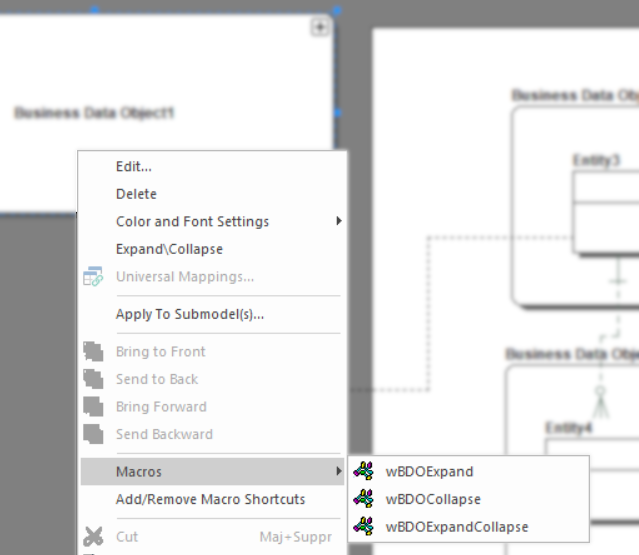
If you don’t know how to use the scripts, at the end of this post, you can watch the video which explains the steps.
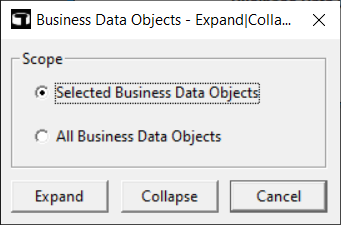
This script provides a user interface to define the action and scope:
'#Language "WWB-COM"
''MACRO TITLE: Business Data Objects - Expand|Collapse
' MACRO VERSION: 1.1
'This macro expands or collapses the selected Business Data Objects
'	or all the Business Data Objects of the current submodel
'
' Release notes
' 1.0 Initial version
' 1.1 Selected objects issue fixed
'---------------------------------------------------------------------------

Option Explicit

Const TITLE$ = "Business Data Objects - Expand|Collapse"

Dim MyModel As Model
Dim MySubModel As SubModel
Dim MyBDODisplay As BusinessDataObjectDisplay
Dim MyBDO As BusinessDataObject
Dim MySelectedObject As SelectedObject

Sub Main

	On Error GoTo errHandler

	Dim MyDiagram As Diagram

	Debug.Clear

	'Get the current diagram.
	Set MyDiagram = DiagramManager.ActiveDiagram

	If Not MyDiagram Is Nothing Then

		'Get the current model.
		Set MyModel = MyDiagram.ActiveModel

		If Not MyModel Is Nothing Then

			'Get the current submodel.
			Set MySubModel = MyModel.ActiveSubModel

			If Not MySubModel Is Nothing Then

				If MySubModel.BusinessDataObjectDisplays.Count > 0 Then

					Begin Dialog UserDialog 310,119, TITLE,.DlgFunction ' %GRID:10,7,1,1
						GroupBox 10,7,290,77,"Scope",.gbScope
						OptionGroup .ogScope
							OptionButton 30,28,260,14,"Selected Business Data Objects",.obBDOSelected
							OptionButton 30,56,260,14,"All Business Data Objects",.obBDOAll
						CancelButton 210,91,90,21
						PushButton 10,91,90,21,"Expand",.pbExpand
						PushButton 110,91,90,21,"Collapse",.pbCollapse
					End Dialog

					Dim dlg As UserDialog

					Dialog dlg

				Else

					MsgBox "The current submodel doesn't contain any Business Data Object.", vbExclamation, TITLE

				End If

			End If

		End If

	End If

	Exit Sub

	errHandler:

		If Err.Number = 10031 Then

			' Form is closing

		Else

			MsgBox "Error:" & vbCrLf & vbCrLf & Err.Description, vbExclamation, TITLE

		End If

		DiagramManager.EnableScreenUpdateEx(True, True)
End Sub

Rem See DialogFunc help topic for more information.
Private Function DlgFunction(DlgItem As String, Action As Integer, SuppValue As PortInt) As Boolean

	Select Case Action
	Case 1 ' Dialog box initialization

		DlgEnable("gbScope", MySubModel.BusinessDataObjectDisplays.Count > 0)
		DlgEnable("obBDOSelected", MySubModel.SelectedObjects.Count > 0)


		If Not DlgEnable("obBDOSelected") Then

			DlgValue("ogScope", 1)

		End If

		DlgEnable("pbExpand", DlgEnable("gbScope"))
		DlgEnable("pbCollapse", DlgEnable("gbScope"))

	Case 2

		Select Case DlgItem
		Case "pbExpand", "pbCollapse"

			Select Case DlgValue "ogScope"
			Case 0

				' Loop Selected objects
				For Each MySelectedObject In MySubModel.SelectedObjects

					' Only manage the BDOs
					If MySelectedObject.Type = 108 Then

						' Get the BDO
						Set MyBDO = MyModel.BusinessDataObjects.Item(MySelectedObject.ID)

						If Not MyBDO Is Nothing Then

							' Get the BDO Display object
							Set MyBDODisplay = MySubModel.BusinessDataObjectDisplays(IIf(MyModel.Logical, MyBDO.LogicalName, MyBDO.PhysicalName))

							If Not MyBDODisplay Is Nothing Then

								If DlgItem = "pbExpand" Then

									MyBDODisplay.Expand

								Else

									MyBDODisplay.Collapse

								End If

							End If

						End If

					End If

				Next MySelectedObject

			Case 1

				' Loop all BDOs of the current submodel
				For Each MyBDODisplay In MySubModel.BusinessDataObjectDisplays

					If DlgItem = "pbExpand" Then

						MyBDODisplay.Expand

					Else

						MyBDODisplay.Collapse

					End If

				Next MyBDODisplay

			Case Else

				' No option selected: it should not be possible
				Debug.Print "No option selected"
				DlgFunction = True
				Exit Function

			End Select

			Debug.Print CStr(Now) & Chr(9) & "Done"
			Beep

		End Select

	End Select

End Function
This script expands all the Business Data Objects of the current Submodel or only the selected BDOs if there’s a selection. There’s a beep when the macro has successfully completed its job, no UI.
'#Language "WWB-COM"
''MACRO TITLE: Business Data Objects - Expand
' MACRO VERSION: 1.1
'This macro expands the selected Business Data Objects if there's a selection
'	or all the Business Data Objects of the current submodel
'
' Release notes
' 1.0 Initial version
' 1.1 Selected objects issue fixed
'---------------------------------------------------------------------------

Option Explicit

Const TITLE$ = "Business Data Objects - Expand"

Sub Main

	Dim MyDiagram As Diagram
	Dim MyModel As Model
	Dim MySubModel As SubModel
	Dim MyBDODisplay As BusinessDataObjectDisplay
	Dim MyBDO As BusinessDataObject
	Dim MySelectedObject As SelectedObject

	Debug.Clear

	'Get the current diagram.
	Set MyDiagram = DiagramManager.ActiveDiagram

	If Not MyDiagram Is Nothing Then

		'Get the current model.
		Set MyModel = MyDiagram.ActiveModel

		If Not MyModel Is Nothing Then

			'Get the current submodel.
			Set MySubModel = MyModel.ActiveSubModel

			If Not MySubModel Is Nothing Then

				If MySubModel.BusinessDataObjectDisplays.Count > 0 Then

					' Some objects are selected
					If MySubModel.SelectedObjects.Count > 0 Then

						' Loop Selected objects
						For Each MySelectedObject In MySubModel.SelectedObjects

							' Only manage the BDOs
							If MySelectedObject.Type = 108 Then

								' Get the BDO
								Set MyBDO = MyModel.BusinessDataObjects.Item(MySelectedObject.ID)

								If Not MyBDO Is Nothing Then

									' Get the BDO Display object
									Set MyBDODisplay = MySubModel.BusinessDataObjectDisplays(IIf(MyModel.Logical, MyBDO.LogicalName, MyBDO.PhysicalName))

									If Not MyBDODisplay Is Nothing Then

										MyBDODisplay.Expand

									End If

								End If

							End If

						Next MySelectedObject

					Else

						' Loop all BDOs of the current submodel
						For Each MyBDODisplay In MySubModel.BusinessDataObjectDisplays

							MyBDODisplay.Expand

						Next MyBDODisplay

					End If

					Debug.Print CStr(Now) & Chr(9) & "Done"
					Beep

				Else

					MsgBox "The current submodel doesn't contain any Business Data Object.", vbExclamation, TITLE

				End If

			End If

		End If

	End If

End Sub
This script is almost the same as the second one. Instead of expanding the Business Data Objects, it’s collapsing them.
'#Language "WWB-COM"
''MACRO TITLE: Business Data Objects - Collapse
' MACRO VERSION: 1.1
'This macro collapses the selected Business Data Objects if there's a selection
'	or all the Business Data Objects of the current submodel
'
' Release notes
' 1.0 Initial version
' 1.1 Selected objects issue fixed
'---------------------------------------------------------------------------

Option Explicit

Const TITLE$ = "Business Data Objects - Collapse"

Sub Main

	Dim MyDiagram As Diagram
	Dim MyModel As Model
	Dim MySubModel As SubModel
	Dim MyBDODisplay As BusinessDataObjectDisplay
	Dim MyBDO As BusinessDataObject
	Dim MySelectedObject As SelectedObject

	Debug.Clear

	'Get the current diagram.
	Set MyDiagram = DiagramManager.ActiveDiagram

	If Not MyDiagram Is Nothing Then

		'Get the current model.
		Set MyModel = MyDiagram.ActiveModel

		If Not MyModel Is Nothing Then

			'Get the current submodel.
			Set MySubModel = MyModel.ActiveSubModel

			If Not MySubModel Is Nothing Then

				If MySubModel.BusinessDataObjectDisplays.Count > 0 Then

					' Some objects are selected
					If MySubModel.SelectedObjects.Count > 0 Then

						' Loop Selected objects
						For Each MySelectedObject In MySubModel.SelectedObjects

							' Only manage the BDOs
							If MySelectedObject.Type = 108 Then

								Set MyBDO = MyModel.BusinessDataObjects(MySelectedObject.ID)

								If Not MyBDO Is Nothing Then

									Set MyBDODisplay = MySubModel.BusinessDataObjectDisplays.Item(IIf(MyModel.Logical, MyBDO.LogicalName, MyBDO.PhysicalName))

									If Not MyBDODisplay Is Nothing Then

										MyBDODisplay.Collapse

									End If

								End If

							End If

						Next MySelectedObject

					Else

						' Loop all BDOs of the current submodel
						For Each MyBDODisplay In MySubModel.BusinessDataObjectDisplays

							MyBDODisplay.Collapse

						Next MyBDODisplay

					End If

					Debug.Print CStr(Now) & Chr(9) & "Done"
					Beep

				Else

					MsgBox "The current submodel doesn't contain any Business Data Object.", vbExclamation, TITLE

				End If

			End If

		End If

	End If

End Sub
In this blog post, we have supplied:
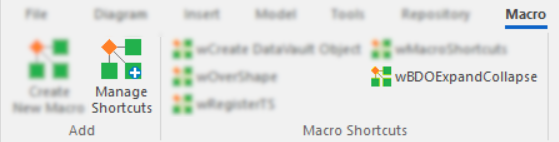
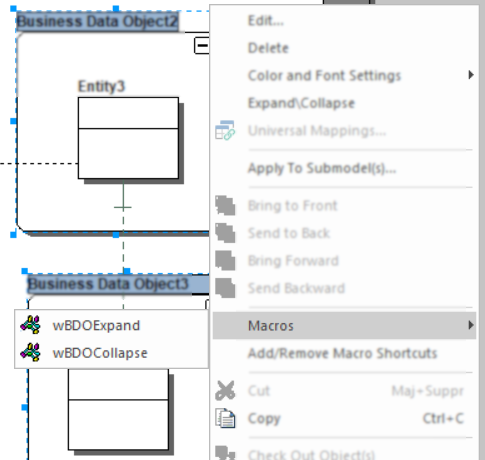
I’d suggest to add these 2 macros in your macros shortcuts for the Business Data Objects using the macro shared in my previous post as you can see in the screenshot above.
A short video which shows how to create a macro from a script in ER/Studio Data Architect:
A video which shows the 3 scripts above in action:




