Some years ago, Sultan shared a post regarding Data Vault modeling with ER/Studio. I strongly recommend to read it before this one.
The different Data Vault providers implement common objects but the attributes can differ. In this blog post, I’ll share an archive with some macros which can create:
The folder contained in the archive provides different files:
You’ll need to copy all the macro files (*.bas & _wDataVault.bas.hidden) in a subfolder of the directory of your macros (by default: C:\ProgramData\Idera\ERStudioDA_xx.x\Macros).
So for example, if you extract all the files in the folder C:\ProgramData\Idera\ERStudioDA_xx.x\Macros\Raw Vault\ you should get a new folder visible in your Macro tab:

You can download the archive from here (HTTPS) or here (other site).
Then I would suggest to add some macro shortcuts in your ribbon and/or for your Entities/Tables:


You can find more information regarding the Macro shortcuts in this blog post.
The macros to create hubs, satellites and links contain common options to create domains and to generate a visual data lineage:
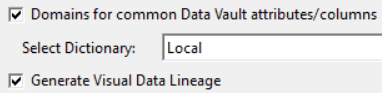


If it doesn’t exactly match your expectations, feel free to update the scripts accordingly to your requirements.
The scripts contain comments to help you understand its different parts.
In the video below, you can see how to use the different macros and what they can create:
Below I’ll share the scripts in case you can’t download the archive which can be blocked by some firewalls as it contains scripts.
As some macros call other ones, I suggest to use the name of each macros when you create them.

'#Language "WWB-COM"
''MACRO TITLE: wCreate DataVault Object
' MACRO VERSION: 1.1
'This macro calls other macros
'
' Release notes
' 1.1: Checks the number of selected objects in the current active submodel
' 1.0 Initial version
'---------------------------------------------------------------------------

Option Explicit

Const TITLE$ = "wCreate DataVault Object"

Dim MyDiagram As Diagram
Dim MyModel As Model
Dim MySubModel As SubModel

Dim iSelectedObjectsCount%

Sub Main

	Debug.Clear

	Begin Dialog UserDialog 300,133,TITLE,.DlgFunction ' %GRID:10,7,1,1
		OptionGroup .DVMacro
			OptionButton 20,35,140,14,"a Hub",.obHub			 ' 0
			OptionButton 20,56,140,14,"a Satellite",.obSatellite ' 1
			OptionButton 20,77,140,14,"a Link",.obLink			 ' 2
		Text 10,7,270,14,"Select the type of object you want to create:",.Text1
		OKButton 10,105,90,21
		CancelButton 200,105,90,21
	End Dialog

	Dim dlg As UserDialog
	Dim sMacro$

	iSelectedObjectsCount = -1

	'Get the current diagram.
	Set MyDiagram = DiagramManager.ActiveDiagram

	If Not MyDiagram Is Nothing Then
		'Get the current model.
		Set MyModel = MyDiagram.ActiveModel

		If Not MyModel Is Nothing Then
			'Get the current submodel.
			Set MySubModel = MyModel.ActiveSubModel

			If Not MySubModel Is Nothing Then
				iSelectedObjectsCount = MySubModel.SelectedObjects.Count
			End If

		End If

	End If

	If Dialog(dlg) = -1 Then
		Select Case dlg.DVMacro
		Case 0
			sMacro = "Hub"
		Case 1
			sMacro = "Satellite"
		Case 2
			sMacro = "Link"
		Case Else
			sMacro = ""
		End Select
		If Not IsMacroAvailable(sMacro) Then
			Debug.Print "The macro ""w" & sMacro & ".bas"" is not available in the folder """ & MacroDir & """"
			sMacro = ""
		End If
		Debug.Print "Option: " & Mid(sMacro, 2)

		If sMacro = "" Then
			MsgBox "You need to select an available option!", vbExclamation, TITLE
		Else
			MacroRun MacroDir & "\w" & sMacro & ".bas"
		End If
	End If

End Sub

Rem See DialogFunc help topic for more information.
Private Function DlgFunction(DlgItem As String, Action As Integer, SuppValue As PortInt) As Boolean
	Select Case Action
	Case 1 ' Dialog box initialization
		DlgEnable("obHub", IsMacroAvailable("Hub") And (iSelectedObjectsCount = 1))
		DlgEnable("obSatellite", IsMacroAvailable("Satellite") And (iSelectedObjectsCount = 1))
		DlgEnable("obLink", IsMacroAvailable("Link") And (iSelectedObjectsCount >= 2))

		If Not DlgEnable("obHub") Then
			If DlgEnable("obSatellite") Then
				DlgValue("DVMacro", 1)
			Else
				DlgValue("DVMacro", 2)
			End If
		End If
		DlgEnable("OK", DlgEnable("obHub") Or DlgEnable("obSatellite") Or DlgEnable("obLink"))
	Case 2
		If DlgItem = "OK" Then
			Dim sMacro$
			Select Case DlgValue "DVMacro"
			Case 0
				sMacro = "Hub"
			Case 1
				sMacro = "Satellite"
			Case 2
				sMacro = "Link"
			Case Else
				' No option selected: it should not be possible
				sMacro = ""
				DlgFunction = True
				Exit Function
			End Select
			If Not DlgEnable("ob" & sMacro) Then
				MsgBox "The macro ""w" & sMacro & ".bas"" is not available in the folder """ & MacroDir & """", vbExclamation, TITLE
				DlgFunction = True
			End If
		End If
	End Select
End Function

Private Function IsMacroAvailable(sName$) As Boolean
	IsMacroAvailable = (Dir$(MacroDir & "\w" & sName & ".bas") <> "")
End Function

'#Language "WWB-COM"
''MACRO TITLE: wHub
' MACRO VERSION: 3.1
'This macro generates a Hub from a selected entity|table
' Dependencies: _wDataVault.bas
'
' Release notes
' 3.1: Rolenames used
' 3.0: Option to generate a Visual Data Lineage
' 2.2: Domains folders updated
' 2.1: Common functions shared with _wDataVault
' 2.0: Domains added
' 1.0 Initial version
'---------------------------------------------------------------------------
'#Uses "_wDataVault.BAS.hidden"

Option Explicit

#Region "Constants"
Const TITLE
nbsp;= "wHub" Const TIMESTAMPED As Boolean = True Const MARGIN% = 1 Const NAME_COMPARTMENT As Boolean = True Const DOMAIN_FOLDER
nbsp;= "Hub" Const DATA_FLOW_NAME
nbsp;= "Raw Vault" Const TRANSFORMATION_HK_NAME
nbsp;= "Generate HashKey for" Const TRANSFORMATION_BK_NAME
nbsp;= "Populate Business Key for" Const HASH_KEY_PREFIX
nbsp;= "HK_" Const HASH_DATATYPE
nbsp;= "CHAR" Const HASH_DATALENGTH% = 32 Const HUB_BGCOLOR& = RGB(192, 192, 255) Const HUB_FGCOLOR& = RGB(63, 63, 0) #End Region #Region "Variables" Dim aLog$() ' Array of strings for the Logs Dim laAttributes$() ' Array of strings for the Attributes Dim MyDictionary As Dictionary Dim dictionary_list$() Dim bVDL As Boolean Dim MyDiagram As Diagram Dim MyModel As Model Dim IsLogical As Boolean Dim MySubModel As SubModel Dim MyEntity As Entity Dim MyAttribute As AttributeObj Dim iLoop% Dim sParentName$ Dim sChildName$ #End Region Private Sub Work #Region "Variables" Dim iDictionarySelect% Dim MyEntityDisplay As EntityDisplay Dim theHubEnt As Entity Dim theAttr As AttributeObj Dim sHubName$ Dim sPrefix$ Dim bUseDomains As Boolean Dim MyTransformation As Transformation Dim MyTransformationField As TransformationField Dim MyTransformationDisplay As TransformationDisplay Dim MyDataFlow As DataFlow Dim MyLineageComponent As LineageComponent Dim MyDataStream As DataStream Dim sTransformationName$ #End Region LogIt "Work" DiagramManager.EnableScreenUpdateEx(False, False) DlgEnable("pbStart", False) sHubName = DlgText "tbHubName" sPrefix = DlgText "tbPrefix" bUseDomains = DlgValue "cbDomains" bVDL = DlgValue("cbVDL") If bUseDomains Then iDictionarySelect = DlgValue "dictionary_select" If dictionary_list(iDictionarySelect) = "Local" Then Set MyDictionary = MyDiagram.Dictionary Else Set MyDictionary = MyDiagram.EnterpriseDataDictionaries.Item(dictionary_list(iDictionarySelect)) End If End If Dim iX%, iY% Dim edf% Set MyEntityDisplay = MySubModel.EntityDisplays.Item(If(IsLogical, MyEntity.EntityName, MyEntity.TableName)) If MyEntityDisplay Is Nothing Then iX = 0 iY = 0 Else iX = MyEntityDisplay.HorizontalPosition + MARGIN iY = MyEntityDisplay.VerticalPosition + MARGIN End If Set theHubEnt = MyModel.Entities.Add(iX, iY) theHubEnt.EntityName = LCase(sPrefix & sHubName) theHubEnt.TableName = theHubEnt.EntityName theHubEnt.Note = "Hub – representing a list of unique business keys" theHubEnt.DimModelTableType = "UNDEFINED" Set theAttr = theHubEnt.Attributes.Add(LCase(HASH_KEY_PREFIX & theHubEnt.EntityName), True) UseDomain(bUseDomains, MyDictionary, DOMAIN_FOLDER, theAttr, HASH_DATATYPE, HASH_DATALENGTH) Dim s%() s = DlgValue "mlbAttributes" For iLoop = LBound(s) To UBound(s) Set MyAttribute = MyEntity.Attributes.Item(laAttributes(s(iLoop))) If Not (MyAttribute Is Nothing) Then LogIt sChildName & ": " & If(IsLogical, MyAttribute.AttributeName, MyAttribute.ColumnName) Set theAttr = theHubEnt.Attributes.Add(LCase(If(IsLogical, If(MyAttribute.HasLogicalRoleName, MyAttribute.LogicalRoleName, MyAttribute.AttributeName), If(MyAttribute.HasRoleName, MyAttribute.RoleName, MyAttribute.ColumnName))), False) theAttr.Datatype = MyAttribute.Datatype theAttr.DataLength = MyAttribute.DataLength theAttr.DataScale = MyAttribute.DataScale ' theAttr.NullOption = MyAttribute.NullOption theAttr.NullOption = "NOT NULL" theAttr.Font.Italic = True ' theAttr.Color = HUB_FGCOLOR End If Next Set theAttr = theHubEnt.Attributes.Add("dss_record_source", False) UseDomain(bUseDomains, MyDictionary, DOMAIN_FOLDER, theAttr, "VARCHAR", 256) Set theAttr = theHubEnt.Attributes.Add("dss_load_date", False) UseDomain(bUseDomains, MyDictionary, DOMAIN_FOLDER, theAttr, "DATETIME", 0) Set MyEntityDisplay = MySubModel.EntityDisplays.Item(theHubEnt.EntityName) MyEntityDisplay.BackgroundColor = HUB_BGCOLOR MyEntityDisplay.NonInheritedPrimaryKeysColor = HUB_FGCOLOR MyEntityDisplay.NonInheritedNonKeysColor = HUB_FGCOLOR MyEntityDisplay.NameColor = If(NAME_COMPARTMENT, HUB_FGCOLOR, HUB_BGCOLOR) MyEntityDisplay.DisplayBackgroundColor = True MyEntityDisplay.HorizontalPosition = iX MyEntityDisplay.VerticalPosition = iY If NAME_COMPARTMENT Then MySubModel.ShowEntityNameCompartment = NAME_COMPARTMENT edf = MySubModel.EntityDisplayFormat If (edf <> 7) And (edf <> 8) Then MySubModel.EntityDisplayFormat = If(IsLogical, 7, 8) End If End If LogIt "New hub created: " & theHubEnt.EntityName Dim l As Line Dim ld As LineDisplay Set l = MyModel.Lines.Add(1, If(IsLogical, MyEntity.EntityName, MyEntity.TableName), 1, theHubEnt.EntityName) Set ld = MySubModel.LineDisplays.Add(l.ID) If Not ld Is Nothing Then ld.Color = HUB_BGCOLOR End If #Region "Visual Data Lineage" ' Manage Visual Data Lineage If bVDL Then Set MyDataFlow = MyDiagram.DataFlows.Item(DATA_FLOW_NAME) If MyDataFlow Is Nothing Then 'data flow doesn't exist so create it Set MyDataFlow = MyDiagram.DataFlows.Add(DATA_FLOW_NAME) End If If MyDataFlow Is Nothing Then 'if the object is still not initialized something happened when creating it. log error to log file LogIt "Data Flow <" & DATA_FLOW_NAME & "> could not be created." LogIt DiagramManager.GetLastErrorString Else ' Add Tranformation for the HashKey sTransformationName = TRANSFORMATION_HK_NAME & " " & theHubEnt.EntityName 'after the data flow is created, create the transformation Set MyTransformationDisplay = MyDataFlow.TransformationDisplays.Item(sTransformationName) Set MyTransformation = MyDataFlow.Transformations.Item(sTransformationName) If MyTransformation Is Nothing And MyTransformationDisplay Is Nothing Then 'if neither the display or object exist add it to the data flow Set MyTransformation = MyDataFlow.Transformations.Add(300, 200) If MyTransformation Is Nothing Then 'log missing transformation in the error string LogIt "Transformation <" & sTransformationName & "> could not be created." LogIt DiagramManager.GetLastErrorString Else 'set the name and display object MyTransformation.Name = sTransformationName Set MyTransformationDisplay = MyDataFlow.TransformationDisplays.Item(sTransformationName) 'set the other transformation properties MyTransformation.Type = "Calculation" MyTransformation.BusinessDefinition = "Calculate HashKey from the Business Keys " & sChildName & "s" MyTransformation.CodeDefinition = "INSERT INTO " & theHubEnt.EntityName & " (" & LCase(HASH_KEY_PREFIX & theHubEnt.EntityName) & ")" ' Add the source 'see if the lineage component exists in the data flow Set MyLineageComponent = MyDataFlow.LineageComponents.ItemBySource(1, MyEntity.ID) If MyLineageComponent Is Nothing Then ' Add the object to the data flow Set MyLineageComponent = MyDataFlow.LineageComponents.Add(1, MyEntity.ID, 1, 305) End If ' Add data stream between source & transformation Set MyDataStream = MyDataFlow.DataStreams.Add(MyTransformation.Name, MyLineageComponent.ID, True) If MyDataStream Is Nothing And Not(MyLineageComponent Is Nothing) Then 'log to error file LogIt "Data Stream between <" & MyLineageComponent.Name & "> and <" & MyTransformation.Name & "> could not be added in data flow <" & MyDataFlow.Name & ">." LogIt DiagramManager.GetLastErrorString Else 'now add the input columns For iLoop = LBound(s) To UBound(s) Set theAttr = MyEntity.Attributes.Item(laAttributes(s(iLoop))) If theAttr Is Nothing Then 'log to error file if column doesn't exist LogIt "Model " & sChildName & " <" & laAttributes(s(iLoop)) & "> could not be found in data flow <" & MyDataFlow.Name & ">." LogIt DiagramManager.GetLastErrorString Else 'set input column based on attribute Set MyTransformationField = MyTransformation.LineageInputs.Add(5, theAttr.ID) If MyTransformationField Is Nothing Then 'log to error file LogIt "Transformation Input <" & laAttributes(s(iLoop)) & "> between Lineage Component <" & MyLineageComponent.Name & "> and Transformation <" & MyTransformation.Name & "> could not be added in data flow <" & MyDataFlow.Name & ">." LogIt DiagramManager.GetLastErrorString End If End If 'transformation existence check Next iLoop End If ' data stream ' Add the target 'see if the lineage component exists in the data flow Set MyLineageComponent = MyDataFlow.LineageComponents.ItemBySource(1, theHubEnt.ID) If MyLineageComponent Is Nothing Then ' Add the object to the data flow Set MyLineageComponent = MyDataFlow.LineageComponents.Add(1, theHubEnt.ID, 650, 300) End If ' Add data stream between source & transformation Set MyDataStream = MyDataFlow.DataStreams.Add(MyTransformation.Name, MyLineageComponent.ID, False) If MyDataStream Is Nothing And Not(MyLineageComponent Is Nothing) Then 'log to error file LogIt "Data Stream between <" & MyLineageComponent.Name & "> and <" & MyTransformation.Name & "> could not be added in data flow <" & MyDataFlow.Name & ">." LogIt DiagramManager.GetLastErrorString Else 'now add the output columns Set theAttr = theHubEnt.Attributes.Item(LCase(HASH_KEY_PREFIX & theHubEnt.EntityName)) If theAttr Is Nothing Then 'log to error file if column doesn't exist LogIt "Model " & sChildName & " <" & LCase(HASH_KEY_PREFIX & theHubEnt.EntityName) & "> could not be found in data flow <" & MyDataFlow.Name & ">." LogIt DiagramManager.GetLastErrorString Else 'set output column based on attribute Set MyTransformationField = MyTransformation.LineageOutputs.Add(5, theAttr.ID) If MyTransformationField Is Nothing Then 'log to error file LogIt "Transformation Output <" & LCase(HASH_KEY_PREFIX & theHubEnt.EntityName) & "> between Lineage Component <" & MyLineageComponent.Name & "> and Transformation <" & MyTransformation.Name & "> could not be added in data flow <" & MyDataFlow.Name & ">." LogIt DiagramManager.GetLastErrorString End If End If 'transformation existence check End If ' data stream End If ' tran is nothing End If 'tran and tran display check ' Add Tranformation for the Business Keys sTransformationName = TRANSFORMATION_BK_NAME & " " & theHubEnt.EntityName ' After the data flow is created, create the transformation Set MyTransformationDisplay = MyDataFlow.TransformationDisplays.Item(sTransformationName) Set MyTransformation = MyDataFlow.Transformations.Item(sTransformationName) If MyTransformation Is Nothing And MyTransformationDisplay Is Nothing Then 'if neither the display or object exist add it to the data flow Set MyTransformation = MyDataFlow.Transformations.Add(300, 400) If MyTransformation Is Nothing Then 'log missing transformation in the error string LogIt "Transformation <" & sTransformationName & "> could not be created." LogIt DiagramManager.GetLastErrorString Else 'set the name and display object MyTransformation.Name = sTransformationName Set MyTransformationDisplay = MyDataFlow.TransformationDisplays.Item(sTransformationName) 'set the other transformation properties MyTransformation.Type = "Select Into" MyTransformation.BusinessDefinition = "Copy the Business Keys values" MyTransformation.CodeDefinition = "INSERT INTO " & theHubEnt.EntityName & " " & vbCrLf & "SELECT * FROM " & If(IsLogical, MyEntity.EntityName, MyEntity.TableName) & vbCrLf & "WHERE " ' Add the source 'see if the lineage component exists in the data flow Set MyLineageComponent = MyDataFlow.LineageComponents.ItemBySource(1, MyEntity.ID) If MyLineageComponent Is Nothing Then ' Add the object to the data flow Set MyLineageComponent = MyDataFlow.LineageComponents.Add(1, MyEntity.ID, 100, 100) End If ' Add data stream between source & transformation Set MyDataStream = MyDataFlow.DataStreams.Add(MyTransformation.Name, MyLineageComponent.ID, True) If MyDataStream Is Nothing And Not(MyLineageComponent Is Nothing) Then 'log to error file LogIt "Data Stream between <" & MyLineageComponent.Name & "> and <" & MyTransformation.Name & "> could not be added in data flow <" & MyDataFlow.Name & ">." LogIt DiagramManager.GetLastErrorString Else 'now add the input columns For iLoop = LBound(s) To UBound(s) Set theAttr = MyEntity.Attributes.Item(laAttributes(s(iLoop))) If theAttr Is Nothing Then 'log to error file if column doesn't exist LogIt "Model " & sChildName & " <" & laAttributes(s(iLoop)) & "> could not be found in data flow <" & MyDataFlow.Name & ">." LogIt DiagramManager.GetLastErrorString Else 'set input column based on attribute Set MyTransformationField = MyTransformation.LineageInputs.Add(5, theAttr.ID) If MyTransformationField Is Nothing Then 'log to error file LogIt "Transformation Input <" & laAttributes(s(iLoop)) & "> between Lineage Component <" & MyLineageComponent.Name & "> and Transformation <" & MyTransformation.Name & "> could not be added in data flow <" & MyDataFlow.Name & ">." LogIt DiagramManager.GetLastErrorString End If End If 'transformation existence check Next iLoop End If ' data stream ' Add the target 'see if the lineage component exists in the data flow Set MyLineageComponent = MyDataFlow.LineageComponents.ItemBySource(1, theHubEnt.ID) If MyLineageComponent Is Nothing Then ' Add the object to the data flow Set MyLineageComponent = MyDataFlow.LineageComponents.Add(1, theHubEnt.ID, 100, 100) End If ' Add data stream between source & transformation Set MyDataStream = MyDataFlow.DataStreams.Add(MyTransformation.Name, MyLineageComponent.ID, False) If MyDataStream Is Nothing And Not(MyLineageComponent Is Nothing) Then 'log to error file LogIt "Data Stream between <" & MyLineageComponent.Name & "> and <" & MyTransformation.Name & "> could not be added in data flow <" & MyDataFlow.Name & ">." LogIt DiagramManager.GetLastErrorString Else 'now add the output columns For iLoop = LBound(s) To UBound(s) Set MyAttribute = MyEntity.Attributes.Item(laAttributes(s(iLoop))) If MyAttribute Is Nothing Then 'log to error file LogIt sChildName & " <" & laAttributes(s(iLoop)) & "> could not be found in data flow <" & MyDataFlow.Name & ">." LogIt DiagramManager.GetLastErrorString Else Set theAttr = theHubEnt.Attributes.Item(LCase(If(IsLogical, MyAttribute.AttributeName, MyAttribute.ColumnName))) If theAttr Is Nothing Then 'log to error file if column doesn't exist LogIt "Model " & sChildName & " <" & LCase(If(IsLogical, MyAttribute.AttributeName, MyAttribute.ColumnName)) & "> could not be found in data flow <" & MyDataFlow.Name & ">." LogIt DiagramManager.GetLastErrorString Else 'set output column based on attribute Set MyTransformationField = MyTransformation.LineageOutputs.Add(5, theAttr.ID) If MyTransformationField Is Nothing Then 'log to error file LogIt "Transformation Output <" & laAttributes(s(iLoop)) & "> between Lineage Component <" & MyLineageComponent.Name & "> and Transformation <" & MyTransformation.Name & "> could not be added in data flow <" & MyDataFlow.Name & ">." LogIt DiagramManager.GetLastErrorString End If End If 'transformation existence check End If Next iLoop End If ' data stream End If ' tran is nothing End If 'tran and tran display check End If 'data flow existence check End If ' Visual Data Lineage #End Region ' Job finished MySubModel.ActivateSubModel MySubModel.SelectedObjects.Add(1, MyEntity.ID) DiagramManager.EnableScreenUpdateEx(True, True) DlgText("pbStart", "Completed") End Sub Sub Main On Error GoTo errHandler Dim MySelectedObject As SelectedObject InitCommonVars(aLog, MyDiagram, MyModel, MySubModel, IsLogical, sParentName, sChildName) ReDim laAttributes(0) If MySubModel.SelectedObjects.Count <> 1 Then MsgBox "Error:" & vbCrLf & vbCrLf & "You can only select ONE " & sParentName & "!", vbExclamation, TITLE Exit Sub End If For Each MySelectedObject In MySubModel.SelectedObjects If MySelectedObject.Type <> 1 Then MsgBox "Error:" & vbCrLf & vbCrLf & "You can only select one " & UCase(sParentName) & "!", vbExclamation, TITLE Exit Sub End If Set MyEntity = MyModel.Entities.Item(MySelectedObject.ID) ' LogIt "Selected " & sParentName & ": " & MyEntity.EntityName iLoop = 0 ReDim laAttributes(0 To MyEntity.Attributes.Count) For Each MyAttribute In MyEntity.Attributes laAttributes(iLoop) = If(IsLogical, If(MyAttribute.HasLogicalRoleName, MyAttribute.LogicalRoleName, MyAttribute.AttributeName), If(MyAttribute.HasRoleName, MyAttribute.RoleName, MyAttribute.ColumnName)) iLoop = iLoop + 1 Next MyAttribute Next MySelectedObject Begin Dialog UserDialog 770,420,TITLE,.DialogFunc ' %GRID:10,7,1,1 Text 30,7,110,14,"Hub Name:",.hubCaption,1 TextBox 160,5,600,18,.tbHubName Text 30,28,110,14,"Prefix:",.prefixCaption,1 TextBox 160,26,600,18,.tbPrefix GroupBox 10,49,750,119,"Attributes",.gbAttributes MultiListBox 20,63,730,98,laAttributes(),.mlbAttributes,1 CheckBox 20,175,730,14,"Domains for common Data Vault attributes/columns",.cbDomains Text 20,196,120,14,"Select Dictionary: ",.tDictionary,1 DropListBox 160,193,590,112,dictionary_list(),.dictionary_select CheckBox 20,217,730,14,"Generate Visual Data Lineage",.cbVDL PushButton 350,238,90,21,"Start",.pbStart ListBox 20,266,740,112,aLog(),.lbLog,1 PushButton 20,392,90,21,"Blog post",.pbBlog PushButton 350,392,90,21,"Close",.cbCancel CancelButton 355,695,80,15 ' out of screen: allow to close the dialog with the X End Dialog Dim dlg As UserDialog init_dictionary_list(dictionary_list, MyDiagram, MyDictionary) dlg.tbHubName = LCase(If(IsLogical, MyEntity.EntityName, MyEntity.TableName)) dlg.tbPrefix = "h_" dlg.cbDomains = True dlg.cbVDL = True dlg.dictionary_select = UBound(dictionary_list) 'Default DD = Latest one: if only one, it's the local one, otherwise, an EDD Dialog dlg Exit Sub errHandler: ManageError(Err, TITLE, TIMESTAMPED) End Sub Private Function DialogFunc(DlgItem$, Action%, SuppValue&) As Boolean Dim i% Dim iLoop% Dim s%() Select Case Action% Case 1 ' Dialog box initialization InitDialog("tbHubName", MyDiagram, MyModel, MySubModel, aLog, TIMESTAMPED) DlgText("gbAttributes", "Select Business Key(s) " & sChildName & "s") DlgText("cbDomains", "Domains for common Data Vault " & If(IsLogical, "Attributes", "Columns")) Case 2 ' Value changing or button pressed DialogFunc = DialogControlUpdated("tbHubName", DlgItem) If DlgItem = "pbStart" Then Work End If Case 3 ' TextBox or ComboBox text changed RefreshButtonStart("tbHubName") End Select End Function Private Sub LogIt(ByVal txt As String) Log(txt, aLog, TIMESTAMPED) End Sub

'#Language "WWB-COM"
''MACRO TITLE: wSatellite
' MACRO VERSION: 3.1
'This macro generates a Satellite from a selected entity|table
' Pre-requisites: To generate the relationship between the Hub & the
'    Satellite, you need to run the wHub macro first.
' Dependencies: _wDataVault.bas
'
' Release notes
' 3.1: Rolenames used
' 3.0: Option to generate a Visual Data Lineage
' 2.2: Domains folders updated
' 2.1: Common functions shared with _wDataVault
' 2.0: Domains added
' 1.0 Initial version
'---------------------------------------------------------------------------
'#Uses "_wDataVault.BAS.hidden"

Option Explicit

#Region "Constants"
Const TITLE As String = "wSatellite"
Const TIMESTAMPED As Boolean = True
Const MARGIN% = 1
Const NAME_COMPARTMENT As Boolean = True
Const DOMAIN_FOLDER
nbsp;= "Satellite" Const DATA_FLOW_NAME
nbsp;= "Raw Vault" Const TRANSFORMATION_NAME
nbsp;= "Populate" Const HASH_KEY_PREFIX
nbsp;= "HK_" Const HASH_DATATYPE
nbsp;= "CHAR" Const HASH_DATALENGTH% = 32 Const SAT_BGCOLOR& = RGB(255, 255, 192) Const SAT_FGCOLOR& = RGB(0, 0, 63) #End Region #Region "Variables" Dim aLog$() ' Array of strings for the Logs Dim laAttributes$() ' Array of strings for the Attributes Dim MyDictionary As Dictionary Dim dictionary_list$() Dim bVDL As Boolean Dim MyDiagram As Diagram Dim MyModel As Model Dim IsLogical As Boolean Dim MyEntity As Entity Dim MySubModel As SubModel Dim MyAttribute As AttributeObj Dim MySelectedObject As SelectedObject Dim iLoop% Dim sParentName$ Dim sChildName$ #End Region Private Sub Work #Region "Variables" Dim iDictionarySelect% Dim MyEntityDisplay As EntityDisplay Dim theSatelliteEnt As Entity Dim theAttr As AttributeObj Dim sSatelliteName$ Dim sPrefix$, sSuffix$ Dim bUseDomains As Boolean Dim MyTransformation As Transformation Dim MyTransformationField As TransformationField Dim MyTransformationDisplay As TransformationDisplay Dim MyDataFlow As DataFlow Dim MyLineageComponent As LineageComponent Dim MyDataStream As DataStream Dim sTransformationName$ Dim eParentHub As Entity Dim rHubSat As Relationship Dim iX%, iY% Dim edf% Dim s%() #End Region LogIt "Work" DiagramManager.EnableScreenUpdateEx(False, False) DlgEnable("pbStart", False) sSatelliteName = DlgText "tbSatelliteName" sPrefix = DlgText "tbPrefix" sSuffix = DlgText "tbSuffix" bUseDomains = DlgValue "cbDomains" bVDL = DlgValue("cbVDL") If bUseDomains Then iDictionarySelect = DlgValue "dictionary_select" If dictionary_list(iDictionarySelect) = "Local" Then Set MyDictionary = MyDiagram.Dictionary Else Set MyDictionary = MyDiagram.EnterpriseDataDictionaries.Item(dictionary_list(iDictionarySelect)) End If End If Set MyEntityDisplay = MySubModel.EntityDisplays.Item(If(IsLogical, MyEntity.EntityName, MyEntity.TableName)) If MyEntityDisplay Is Nothing Then iX = 0 iY = 0 Else iX = MyEntityDisplay.HorizontalPosition + MARGIN iY = MyEntityDisplay.VerticalPosition + MARGIN End If Set theSatelliteEnt = MyModel.Entities.Add(iX, iY) theSatelliteEnt.EntityName = LCase(sPrefix & sSatelliteName & sSuffix) theSatelliteEnt.TableName = theSatelliteEnt.EntityName theSatelliteEnt.Note = "Satellites – contain descriptions and the contexts of the business keys or links" theSatelliteEnt.DimModelTableType = "UNDEFINED" Set eParentHub = MyModel.Entities(LCase("h_" & sSatelliteName)) If eParentHub Is Nothing Then LogIt "Hub has not been found. You should use the wHub macro before using this one." Set theAttr = theSatelliteEnt.Attributes.Add(LCase(HASH_KEY_PREFIX & "h_" & sSatelliteName), True) UseDomain(bUseDomains, MyDictionary, DOMAIN_FOLDER, theAttr, HASH_DATATYPE, HASH_DATALENGTH) Else Set rHubSat = MyModel.Relationships.Add(eParentHub.EntityName, theSatelliteEnt.EntityName, 0) End If s = DlgValue "mlbAttributes" For iLoop = LBound(s) To UBound(s) Set MyAttribute = MyEntity.Attributes.Item(laAttributes(s(iLoop))) If Not (MyAttribute Is Nothing) Then LogIt sChildName & ": " & If(IsLogical, MyAttribute.AttributeName, MyAttribute.ColumnName) Set theAttr = theSatelliteEnt.Attributes.Add(LCase(If(IsLogical, If(MyAttribute.HasLogicalRoleName, MyAttribute.LogicalRoleName, MyAttribute.AttributeName), If(MyAttribute.HasRoleName, MyAttribute.RoleName, MyAttribute.ColumnName))), False) theAttr.Datatype = MyAttribute.Datatype theAttr.DataLength = MyAttribute.DataLength theAttr.DataScale = MyAttribute.DataScale theAttr.NullOption = "NOT NULL" ' theAttr.NullOption = MyAttribute.NullOption theAttr.Font.Italic = True ' theAttr.Color = SAT_FGCOLOR End If Next Set theAttr = theSatelliteEnt.Attributes.Add("dss_change_hash", False) theAttr.Datatype = HASH_DATATYPE theAttr.DataLength = HASH_DATALENGTH ' theAttr.Color = SAT_FGCOLOR Set theAttr = theSatelliteEnt.Attributes.Add("dss_record_source", False) UseDomain(bUseDomains, MyDictionary, DOMAIN_FOLDER, theAttr, "VARCHAR", 256) Set theAttr = theSatelliteEnt.Attributes.Add("dss_load_date", False) UseDomain(bUseDomains, MyDictionary, DOMAIN_FOLDER, theAttr, "DATETIME", 0) Set theAttr = theSatelliteEnt.Attributes.Add("dss_start_date", True) UseDomain(bUseDomains, MyDictionary, DOMAIN_FOLDER, theAttr, "DATETIME", 0) Set theAttr = theSatelliteEnt.Attributes.Add("dss_version", False) UseDomain(bUseDomains, MyDictionary, DOMAIN_FOLDER, theAttr, "INTEGER", 0) Set MyEntityDisplay = MySubModel.EntityDisplays.Item(theSatelliteEnt.EntityName) ' DiagramManager.EnableScreenUpdateEx(False, False) MyEntityDisplay.BackgroundColor = SAT_BGCOLOR MyEntityDisplay.InheritedPrimaryKeysColor = SAT_FGCOLOR MyEntityDisplay.NonInheritedPrimaryKeysColor = SAT_FGCOLOR MyEntityDisplay.NonInheritedNonKeysColor = SAT_FGCOLOR MyEntityDisplay.NameColor = If(NAME_COMPARTMENT, SAT_FGCOLOR, SAT_BGCOLOR) MyEntityDisplay.DisplayBackgroundColor = True MyEntityDisplay.HorizontalPosition = iX MyEntityDisplay.VerticalPosition = iY If NAME_COMPARTMENT Then MySubModel.ShowEntityNameCompartment = NAME_COMPARTMENT edf = MySubModel.EntityDisplayFormat If (edf <> 7) And (edf <> 8) Then MySubModel.EntityDisplayFormat = If(IsLogical, 7, 8) End If End If ' DiagramManager.EnableScreenUpdateEx(True, True) LogIt "New satellite created: " & theSatelliteEnt.EntityName Dim l As Line Dim ld As LineDisplay Set l = MyModel.Lines.Add(1, If(IsLogical, MyEntity.EntityName, MyEntity.TableName), 1, theSatelliteEnt.EntityName) Set ld = MySubModel.LineDisplays.Add(l.ID) If Not ld Is Nothing Then ld.Color = SAT_BGCOLOR End If #Region "Visual Data Lineage" ' Manage Visual Data Lineage If bVDL Then If eParentHub Is Nothing Then LogIt "Visual Data Lineage not generated without the Hub" Else Set MyDataFlow = MyDiagram.DataFlows.Item(DATA_FLOW_NAME) If MyDataFlow Is Nothing Then 'data flow doesn't exist so create it Set MyDataFlow = MyDiagram.DataFlows.Add(DATA_FLOW_NAME) End If If MyDataFlow Is Nothing Then 'if the object is still not initialized something happened when creating it. log error to log file LogIt "Data Flow <" & DATA_FLOW_NAME & "> could not be created." LogIt DiagramManager.GetLastErrorString Else ' Add Tranformation for the HashKey sTransformationName = TRANSFORMATION_NAME & " " & theSatelliteEnt.EntityName 'after the data flow is created, create the transformation Set MyTransformationDisplay = MyDataFlow.TransformationDisplays.Item(sTransformationName) Set MyTransformation = MyDataFlow.Transformations.Item(sTransformationName) If MyTransformation Is Nothing And MyTransformationDisplay Is Nothing Then 'if neither the display or object exist add it to the data flow Set MyTransformation = MyDataFlow.Transformations.Add(900, 200) If MyTransformation Is Nothing Then 'log missing transformation in the error string LogIt "Transformation <" & sTransformationName & "> could not be created." LogIt DiagramManager.GetLastErrorString Else 'set the name and display object MyTransformation.Name = sTransformationName Set MyTransformationDisplay = MyDataFlow.TransformationDisplays.Item(sTransformationName) 'set the other transformation properties MyTransformation.Type = "Select Into" MyTransformation.BusinessDefinition = "Copy descriptions and contexts" MyTransformation.CodeDefinition = "INSERT INTO " & theSatelliteEnt.EntityName & " (" & LCase(HASH_KEY_PREFIX & eParentHub.EntityName) & ", ...)" ' Add the 1st source 'see if the lineage component exists in the data flow Set MyLineageComponent = MyDataFlow.LineageComponents.ItemBySource(1, eParentHub.ID) If MyLineageComponent Is Nothing Then ' Add the object to the data flow Set MyLineageComponent = MyDataFlow.LineageComponents.Add(1, eParentHub.ID, 650, 300) End If ' Add data stream between source & transformation Set MyDataStream = MyDataFlow.DataStreams.Add(MyTransformation.Name, MyLineageComponent.ID, True) If MyDataStream Is Nothing And Not(MyLineageComponent Is Nothing) Then 'log to error file LogIt "Data Stream between <" & MyLineageComponent.Name & "> and <" & MyTransformation.Name & "> could not be added in data flow <" & MyDataFlow.Name & ">." LogIt DiagramManager.GetLastErrorString Else 'now add the input column Set theAttr = eParentHub.Attributes.Item(LCase(HASH_KEY_PREFIX & eParentHub.EntityName)) If theAttr Is Nothing Then 'log to error file if column doesn't exist LogIt "Model " & sChildName & " <" & LCase(HASH_KEY_PREFIX & eParentHub.EntityName) & "> could not be found in data flow <" & MyDataFlow.Name & ">." LogIt DiagramManager.GetLastErrorString Else 'set input column based on attribute Set MyTransformationField = MyTransformation.LineageInputs.Add(5, theAttr.ID) If MyTransformationField Is Nothing Then 'log to error file LogIt "Transformation Output <" & LCase(HASH_KEY_PREFIX & eParentHub.EntityName) & "> between Lineage Component <" & MyLineageComponent.Name & "> and Transformation <" & MyTransformation.Name & "> could not be added in data flow <" & MyDataFlow.Name & ">." LogIt DiagramManager.GetLastErrorString End If End If End If ' data stream ' Add the 2nd source 'see if the lineage component exists in the data flow Set MyLineageComponent = MyDataFlow.LineageComponents.ItemBySource(1, MyEntity.ID) If MyLineageComponent Is Nothing Then ' Add the object to the data flow Set MyLineageComponent = MyDataFlow.LineageComponents.Add(1, MyEntity.ID, 0, 300) End If ' Add data stream between source & transformation Set MyDataStream = MyDataFlow.DataStreams.Add(MyTransformation.Name, MyLineageComponent.ID, True) If MyDataStream Is Nothing And Not(MyLineageComponent Is Nothing) Then 'log to error file LogIt "Data Stream between <" & MyLineageComponent.Name & "> and <" & MyTransformation.Name & "> could not be added in data flow <" & MyDataFlow.Name & ">." LogIt DiagramManager.GetLastErrorString Else 'now add the input columns For iLoop = LBound(s) To UBound(s) Set theAttr = MyEntity.Attributes.Item(laAttributes(s(iLoop))) If theAttr Is Nothing Then 'log to error file if column doesn't exist LogIt "Model " & sChildName & " <" & laAttributes(s(iLoop)) & "> could not be found in data flow <" & MyDataFlow.Name & ">." LogIt DiagramManager.GetLastErrorString Else 'set input column based on attribute Set MyTransformationField = MyTransformation.LineageInputs.Add(5, theAttr.ID) If MyTransformationField Is Nothing Then 'log to error file LogIt "Transformation Input <" & laAttributes(s(iLoop)) & "> between Lineage Component <" & MyLineageComponent.Name & "> and Transformation <" & MyTransformation.Name & "> could not be added in data flow <" & MyDataFlow.Name & ">." LogIt DiagramManager.GetLastErrorString End If End If 'transformation existence check Next iLoop End If ' data stream ' Add the target 'see if the lineage component exists in the data flow Set MyLineageComponent = MyDataFlow.LineageComponents.ItemBySource(1, theSatelliteEnt.ID) If MyLineageComponent Is Nothing Then ' Add the object to the data flow Set MyLineageComponent = MyDataFlow.LineageComponents.Add(1, theSatelliteEnt.ID, 1300, 300) End If ' Add data stream between source & transformation Set MyDataStream = MyDataFlow.DataStreams.Add(MyTransformation.Name, MyLineageComponent.ID, False) If MyDataStream Is Nothing And Not(MyLineageComponent Is Nothing) Then 'log to error file LogIt "Data Stream between <" & MyLineageComponent.Name & "> and <" & MyTransformation.Name & "> could not be added in data flow <" & MyDataFlow.Name & ">." LogIt DiagramManager.GetLastErrorString Else 'now add the output column for hashkey Set theAttr = theSatelliteEnt.Attributes.Item(LCase(HASH_KEY_PREFIX & eParentHub.EntityName)) If theAttr Is Nothing Then 'log to error file if column doesn't exist LogIt "Model " & sChildName & " <" & LCase(HASH_KEY_PREFIX & eParentHub.EntityName) & "> could not be found in data flow <" & MyDataFlow.Name & ">." LogIt DiagramManager.GetLastErrorString Else 'set output column based on attribute Set MyTransformationField = MyTransformation.LineageOutputs.Add(5, theAttr.ID) If MyTransformationField Is Nothing Then 'log to error file LogIt "Transformation Output <" & LCase(HASH_KEY_PREFIX & eParentHub.EntityName) & "> between Lineage Component <" & MyLineageComponent.Name & "> and Transformation <" & MyTransformation.Name & "> could not be added in data flow <" & MyDataFlow.Name & ">." LogIt DiagramManager.GetLastErrorString End If End If 'transformation existence check ' Add the other columns 'now add the output columns For iLoop = LBound(s) To UBound(s) Set MyAttribute = MyEntity.Attributes.Item(laAttributes(s(iLoop))) If MyAttribute Is Nothing Then 'log to error file LogIt sChildName & " <" & laAttributes(s(iLoop)) & "> could not be found in data flow <" & MyDataFlow.Name & ">." LogIt DiagramManager.GetLastErrorString Else Set theAttr = theSatelliteEnt.Attributes.Item(LCase(If(IsLogical, MyAttribute.AttributeName, MyAttribute.ColumnName))) If theAttr Is Nothing Then 'log to error file if column doesn't exist LogIt "Model " & sChildName & " <" & LCase(If(IsLogical, MyAttribute.AttributeName, MyAttribute.ColumnName)) & "> could not be found in data flow <" & MyDataFlow.Name & ">." LogIt DiagramManager.GetLastErrorString Else 'set output column based on attribute Set MyTransformationField = MyTransformation.LineageOutputs.Add(5, theAttr.ID) If MyTransformationField Is Nothing Then 'log to error file LogIt "Transformation Output <" & laAttributes(s(iLoop)) & "> between Lineage Component <" & MyLineageComponent.Name & "> and Transformation <" & MyTransformation.Name & "> could not be added in data flow <" & MyDataFlow.Name & ">." LogIt DiagramManager.GetLastErrorString End If End If 'transformation existence check End If Next iLoop End If ' data stream End If ' tran is nothing End If 'tran and tran display check End If 'data flow existence check End If ' Hub created before using this macro End If ' Visual Data Lineage #End Region ' Job finished MySubModel.ActivateSubModel MySubModel.SelectedObjects.Add(1, MyEntity.ID) MySubModel.ActivateSubModel DiagramManager.EnableScreenUpdateEx(True, True) End Sub Sub Main On Error GoTo errHandler InitCommonVars(aLog, MyDiagram, MyModel, MySubModel, IsLogical, sParentName, sChildName) ReDim laAttributes(0) If MySubModel.SelectedObjects.Count <> 1 Then MsgBox "Error:" & vbCrLf & vbCrLf & "You can only select ONE " & sParentName & "!", vbExclamation, TITLE Exit Sub End If For Each MySelectedObject In MySubModel.SelectedObjects If MySelectedObject.Type <> 1 Then MsgBox "Error:" & vbCrLf & vbCrLf & "You can only select one " & UCase(sParentName) & "!", vbExclamation, TITLE Exit Sub End If Set MyEntity = MyModel.Entities.Item(MySelectedObject.ID) ' LogIt "Selected " & sParentName & ": " & MyEntity.EntityName iLoop = 0 ReDim laAttributes(0 To MyEntity.Attributes.Count) For Each MyAttribute In MyEntity.Attributes laAttributes(iLoop) = If(IsLogical, If(MyAttribute.HasLogicalRoleName, MyAttribute.LogicalRoleName, MyAttribute.AttributeName), If(MyAttribute.HasRoleName, MyAttribute.RoleName, MyAttribute.ColumnName)) iLoop = iLoop + 1 Next MyAttribute Next MySelectedObject Begin Dialog UserDialog 770,420,TITLE,.DialogFunc ' %GRID:10,7,1,1 Text 30,7,110,14,"Satellite Name:",.satelliteCaption,1 TextBox 160,5,600,18,.tbSatelliteName Text 30,28,110,14,"Prefix:",.prefixCaption,1 TextBox 160,26,600,18,.tbPrefix Text 30,49,110,14,"Suffix:",.suffixCaption,1 TextBox 160,47,600,18,.tbSuffix GroupBox 10,77,750,119,"Attributes",.gbAttributes MultiListBox 20,91,730,98,laAttributes(),.mlbAttributes,1 CheckBox 20,203,730,14,"Domains for common Data Vault attributes/columns",.cbDomains Text 20,224,120,14,"Select Dictionary: ",.tDictionary,1 DropListBox 160,221,590,112,dictionary_list(),.dictionary_select CheckBox 20,245,730,14,"Generate Visual Data Lineage",.cbVDL PushButton 350,273,90,21,"Start",.pbStart ListBox 20,301,740,77,aLog(),.lbLog,1 PushButton 20,392,90,21,"Blog post",.pbBlog PushButton 350,392,90,21,"Close",.cbCancel CancelButton 355,695,80,15 ' out of screen: allow to close the dialog with the X End Dialog Dim dlg As UserDialog init_dictionary_list(dictionary_list, MyDiagram, MyDictionary) dlg.tbSatelliteName = LCase(If(IsLogical, MyEntity.EntityName, MyEntity.TableName)) dlg.tbPrefix = "s_" dlg.tbSuffix = "_lroc" dlg.cbDomains = True dlg.cbVDL = True dlg.dictionary_select = UBound(dictionary_list) 'Default DD = Latest one: if only one, it's the local one, otherwise, an EDD Dialog dlg Exit Sub errHandler: ManageError(Err, TITLE, TIMESTAMPED) End Sub Private Function DialogFunc(DlgItem$, Action%, SuppValue&) As Boolean Dim i%, iLoop%, s%() Select Case Action% Case 1 ' Dialog box initialization InitDialog("tbSatelliteName", MyDiagram, MyModel, MySubModel, aLog, TIMESTAMPED) DlgText("gbAttributes", "Select Changing " & sChildName & "s") Case 2 ' Value changing or button pressed DialogFunc = DialogControlUpdated("tbSatelliteName", DlgItem) If DlgItem = "pbStart" Then Work End If Case 3 ' TextBox or ComboBox text changed RefreshButtonStart("tbSatelliteName") End Select End Function Private Sub LogIt(ByVal txt As String) Log(txt, aLog, TIMESTAMPED) End Sub

'#Language "WWB-COM"
''MACRO TITLE: wLink
' MACRO VERSION: 3.1
'This macro generates a Link from selected hubs and|or satellites
' Pre-requisites: You need to select the Hubs (2+) before you run the macro.
' Dependencies: _wDataVault.bas
'
' Release notes
' 3.1: Satellites can be used to create a Link
' 3.0: Option to generate a Visual Data Lineage
' 2.2: Domains folders updated
' 2.1: Common functions shared with _wDataVault
' 2.0: Domains added
' 1.0 Initial version
'---------------------------------------------------------------------------
'#Uses "_wDataVault.BAS.hidden"

Option Explicit

#Region "Constants"
Const TITLE As String = "wLink"
Const TIMESTAMPED As Boolean = True
Const MARGIN% = 1
Const NAME_COMPARTMENT As Boolean = True
Const DOMAIN_FOLDER$ = "Link"

Const DATA_FLOW_NAME$ = "Raw Vault"
Const TRANSFORMATION_NAME$ = "Populate "

Const HASH_KEY_PREFIX$ = "HK_"
Const HASH_DATATYPE$ = "CHAR"
Const HASH_DATALENGTH% = 32
'Const HUB_PREFIX$ = "h_"
Const LINK_BGCOLOR& = RGB(255, 192, 192)
Const LINK_FGCOLOR& = RGB(0, 63, 63)
#End Region

#Region "Variables"
Dim aLog$() ' Array of strings for the Logs
Dim laHub() As Entity ' Array of Entity for the Hubs
Dim laHubName$() ' Array of strings for the Hubs names

Dim MyDictionary As Dictionary
Dim dictionary_list$()

Dim bVDL As Boolean

Dim MyDiagram As Diagram
Dim MyModel As Model
Dim IsLogical As Boolean
Dim MySubModel As SubModel
Dim MySelectedObject As SelectedObject

Dim iLoop%

Dim sParentName$, sParentsName$
Dim sChildName$
#End Region

Private Sub Work
#Region "Variables"
	Dim iDictionarySelect%

	Dim MyEntityDisplay As EntityDisplay
	Dim theLinkEnt As Entity
	Dim theAttr As AttributeObj

	Dim sLinkName$
	Dim sPrefix$
	Dim bUseDomains As Boolean

	Dim MyTransformation As Transformation
	Dim MyTransformationField As TransformationField
	Dim MyTransformationDisplay As TransformationDisplay
	Dim MyDataFlow As DataFlow
	Dim MyLineageComponent As LineageComponent
	Dim MyDataStream As DataStream
	Dim sTransformationName$
#End Region

	LogIt "Work"
	DiagramManager.EnableScreenUpdateEx(False, False)

	DlgEnable("pbStart", False)
	sLinkName = DlgText "tbLinkName"
	sPrefix = DlgText "tbPrefix"
	bUseDomains = DlgValue "cbDomains"
	bVDL = DlgValue("cbVDL")

	If bUseDomains Then
		iDictionarySelect = DlgValue "dictionary_select"
		If dictionary_list(iDictionarySelect) = "Local" Then
			Set MyDictionary = MyDiagram.Dictionary
		Else
			Set MyDictionary = MyDiagram.EnterpriseDataDictionaries.Item(dictionary_list(iDictionarySelect))
		End If
	End If

	Dim iX%, iY%
	Dim edf%
	Set MyEntityDisplay = MySubModel.EntityDisplays.Item(If(IsLogical, laHub(LBound(laHub)).EntityName, laHub(LBound(laHub)).TableName))
	If MyEntityDisplay Is Nothing Then
		iX = 0
		iY = 0
	Else
		iX = MyEntityDisplay.HorizontalPosition + MARGIN
		iY = MyEntityDisplay.VerticalPosition   + MARGIN
	End If

	Set theLinkEnt = MyModel.Entities.Add(iX, iY)
	theLinkEnt.EntityName = LCase(sPrefix & sLinkName)
	theLinkEnt.TableName = theLinkEnt.EntityName
	theLinkEnt.Note = "Link – describes a unique list of relationships/interactions between business keys"

	Set theAttr = theLinkEnt.Attributes.Add(LCase(HASH_KEY_PREFIX & theLinkEnt.EntityName), True)
	UseDomain(bUseDomains, MyDictionary, DOMAIN_FOLDER, theAttr, HASH_DATATYPE, HASH_DATALENGTH)

	Dim rLink As Relationship

	For iLoop = LBound(laHub) To UBound(laHub)
		Set rLink = MyModel.Relationships.Add(If(IsLogical, laHub(iLoop).EntityName, laHub(iLoop).TableName), theLinkEnt.EntityName, 1)
	Next iLoop

	Set theAttr = theLinkEnt.Attributes.Add("dss_record_source", False)
	UseDomain(bUseDomains, MyDictionary, DOMAIN_FOLDER, theAttr, "VARCHAR", 256)

	Set theAttr = theLinkEnt.Attributes.Add("dss_load_date", False)
	UseDomain(bUseDomains, MyDictionary, DOMAIN_FOLDER, theAttr, "DATETIME", 0)

  	Set MyEntityDisplay = MySubModel.EntityDisplays.Item(theLinkEnt.EntityName)

	MyEntityDisplay.BackgroundColor =  LINK_BGCOLOR
	MyEntityDisplay.NonInheritedPrimaryKeysColor = LINK_FGCOLOR
	MyEntityDisplay.NonInheritedNonKeysColor = LINK_FGCOLOR
	MyEntityDisplay.InheritedNonKeysColor = LINK_FGCOLOR
	MyEntityDisplay.NameColor = If(NAME_COMPARTMENT, LINK_FGCOLOR, LINK_BGCOLOR)
	MyEntityDisplay.DisplayBackgroundColor = True
	MyEntityDisplay.HorizontalPosition = iX
	MyEntityDisplay.VerticalPosition = iY

	If NAME_COMPARTMENT Then
		MySubModel.ShowEntityNameCompartment = NAME_COMPARTMENT

		edf = MySubModel.EntityDisplayFormat
		If (edf <> 7) And (edf <> 8) Then
			MySubModel.EntityDisplayFormat = If(IsLogical, 7, 8)
		End If
	End If

	LogIt "New link created: " & theLinkEnt.EntityName

#Region "Visual Data Lineage"
	' Manage Visual Data Lineage
	If bVDL Then

		Set MyDataFlow = MyDiagram.DataFlows.Item(DATA_FLOW_NAME)

		If MyDataFlow Is Nothing Then

			'data flow doesn't exist so create it
			Set MyDataFlow = MyDiagram.DataFlows.Add(DATA_FLOW_NAME)

		End If

		If MyDataFlow Is Nothing Then

			'if the object is still not initialized something happened when creating it.  log error to log file
			LogIt "Data Flow  <" & DATA_FLOW_NAME & "> could not be created."
			LogIt DiagramManager.GetLastErrorString

		Else

			' Add Tranformation for the HashKey
			sTransformationName = TRANSFORMATION_NAME & " " & theLinkEnt.EntityName
			'after the data flow is created, create the transformation
			Set MyTransformationDisplay = MyDataFlow.TransformationDisplays.Item(sTransformationName)
			Set MyTransformation = MyDataFlow.Transformations.Item(sTransformationName)

			If MyTransformation Is Nothing And MyTransformationDisplay Is Nothing Then

				'if neither the display or object exist add it to the data flow
				Set MyTransformation = MyDataFlow.Transformations.Add(300, 600)

				If MyTransformation Is Nothing Then

					'log missing transformation in the error string
					LogIt "Transformation  <" & sTransformationName & "> could not be created."
					LogIt DiagramManager.GetLastErrorString

				Else

					'set the name and display object
					MyTransformation.Name = sTransformationName
					Set MyTransformationDisplay = MyDataFlow.TransformationDisplays.Item(sTransformationName)

					'set the other transformation properties
					MyTransformation.Type = "Direct Map"
					MyTransformation.BusinessDefinition = "HashKeys from the Hubs"
					MyTransformation.CodeDefinition = ""

					' Add the sources
					For iLoop = LBound(laHub) To UBound(laHub)

						'see if the lineage component exists in the data flow
						Set MyLineageComponent = MyDataFlow.LineageComponents.ItemBySource(1, laHub(iLoop).ID)

						If MyLineageComponent Is Nothing Then
							' Add the object to the data flow
							Set MyLineageComponent = MyDataFlow.LineageComponents.Add(1, laHub(iLoop).ID, 650, (400 + (200 * iLoop)))
						End If

						' Add data stream between source & transformation
						Set MyDataStream = MyDataFlow.DataStreams.Add(MyTransformation.Name, MyLineageComponent.ID, True)

						If MyDataStream Is Nothing And Not(MyLineageComponent Is Nothing) Then
							'log to error file
							LogIt "Data Stream between  <" & MyLineageComponent.Name & "> and <" & MyTransformation.Name & "> could not be added in data flow <" & MyDataFlow.Name & ">."
							LogIt DiagramManager.GetLastErrorString
						Else

							'now add the input columns
							For Each theAttr In laHub(iLoop).Attributes

								' get the hashkey
								If theAttr.PrimaryKey And (InStr(LCase(theAttr.AttributeName),  LCase(HASH_KEY_PREFIX)) = 1) Then

									'set input column based on attribute
									Set MyTransformationField = MyTransformation.LineageInputs.Add(5, theAttr.ID)

									If MyTransformationField Is Nothing Then

										'log to error file
										LogIt "Transformation Output  <" & LCase(HASH_KEY_PREFIX & laHub(iLoop).EntityName) & "> between Lineage Component <" & MyLineageComponent.Name & "> and Transformation <" & MyTransformation.Name & "> could not be added in data flow <" & MyDataFlow.Name & ">."
										LogIt DiagramManager.GetLastErrorString

									End If

									' HK found, exit the loop
									Exit For

								End If

							Next theAttr

						End If ' data stream

						'						Set rLink = MyModel.Relationships.Add(If(IsLogical, laHub(iLoop).EntityName, laHub(iLoop).TableName), theLinkEnt.EntityName, 1)
					Next iLoop

					' Add the target
					'see if the lineage component exists in the data flow
					Set MyLineageComponent = MyDataFlow.LineageComponents.ItemBySource(1, theLinkEnt.ID)

					If MyLineageComponent Is Nothing Then
						' Add the object to the data flow
						Set MyLineageComponent = MyDataFlow.LineageComponents.Add(1, theLinkEnt.ID, 650, 600)
					End If

					' Add data stream between source & transformation
					Set MyDataStream = MyDataFlow.DataStreams.Add(MyTransformation.Name, MyLineageComponent.ID, False)

					If MyDataStream Is Nothing And Not(MyLineageComponent Is Nothing) Then
						'log to error file
						LogIt "Data Stream between  <" & MyLineageComponent.Name & "> and <" & MyTransformation.Name & "> could not be added in data flow <" & MyDataFlow.Name & ">."
						LogIt DiagramManager.GetLastErrorString
					Else

						'now add the output columns
						For Each theAttr In theLinkEnt.Attributes

							' get the hashkey
							If theAttr.ForeignKey And (InStr(LCase(theAttr.AttributeName),  LCase(HASH_KEY_PREFIX)) = 1) Then

								'set output column based on attribute
								Set MyTransformationField = MyTransformation.LineageOutputs.Add(5, theAttr.ID)

								If MyTransformationField Is Nothing Then
									'log to error file
									LogIt "Transformation Output  <" & LCase(HASH_KEY_PREFIX & theLinkEnt.EntityName) & "> between Lineage Component <" & MyLineageComponent.Name & "> and Transformation <" & MyTransformation.Name & "> could not be added in data flow <" & MyDataFlow.Name & ">."
									LogIt DiagramManager.GetLastErrorString
								End If

							End If

						Next theAttr

					End If ' data stream

				End If ' tran is nothing

			End If 'tran and tran display check

		End If		  'data flow existence check

	End If ' Visual Data Lineage
#End Region

	' Job finished
	MySubModel.ActivateSubModel
	For iLoop = LBound(laHub) To UBound(laHub)
		MySubModel.SelectedObjects.Add(1, laHub(iLoop).ID)
	Next
	DiagramManager.EnableScreenUpdateEx(True, True)
	DlgText("pbStart", "Completed")
End Sub

Sub Main
	On Error GoTo errHandler

	Dim sName$

	InitCommonVars(aLog, MyDiagram, MyModel, MySubModel, IsLogical, sParentName, sChildName)

	sParentsName = If(IsLogical, "Entities", "Tables")

	If MySubModel.SelectedObjects.Count < 2 Then
		MsgBox "Error:" & vbCrLf & vbCrLf & "You must select at least 2 hubs!", vbExclamation, TITLE
		Exit Sub
	End If

	ReDim laHub(0 To MySubModel.SelectedObjects.Count - 1)
	ReDim laHubName(0 To MySubModel.SelectedObjects.Count - 1)
	iLoop = 0

	For Each MySelectedObject In MySubModel.SelectedObjects
		If (MySelectedObject.Type <> 1) Then
			MsgBox "Error:" & vbCrLf & vbCrLf & "You can only select " & sParentsName & "!", vbExclamation, TITLE
			Exit Sub
		End If

		Set laHub(iLoop) = MyModel.Entities.Item(MySelectedObject.ID)
		laHubName(iLoop) = If(IsLogical, laHub(iLoop).EntityName, laHub(iLoop).TableName)

'		If (LCase(Left(If(IsLogical, laHub(iLoop).EntityName, laHub(iLoop).TableName), 2)) <> LCase(HUB_PREFIX)) Then
'			MsgBox "Error:" & vbCrLf & vbCrLf & "You can only select hubs!", vbExclamation, TITLE
'			Exit Sub
'		End If

'		Debug.Print "Selected Hub: " & If(IsLogical, laHub(iLoop).EntityName, laHub(iLoop).TableName)

		iLoop = iLoop + 1
	Next MySelectedObject

	Begin Dialog UserDialog 770,420,TITLE,.DialogFunc ' %GRID:10,7,1,1
		Text 30,7,110,14,"Link Name:",.linkCaption,1
		TextBox 160,5,600,18,.tbLinkName
		Text 30,28,110,14,"Prefix:",.prefixCaption,1
		TextBox 160,26,600,18,.tbPrefix
		GroupBox 10,49,750,119,"Selected hubs",.gbAttributes
		MultiListBox 20,63,730,98,laHubName(),.mlbAttributes,3
		CheckBox 20,175,730,14,"Domains for common Data Vault attributes/columns",.cbDomains
		Text 20,196,120,14,"Select Dictionary: ",.tDictionary,1
		DropListBox 160,193,590,112,dictionary_list(),.dictionary_select
		CheckBox 20,217,730,14,"Generate Visual Data Lineage",.cbVDL
		PushButton 350,238,90,21,"Start",.pbStart
		ListBox 20,266,740,112,aLog(),.lbLog,1
		PushButton 20,392,90,21,"Blog post",.pbBlog
		PushButton 350,392,90,21,"Close",.cbCancel
		CancelButton 355,695,80,15 ' out of screen: allow to close the dialog with the X
	End Dialog

	Dim dlg As UserDialog

	sName = ""

	For iLoop = 0 To UBound(laHubName)
		sName = sName & "_" & Right(laHubName(iLoop), Len(laHubName(iLoop)) - 2)
	Next iLoop
	sName = Right(sName, Len(sName) - 1)

	init_dictionary_list(dictionary_list, MyDiagram, MyDictionary)

	dlg.tbLinkName = LCase(sName)
	dlg.tbPrefix = "l_"
	dlg.cbDomains = True
	dlg.cbVDL = True
	dlg.dictionary_select = UBound(dictionary_list) 'Default DD = Latest one: if only one, it's the local one, otherwise, an EDD

	Dialog dlg

	Exit Sub

	errHandler:
		ManageError(Err, TITLE, TIMESTAMPED)
End Sub

Private Function DialogFunc(DlgItem$, Action%, SuppValue&) As Boolean
	Dim i%, iLoop%, s%()

	Select Case Action%
		Case 1 ' Dialog box initialization

			InitDialog("tbLinkName", MyDiagram, MyModel, MySubModel, aLog, TIMESTAMPED)
			DlgEnable("mlbAttributes", False)

		Case 2        ' Value changing or button pressed

			DialogFunc = DialogControlUpdated("tbLinkName", DlgItem)
			If DlgItem = "pbStart" Then
				Work
			End If

		Case 3 ' TextBox or ComboBox text changed

			RefreshButtonStart("tbLinkName")

	End Select
End Function

Private Sub LogIt(ByVal txt As String)
	Log(txt, aLog, TIMESTAMPED)
End Sub

'#Language "WWB-COM"
''MACRO TITLE: _wDataVault
' MACRO VERSION: 1.1
'This macro is used by others: DO NOT DIRECTLY RUN IT!
' - wHub
' - wLink
' - wSatellite
'
' Release notes
' 1.1: Domains folders updated
' 1.0 Initial version
'---------------------------------------------------------------------------

Option Explicit

Const DOMAIN_FOLDER$ = "Data Vault" ' Root folder for the domains

Sub main
	Debug.Print "You need to run another macro."
	MsgBox "You need to run another macro:" & vbCrLf & vbCrLf & "- wHub" & vbCrLf & "- wSatellite" & vbCrLf & "- wLink", vbCritical
End Sub

Public Sub InitCommonVars(ByRef aLog$(), ByRef MyDiagram As Diagram, ByRef MyModel As Model, ByRef MySubModel As SubModel, ByRef IsLogical As Boolean, ByRef sParentName$, ByRef sChildName$)
	Debug.Clear
	ReDim aLog(0)

	'Get the current diagram.
	Set MyDiagram = DiagramManager.ActiveDiagram

	'Get the current model.
	Set MyModel = MyDiagram.ActiveModel

	IsLogical = MyModel.Logical
	sParentName = If(IsLogical, "Entity", "Table")
	sChildName = If(IsLogical, "Attribute", "Column")

	'Get the current submodel.
	Set MySubModel = MyModel.ActiveSubModel
End Sub

'initialize the dictionary drop down list
Public Sub init_dictionary_list(ByRef dictionary_list$(), MyDiagram As Diagram, MyDictionary As Dictionary)
	Dim i%

	ReDim dictionary_list$(0 To MyDiagram.EnterpriseDataDictionaries.Count)

	dictionary_list (0) = "Local"
	i = 1

	For Each MyDictionary In MyDiagram.EnterpriseDataDictionaries
		dictionary_list (i) = MyDictionary.Name
		i = i + 1
	Next
End Sub

Public Sub InitDialog(sName$, ByVal MyDiagram As Diagram, ByVal MyModel As Model, ByVal MySubModel As SubModel, ByRef aLog$(), bTS As Boolean)
			DlgEnable("pbStart", False)

			Log("Project: " & MyDiagram.ProjectName, aLog, bTS)
			Log("Filename: " & MyDiagram.FileName, aLog, bTS)
			Log("Model: " & MyModel.Name, aLog, bTS)
			Log("Submodel: " & MySubModel.Name, aLog, bTS)

			RefreshButtonStart(sName)
End Sub

Public Function DialogControlUpdated(sName$, DlgItem$)
	DialogControlUpdated = True
	DlgEnable("pbStart", False)

	If DlgItem = "cbDomains" Then

		DlgEnable("tDictionary", DlgValue("cbDomains"))
		DlgEnable("dictionary_select", DlgValue("cbDomains"))

	ElseIf DlgItem = "pbBlog" Then

		ShowBlogPost

	ElseIf DlgItem = "cbCancel" Then

		DialogControlUpdated = False

	End If
	RefreshButtonStart(sName)
End Function

Public Function RefreshButtonStart(sName$)
	Dim bEnable As Boolean
	bEnable = (sName = "tbLinkName") ' No attributes|columns to check for the Link
	If Not bEnable Then
		Dim s%()
		s = DlgValue "mlbAttributes"
		bEnable = LBound(s) <= UBound(s)
	End If

	bEnable = bEnable And ((DlgText sName) <> "")
	bEnable = bEnable And ((DlgText "tbPrefix") <> "")

	DlgEnable("pbStart", bEnable)
	RefreshButtonStart = bEnable
End Function

Private Function GetDomain(MyDictionary As Dictionary, sDomainFolder$, sDomain$) As Domain
	Dim MyDomain As Domain
	Dim MyDomainFolder As DomainFolder

	Set GetDomain = MyDictionary.Domains(sDomain)

	If GetDomain Is Nothing Then
		' Check if Domain Folder exists: if not, create it
		Set MyDomainFolder = MyDictionary.DomainFolders.Item(sDomainFolder)
		If MyDomainFolder Is Nothing Then
			' Check if Parent folder exists
			Set MyDomainFolder = MyDictionary.DomainFolders.Item(DOMAIN_FOLDER)
			If MyDomainFolder Is Nothing Then
				' Create Parent folder
				MyDictionary.DomainFolders.Add(DOMAIN_FOLDER, "")
			End If
			' Create the folder
			Set MyDomainFolder = MyDictionary.DomainFolders.Add(sDomainFolder, DOMAIN_FOLDER)
		End If
		' Create the domain
		Set GetDomain = MyDictionary.Domains.AddEx(sDomain, sDomain, sDomain, MyDomainFolder.ID)
	End If
End Function

Public Sub UseDomain(bUseDomains As Boolean, MyDictionary As Dictionary, sDomainFolder$, theAttr As AttributeObj, sDatatype$, iDataLength%)
	Dim MyDomain As Domain

	If bUseDomains Then
		Set MyDomain = GetDomain(MyDictionary, sDomainFolder, theAttr.AttributeName)
		MyDomain.Datatype = sDatatype
		MyDomain.DataLength = iDataLength
		MyDomain.Nullable = False
		theAttr.DomainId = MyDomain.ID
	Else
		theAttr.Datatype = sDatatype
		theAttr.DataLength = iDataLength
		theAttr.NullOption = "NOT NULL"
	End If
End Sub

Public Function PrefixDT(txt As String, bTS As Boolean) As String
	If bTS Then
		PrefixDT = CStr(Now) & Chr(9) & txt
	Else
		PrefixDT = txt
	End If
End Function

Public Sub Log(ByVal txt As String, ByRef aLog$(), ByVal bTS As Boolean)
	Dim idx As Integer

	idx = UBound(aLog) + 1
	ReDim Preserve aLog(idx)
	aLog(idx) = PrefixDT(txt, bTS)

	Debug.Print PrefixDT(txt, bTS)
	DlgListBoxArray("lbLog", aLog)
	DlgValue("lbLog", idx) ' Scroll to the last row
	DlgValue("lbLog", -1) ' Unselect all rows
End Sub

Public Sub ShowBlogPost
	Shell "explorer https://blog.idera.com/database-tools/data-vault-modeling-with-er-studio-data-architect/", vbNormalFocus  'explorer to open with the default browser
End Sub

Public Sub ManageError(e As ErrObject, sTITLE$, bTS As Boolean)
	If Err.Number = 10031 Then
		' Form is closing
		Debug.Print PrefixDT("Closing", bTS)
	Else
		MsgBox "Error:" & vbCrLf & vbCrLf & Err.Description, vbExclamation, sTITLE
	End If
	DiagramManager.EnableScreenUpdateEx(True, True)
End Sub
Here you go. You have the 5 macros shared above and you can edit and use them as much as you need.




