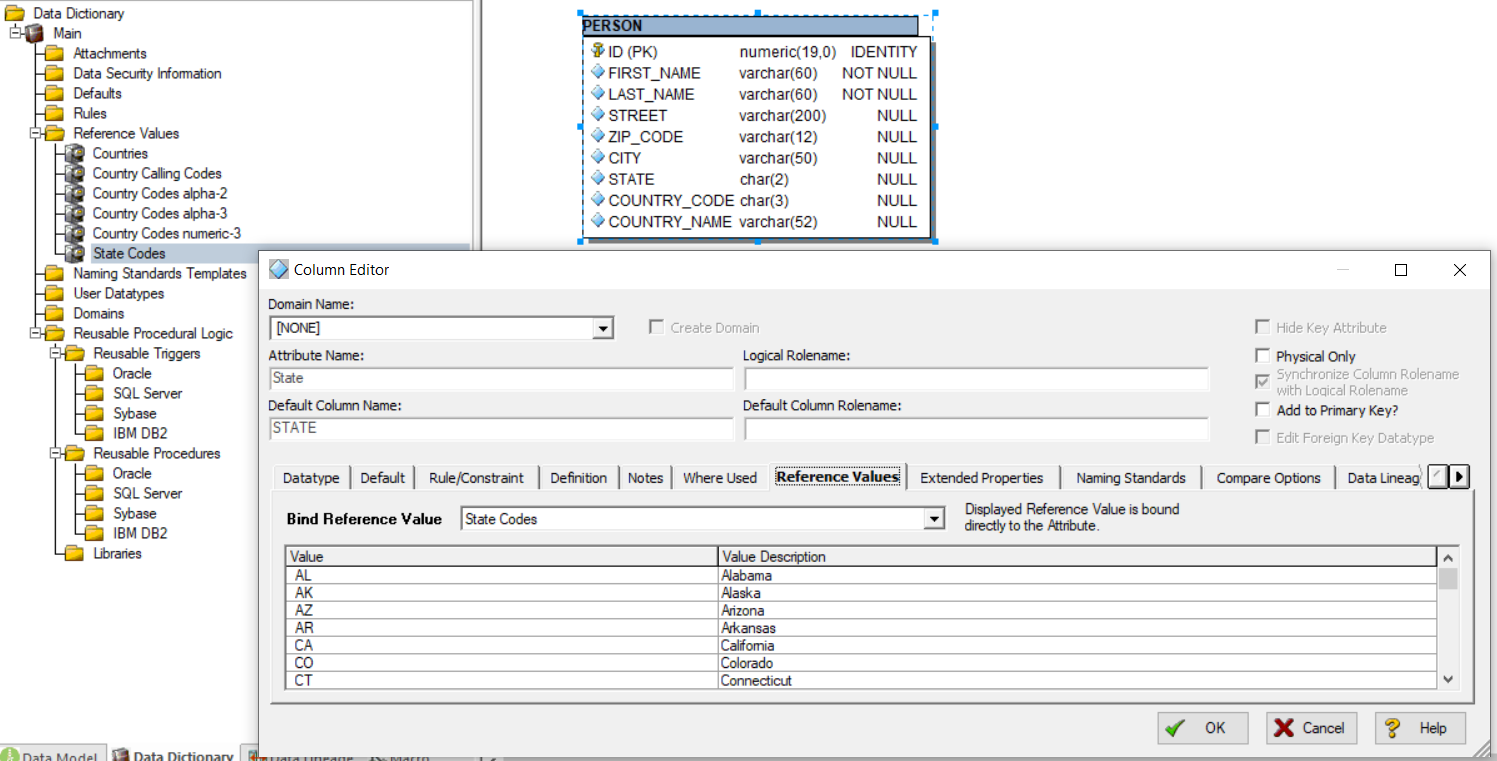
With ER/Studio Data Architect, we can use the Data Dictionaries to define Reference Values and to bind them to our Attributes|Columns.
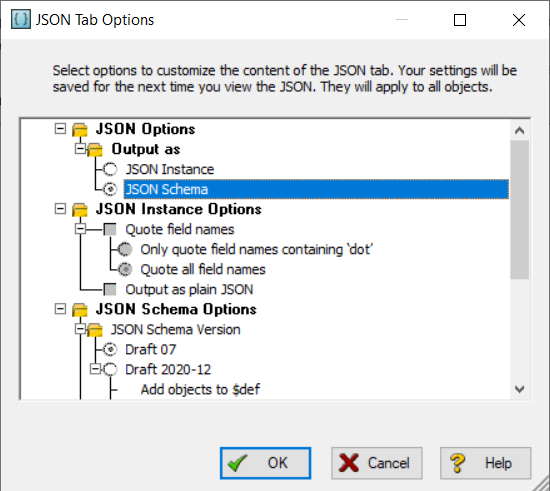
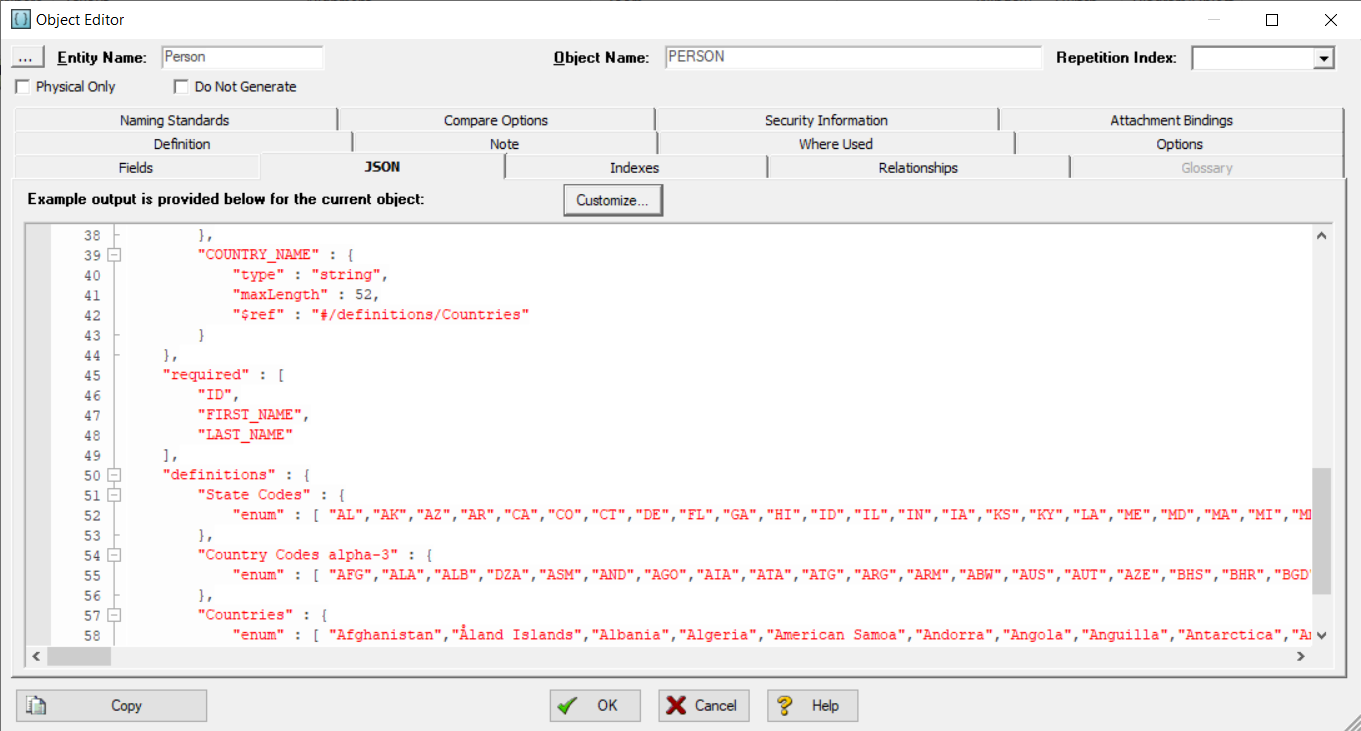
If we generate a JSON instance, we can directly use these Reference Values in our JSON Schema:
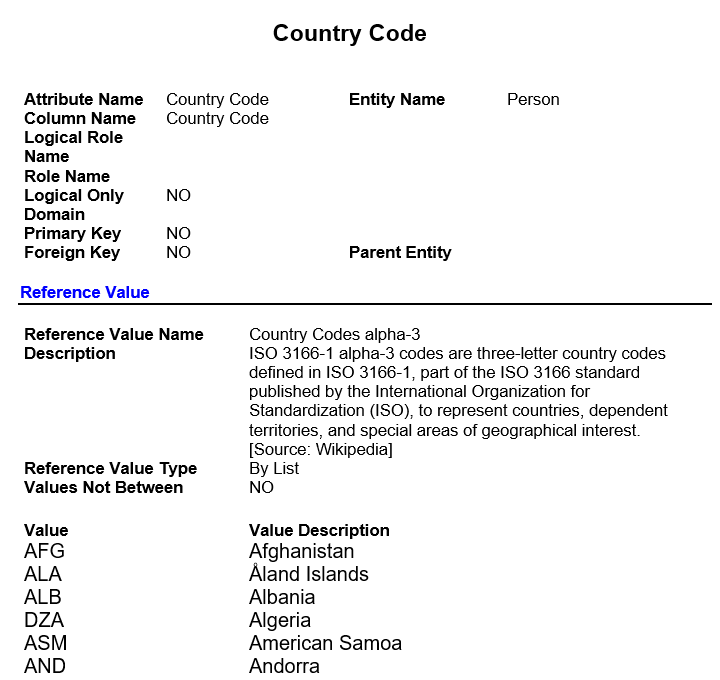
Moreover, we can used it as documentation with the Tables, or we can generate objects and SQL from these Reference Values.
For instance, I’ll share a script to generate the lookup tables for all the columns of the selected Tables which use Reference Values Lists. With Physical Data Model, it also generates in the Post SQL tab of the created Reference table, the Insert statements.
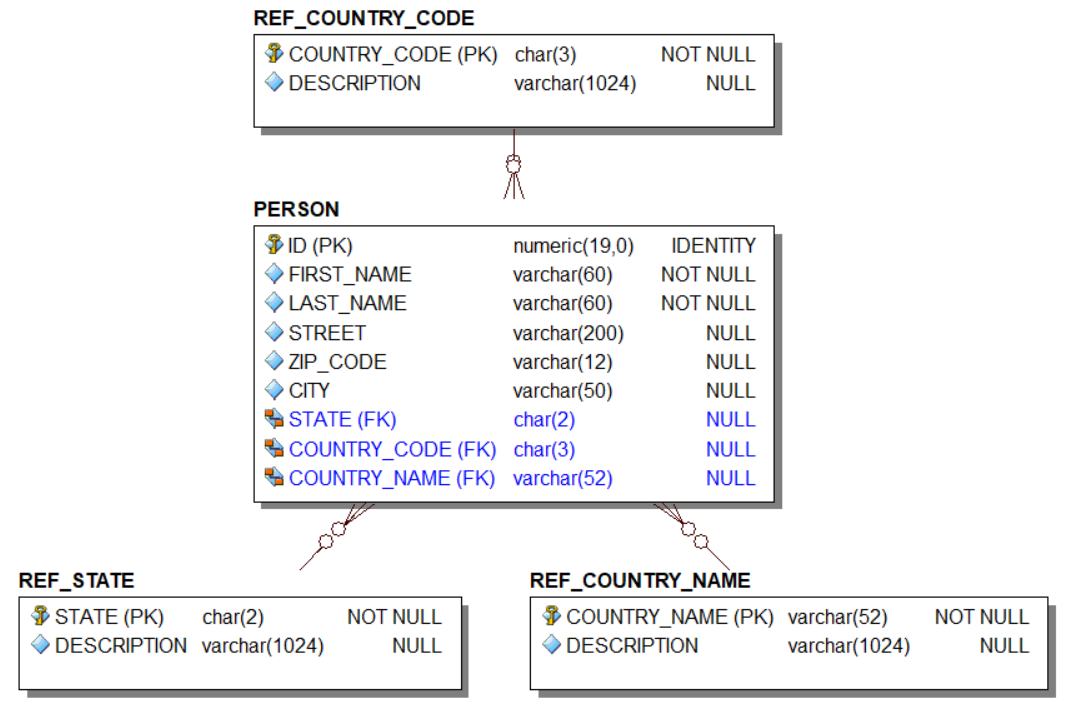
It generates the INSERT statements for each list item for a Physical Data Model
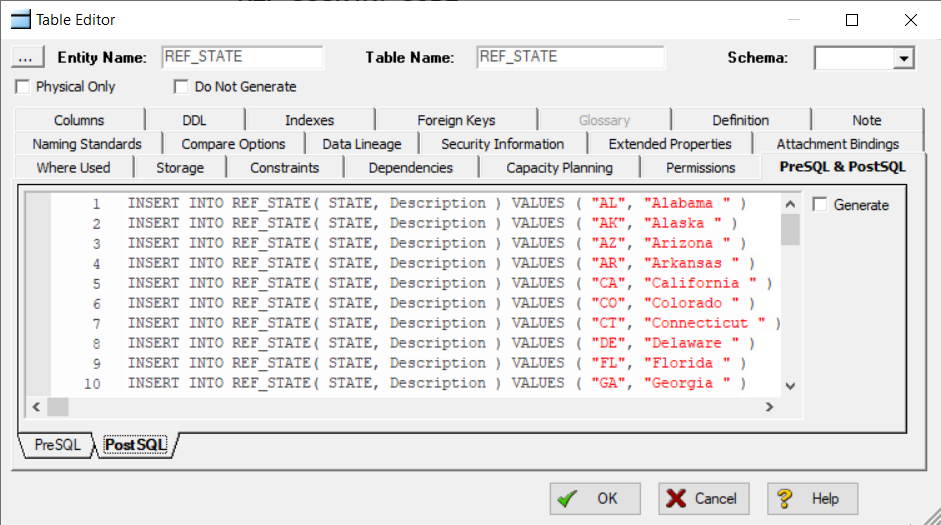
As usual, feel free to update the code to get your custom requirements.
'#Language "WWB-COM"
'
'MACRO TITLE: Generate Lookup Table From Reference Values
'
'This macro generates a lookup Table|Entity for the
'	columns|attributes which use a list of Reference Values,
'	for the selected table|entities.
'With Physical models, it also generates the Insert statements
'	for the values in the 'Post SQL' Table Tab.
'
' Known limitations:
' The SQL code for the Insert should be updated depending on the DB
'	platform used
'
'-------------------------------------------------------------------

Option Explicit

Const REF_OBJECT_PREFIX$ = "REF_"
Const GENERATE_INSERT As Boolean = True

Sub Main
	Dim MyDiagram As Diagram
	Dim MyModel As Model
	Dim MyEntity As Entity
	Dim MyEntityDisplay As EntityDisplay
	Dim MySubModel As SubModel
	Dim MySelObject As SelectedObject
	Dim MyAttribute As AttributeObj
	Dim MyReferenceValue As ReferenceValue

	Dim MyRefEntity As Entity
	Dim MyRefID As AttributeObj
	Dim MyRefDesc As AttributeObj
	Dim MyRelationship As Relationship
	Dim MyDomain As Domain
	Dim MyDictionary As Dictionary

	Dim ID%, iExtract%
	Dim Logical As Boolean
	Dim ObjectName$, SubObjectName$
	Dim ObjType%, RefValueID%
	Dim vp As ValuePair
	Dim sPostSQL$
	Dim bGenerateInsert As Boolean

	Debug.Clear

	'Get the current diagram.
	Set MyDiagram = DiagramManager.ActiveDiagram

	'Get the current model.
	Set MyModel = MyDiagram.ActiveModel

	'Get the current submodel.
	Set MySubModel = MyModel.ActiveSubModel

	'Determine if the model is logical or physical.
	Logical = MyModel.Logical

	bGenerateInsert = GENERATE_INSERT And Not Logical

	'Iterate through all the selected entities in the submodel
	For Each MySelObject In MySubModel.SelectedObjects

		'Get type of the selected object.
		ObjType = MySelObject.Type

		'We only want to get the entities, so check the object type.
		If ObjType = 1 Then

			'Get the ID of the selected object.
			ID = MySelObject.ID

			'Now, get the actual entity object with this ID.
			Set MyEntity = MyModel.Entities.Item(ID)

			'If the model is logical, get the entity name.
			'If it is physical, get the table name.
			ObjectName = IIf(Logical, MyEntity.EntityName, MyEntity.TableName)

			'Now, get the actual entity display object with the name of the Entity.
			Set MyEntityDisplay = MySubModel.EntityDisplays.Item(ObjectName)

			Debug.Print ObjectName

			' Loop the Attributes
			For Each MyAttribute In MyEntity.Attributes

				'If the model is logical, get the attribute name.
				'If it is physical, get the column name.
				SubObjectName = IIf(Logical, MyAttribute.AttributeName, MyAttribute.ColumnName)
				Debug.Print vbTab & SubObjectName & ": " & MyAttribute.ReferenceValueId & " / " & MyAttribute.DomainId

				' Only check the attributes which are not FK yet
				If Not MyAttribute.ForeignKey Then

					' Check if a domain is bound if no ref value set
					If MyAttribute.ReferenceValueId = 0 And MyAttribute.DomainId > 0 Then

						' Try to get a reference to the Domain from the LOCAL DD
						Set MyDomain = MyDiagram.Dictionary.Domains.Item(MyAttribute.DomainId)

						' Check if domain exists
						If Not MyDomain Is Nothing Then

							Debug.Print vbTab & vbTab & "Local dictionary: " & MyDomain.ReferenceValueId
							' Copy the ReferenceValueId from the Domain to the Attribute|Column
							MyAttribute.ReferenceValueId = MyDomain.ReferenceValueId

						Else

							' Loop the Enterprise DD
							For Each MyDictionary In MyDiagram.EnterpriseDataDictionaries

								' Try to get a reference to the Domain from an Enterprise DD
								Set MyDomain = MyDictionary.Domains.Item(MyAttribute.DomainId)

								' Check if domain exists
								If Not MyDomain Is Nothing Then

									Debug.Print vbTab & vbTab & "Enterprise dictionary [" & MyDictionary.Name & "]: " & MyDomain.ReferenceValueId
									' Copy the ReferenceValueId from the Domain to the Attribute|Column
									MyAttribute.ReferenceValueId = MyDomain.ReferenceValueId

									' Break the loop
									Exit For

								End If

							Next MyDictionary

						End If

					End If

					' Check if a Reference Value is bound to the Attribute
					If MyAttribute.ReferenceValueId > 0 Then

						sPostSQL = ""

						' Get the ReferenceValue
						Set MyReferenceValue = MyAttribute.GetReferenceValue
						RefValueID = MyAttribute.ReferenceValueId

						If Not MyReferenceValue Is Nothing Then

							' Check if the ReferenceValueId is linked to a list
							If Not MyReferenceValue.IsRange Then

								' Check if a Lookup object already exists
								Set MyRefEntity = MyModel.Entities(REF_OBJECT_PREFIX + SubObjectName)

								If MyRefEntity Is Nothing Then

									' Create the Lookup object
									Set MyRefEntity = MyModel.Entities.AddEx(MyEntityDisplay.HorizontalPosition + 50, MyEntityDisplay.VerticalPosition)
									MyRefEntity.EntityName = REF_OBJECT_PREFIX + SubObjectName
									MyRefEntity.TableName = MyRefEntity.EntityName

									MyRefEntity.Definition = "Lookup Table for column '" & SubObjectName & "' of the Table '" & ObjectName & "'"
									MyRefEntity.Note = IIf(bGenerateInsert, "Values", "Extract") & " of the Reference Value '" & MyReferenceValue.Name & "': " & vbCrLf
									iExtract = 0
									For Each vp In MyReferenceValue.Values

										Debug.Print Chr(9) & Chr(9) & vp.Value
										Debug.Print Chr(9) & Chr(9) & vp.ValueDescription
										MyRefEntity.Note = MyRefEntity.Note & vbCrLf & vp.Value & ": " & vp.ValueDescription

										' Generate Insert
										If bGenerateInsert Then
											sPostSQL = sPostSQL & "INSERT INTO " & MyRefEntity.TableName & "( " & SubObjectName & ", Description ) VALUES ( """ & vp.Value & """, """ & vp.ValueDescription & """ )" & vbCrLf
										End If

										' We only take the 5 firsts
										iExtract = iExtract + 1
										If Not bGenerateInsert And (iExtract = 5) Then

											MyRefEntity.Note = MyRefEntity.Note & vbCrLf & "..."
											Exit For

										End If

									Next vp

									' Add INSERT into the PostSQL of the lookup table
									If bGenerateInsert Then

										MyRefEntity.PostSQL = sPostSQL
										MyRefEntity.GenPostSQL = False

									End If

									' Add the Reference value column
									Set MyRefID = MyRefEntity.Attributes.Add(SubObjectName, True)
									MyRefID.Datatype = MyAttribute.Datatype
									MyRefID.DataLength = MyAttribute.DataLength
									MyRefID.DataScale =  MyAttribute.DataScale
									' add the Description column
									Set MyRefDesc = MyRefEntity.Attributes.Add("Description", False)
									MyRefDesc.Datatype = "VARCHAR"
									MyRefDesc.DataLength = 1024
									MyRefDesc.NullOption = "NULL"

									' Add the relationship
									Set MyRelationship = MyModel.Relationships.Add(MyRefEntity.EntityName, ObjectName, IIf(MyAttribute.NullOption = "NOT NULL", 1, 3))
									MyAttribute.ReferenceValueId = RefValueID

								Else

									Debug.Print REF_OBJECT_PREFIX + SubObjectName & " already exists!"

									' Get the Reference value column
									Set MyRefID = MyRefEntity.Attributes.Item(SubObjectName)

									' Check if the Attribute|Column exists
									If Not MyRefID Is Nothing Then

										' Add the relationship
										Set MyRelationship = MyModel.Relationships.Add(MyRefEntity.EntityName, ObjectName, IIf(MyAttribute.NullOption = "NOT NULL", 1, 3))
										MyAttribute.ReferenceValueId = RefValueID

										' Update the Definition of the lookup object
										MyRefEntity.Definition = "Lookup Table for column '" & SubObjectName & "' of the Table '" & ObjectName & "'" & vbCrLf & vbCrLf & MyRefEntity.Definition

									End If

								End If

							End If

						End If

					End If

				End If

			Next MyAttribute

		End If

	Next MySelObject

	Debug.Print ""
	Debug.Print "End!"
	MsgBox "Done.", vbInformation

End Sub
A short video which shows how to create a macro from a script in ER/Studio Data Architect:




