This is the third post regarding the binding of custom properties to specific ER objects.
With the first one, we saw how to bind attachments to one type of ER object.
Then, we extended the different macros to bind the attachments to several ER objects.
Now, in this one, we’ll support some new ER objects (Models, Submodels, Business Data Objects) and we’ll filter the types of ER objects that can be bound to each Attachment Type.

Even more importantly, we’ll also integrate the Data Security Information so it can also be automatically bound to their relative ER Objects.

By the way, the different strings used by the macros for the Attachment Types, Security Types, Excel Spreadsheets can be easily customized in the script named wBindPropertiesToERObjects.bas.
' Labels used in the different Attachments or Security Data Information Types
Public Const MODELS$			= "Models"
Public Const SUBMODELS$			= "Submodels"
Public Const BUSINESSDATAOBJECTS$	= "BusinessDataObjects"
Public Const ENTITIES$			= "Entities"
Public Const TABLES$			= "Tables"
Public Const VIEWS$			= "Views"
Public Const RELATIONSHIPS$ 		= "Relationships"
Public Const ATTRIBUTES$		= "Attributes"
Public Const COLUMNS$			= "Columns"

' Delimiter used between the different Labels
Public Const DELIMITER$			= "|"

' Empty = Local Data Dictionary; Name of the Enterprise Data Dictionary
Public Const DICTIONARY_NAME$		= "Custom properties"
'Public Const DICTIONARY_NAME$		= ""

' Excel sheets names
Public Const XL_TAB_ATTACHMENT$ 	= "Attachments"
Public Const XL_TAB_SECURITY$		= "Data Security Information"
Feel free to update them according to your requirements.
This short video shows the usage of an Enterprise Data Dictionary containing Attachments and Data Security Information with different projects:
Below are the 5 usual scripts updated with the previously mentioned enhancements.
'#Language "WWB-COM"
''MACRO TITLE: wBind Properties to ER Objects
' MACRO VERSION: 3.0
'This macro binds the Attachments and Data Security Information
'	for Entities, Tables, Attributes, Columns, Relationships, Views,
'	Models, Submodels & Business Data Objects
'
' Release notes
' 3.0: Bind Data Security Information too
' 2.0: ToImportExport & IsMatching functions added
' 1.0: Initial version
'---------------------------------------------------------------------------

Option Explicit

' Labels used in the different Attachments or Security Data Information Types
Public Const MODELS$			= "Models"
Public Const SUBMODELS$			= "Submodels"
Public Const BUSINESSDATAOBJECTS$	= "BusinessDataObjects"
Public Const ENTITIES$			= "Entities"
Public Const TABLES$			= "Tables"
Public Const VIEWS$			= "Views"
Public Const RELATIONSHIPS$ 		= "Relationships"
Public Const ATTRIBUTES$		= "Attributes"
Public Const COLUMNS$			= "Columns"

' Delimiter used between the different Labels
Public Const DELIMITER$			= "|"

' Empty = Local Data Dictionary; Name of the Enterprise Data Dictionary
Public Const DICTIONARY_NAME$		= "Custom properties"
'Public Const DICTIONARY_NAME$		= ""

' Excel sheets names
Public Const XL_TAB_ATTACHMENT$ 	= "Attachments"
Public Const XL_TAB_SECURITY$		= "Data Security Information"

' DO NOT EDIT THE FOLLOWING CONSTANTS
' Datatypes constants
Public Const BOOLEAN_TYPE%		= 1
Public Const DATE_TYPE%			= 2
Public Const EXTERNAL_FILE_PATH_TYPE%	= 3
Public Const NUMERIC_TYPE%		= 4
Public Const TEXT_TYPE%			= 5
Public Const TEXT_LIST_TYPE%		= 6
Public Const TIME_TYPE%			= 7

' Datatypes used by the different Attachments Types: ValidAttachmentBinding.ObjectType
Public Const VAB_MODELS$		= "Model"
Public Const VAB_SUBMODELS$		= "SubModel"
Public Const VAB_BUSINESSDATAOBJECTS$	= "Business Data Object"
Public Const VAB_ENTITIES_TABLES$	= "Entity / Table"
Public Const VAB_VIEWS$			= "View"
Public Const VAB_RELATIONSHIPS$ 	= "Relationship"
Public Const VAB_ATTRIBUTES_COLUMNS$	= "Attribute / Column"

' Excel constants
Public Const xlCenter% 				= -4108
Public Const xlBottom% 				= -4107
Public Const xlTop%				= -4160
Public Const xlLeft%				= -4131
Public Const xlRight%				= -4152
Public Const xlCalculationAutomatic&		= -4105
Public Const xlCalculationManual& 		= -4135
Public Const xlCalculationSemiautomatic&	= 2

Sub main

	On Error GoTo ErrorEnd

	DiagramManager.EnableScreenUpdateEx(False, False)
	Debug.Clear
	BindProperties(False)

ErrorEnd:
	DiagramManager.EnableScreenUpdateEx(True, True)

End Sub

Public Sub BindProperties(currentModelOnly As Boolean)

	Dim MyDictionary As Dictionary

	Dim MyDiagram As Diagram
	Dim MyModel As Model

	Set MyDiagram = DiagramManager.ActiveDiagram

	If Not MyDiagram Is Nothing Then

		If DICTIONARY_NAME = "" Then
			Set MyDictionary = MyDiagram.Dictionary
		Else
			Set MyDictionary = MyDiagram.EnterpriseDataDictionaries.Item(DICTIONARY_NAME)
		End If

		If Not (MyDictionary Is Nothing) Then

			Debug.Print
			If currentModelOnly Then

				Set MyModel = MyDiagram.ActiveModel
				BindModelAttachment(MyDictionary, MyModel)
				BindModelSecurity(MyDictionary, MyModel)

			Else

				For Each MyModel In MyDiagram.Models

					BindModelAttachment(MyDictionary, MyModel)
					BindModelSecurity(MyDictionary, MyModel)

				Next

			End If

		Else

			Debug.Print "Data dictionary not available!"

		End If

	Else

		Debug.Print "No project opened!"

	End If

End Sub

Private Sub BindModelAttachment(MyDictionary As Dictionary, MyModel As Model)

	Dim MyEntity As Entity
	Dim MyAttribute As AttributeObj
	Dim MyRelationship As Relationship
	Dim MyView As View
	Dim MySubModel As SubModel
	Dim MyBusinessDataObject As BusinessDataObject

	Dim MyBoundAttachment As BoundAttachment
	Dim MyAttachmentType As AttachmentType
	Dim MyAttachment As Attachment

	Debug.Print "Attachments"

	' Bind Models' Attachments
	Debug.Print "Model:" & vbTab & MyModel.Name

	For Each MyAttachmentType In MyDictionary.AttachmentTypes

		If IsMatching(MyAttachmentType.Name, MODELS) Then

			For Each MyAttachment In MyAttachmentType.Attachments

				MyModel.BoundAttachments.Add(MyAttachment.ID)

			Next

		End If

	Next

	' Bind Submodels' Attachments
	For Each MySubModel In MyModel.SubModels

		Debug.Print "Submodel:" & vbTab & MySubModel.Name

		For Each MyAttachmentType In MyDictionary.AttachmentTypes

			If IsMatching(MyAttachmentType.Name, SUBMODELS) Then

				For Each MyAttachment In MyAttachmentType.Attachments

					Debug.Print "[" & MyAttachmentType.Name & "]" & vbTab & "Submodel:" & vbTab & MySubModel.Name
					MySubModel.BoundAttachments.Add(MyAttachment.ID)

				Next

			End If

		Next

	Next

	' Bind Entities' Attachments
	For Each MyEntity In MyModel.Entities

		Debug.Print IIf(MyModel.Logical, "Entity:" & vbTab & MyEntity.EntityName, "Table:" & vbTab & MyEntity.TableName)

		For Each MyAttachmentType In MyDictionary.AttachmentTypes

			If IsMatching(MyAttachmentType.Name, IIf(MyModel.Logical, ENTITIES, TABLES)) Then

				For Each MyAttachment In MyAttachmentType.Attachments

					MyEntity.BoundAttachments.Add(MyAttachment.ID)

				Next

			End If

		Next

		' Bind Attributes' Attachments
		For Each MyAttachmentType In MyDictionary.AttachmentTypes

			If IsMatching(MyAttachmentType.Name, IIf(MyModel.Logical, ATTRIBUTES, COLUMNS)) Then

				For Each MyAttribute In MyEntity.Attributes

					Debug.Print "[" & MyAttachmentType.Name & "]" & vbTab & IIf(MyModel.Logical, "Attribute:" & vbTab & MyAttribute.AttributeName, "Column:" & vbTab & MyAttribute.ColumnName)

					For Each MyAttachment In MyAttachmentType.Attachments

						MyAttribute.BoundAttachments.Add(MyAttachment.ID)

					Next

				Next

			End If

		Next

	Next

	' Bind Relationships' Attachments
	For Each MyRelationship In MyModel.Relationships

		Debug.Print "Relationship:" & vbTab & MyRelationship.Name

		For Each MyAttachmentType In MyDictionary.AttachmentTypes

			If IsMatching(MyAttachmentType.Name, RELATIONSHIPS) Then

				For Each MyAttachment In MyAttachmentType.Attachments

					MyRelationship.BoundAttachments.Add(MyAttachment.ID)

				Next

			End If

		Next

	Next

	' Bind Views' Attachments
	For Each MyView In MyModel.Views

		Debug.Print "View:" & vbTab & MyView.Name

		For Each MyAttachmentType In MyDictionary.AttachmentTypes

			If IsMatching(MyAttachmentType.Name, VIEWS) Then

				For Each MyAttachment In MyAttachmentType.Attachments

					MyView.BoundAttachments.Add(MyAttachment.ID)

				Next

			End If

		Next

	Next

	' Bind Business Data Objects' Attachments
	For Each MyBusinessDataObject In MyModel.BusinessDataObjects

		Debug.Print "BDO:" & vbTab & IIf(MyModel.Logical, MyBusinessDataObject.LogicalName, MyBusinessDataObject.PhysicalName)

		For Each MyAttachmentType In MyDictionary.AttachmentTypes

			If IsMatching(MyAttachmentType.Name, BUSINESSDATAOBJECTS) Then

				For Each MyAttachment In MyAttachmentType.Attachments

					MyBusinessDataObject.BoundAttachments.Add(MyAttachment.ID)

				Next

			End If

		Next

	Next

	Debug.Print

End Sub

Private Sub BindModelSecurity(MyDictionary As Dictionary, MyModel As Model)

	Dim MyEntity As Entity
	Dim MyAttribute As AttributeObj
	Dim MyRelationship As Relationship
	Dim MyView As View
	Dim MySubModel As SubModel
	Dim MyBusinessDataObject As BusinessDataObject

	Dim MyBoundAttachment As BoundAttachment
	Dim MySecurityType As SecurityType
	Dim MySecurityProperty As SecurityProperty

	Debug.Print "Security"

	' Bind Models' Data Security Infomartion
	Debug.Print "Model:" & vbTab & MyModel.Name

	For Each MySecurityType In MyDictionary.SecurityTypes

		If IsMatching(MySecurityType.Name, MODELS) Then

			For Each MySecurityProperty In MySecurityType.SecurityProperties

				MyModel.BoundSecurityProperties.Add(MySecurityProperty.ID)

			Next

		End If

	Next

	' Bind Submodels' Data Security Infomartion
	For Each MySubModel In MyModel.SubModels

		Debug.Print "Submodel:" & vbTab & MySubModel.Name

		For Each MySecurityType In MyDictionary.SecurityTypes

			If IsMatching(MySecurityType.Name, SUBMODELS) Then

				Debug.Print "[" & MySecurityType.Name & "]" & vbTab & "Submodel:" & vbTab & MySubModel.Name

				For Each MySecurityProperty In MySecurityType.SecurityProperties

					MySubModel.BoundSecurityProperties.Add(MySecurityProperty.ID)

				Next

			End If

		Next

	Next

	' Bind Entities' Data Security Infomartion
	For Each MyEntity In MyModel.Entities

		Debug.Print IIf(MyModel.Logical, "Entity:" & vbTab & MyEntity.EntityName, "Table:" & vbTab & MyEntity.TableName)

		For Each MySecurityType In MyDictionary.SecurityTypes

			If IsMatching(MySecurityType.Name, IIf(MyModel.Logical, ENTITIES, TABLES)) Then

				For Each MySecurityProperty In MySecurityType.SecurityProperties

					MyEntity.BoundSecurityProperties.Add(MySecurityProperty.ID)

				Next

			End If

		Next

		' Bind Attributes' Data Security Infomartion
		For Each MySecurityType In MyDictionary.SecurityTypes

			If IsMatching(MySecurityType.Name, IIf(MyModel.Logical, ATTRIBUTES, COLUMNS)) Then

				For Each MyAttribute In MyEntity.Attributes

					Debug.Print "[" & MySecurityType.Name & "]" & vbTab & IIf(MyModel.Logical, "Attribute:" & vbTab & MyAttribute.AttributeName, "Column:" & vbTab & MyAttribute.ColumnName)

					For Each MySecurityProperty In MySecurityType.SecurityProperties

						MyAttribute.BoundSecurityProperties.Add(MySecurityProperty.ID)

					Next

				Next

			End If

		Next

	Next

	' Bind Views' Data Security Infomartion
	For Each MyView In MyModel.Views

		Debug.Print "View:" & vbTab & MyView.Name

		For Each MySecurityType In MyDictionary.SecurityTypes

			If IsMatching(MySecurityType.Name, VIEWS) Then

				For Each MySecurityProperty In MySecurityType.SecurityProperties

					MyView.BoundSecurityProperties.Add(MySecurityProperty.ID)

				Next

			End If

		Next

	Next

	' Bind Business Data Objects' Data Security Infomartion
	For Each MyBusinessDataObject In MyModel.BusinessDataObjects

		Debug.Print "BDO:" & vbTab & IIf(MyModel.Logical, MyBusinessDataObject.LogicalName, MyBusinessDataObject.PhysicalName)

		For Each MySecurityType In MyDictionary.SecurityTypes

			If IsMatching(MySecurityType.Name, BUSINESSDATAOBJECTS) Then

				For Each MySecurityProperty In MySecurityType.SecurityProperties

					MyBusinessDataObject.BoundSecurityProperties.Add(MySecurityProperty.ID)

				Next

			End If

		Next

	Next

	Debug.Print

End Sub

Public Function IsMatching(theAttachmentType$, theObjectType$) As Boolean

	Dim rc As Boolean, i%
	Dim names$()

	rc = UCase(theObjectType) = UCase(theAttachmentType)

	If Not rc Then

		names = Split(theAttachmentType, DELIMITER)
		For i = LBound(names) To UBound(names)

			rc = (UCase(names(i)) = UCase(theObjectType))

			If rc Then

				Exit For

			End If

		Next i

	End If

	IsMatching = rc

End Function

Public Function ToImportExport(name$) As Boolean

	Dim rc As Boolean, i%
	Dim names$()

	rc = InStr(DELIMITER & UCase(ENTITIES) & DELIMITER & UCase(TABLES) & DELIMITER & UCase(ATTRIBUTES) & DELIMITER & UCase(COLUMNS) & DELIMITER & UCase(RELATIONSHIPS) & DELIMITER & UCase(VIEWS) & DELIMITER & UCase(MODELS) & DELIMITER & UCase(SUBMODELS) & DELIMITER & UCase(BUSINESSDATAOBJECTS) & DELIMITER, DELIMITER & UCase(name) & DELIMITER) > 0

	If Not rc Then

		names = Split(name, DELIMITER)
		For i = LBound(names) To UBound(names)

			rc = (UCase(names(i)) = UCase(ENTITIES)) Or (UCase(names(i)) = UCase(TABLES)) Or (UCase(names(i)) = UCase(ATTRIBUTES)) Or (UCase(names(i)) = UCase(COLUMNS)) Or (UCase(names(i)) = UCase(RELATIONSHIPS)) Or (UCase(names(i)) = UCase(VIEWS)) Or (UCase(names(i)) = UCase(MODELS)) Or (UCase(names(i)) = UCase(SUBMODELS)) Or (UCase(names(i)) = UCase(BUSINESSDATAOBJECTS))

			If rc Then

				Exit For

			End If

		Next i

	End If

	ToImportExport = rc

End Function

Public Sub FilterTypes(ByRef MyAttachmentType As AttachmentType, sValue$)

	Dim MyValidAttachmentBinding As ValidAttachmentBinding
	Dim rc As Boolean, i%, sType$
	Dim names$()

	' Remove the existing bindings
	For Each MyValidAttachmentBinding In MyAttachmentType.ValidAttachmentBindings

		MyAttachmentType.ValidAttachmentBindings.Remove(MyValidAttachmentBinding.ID)

	Next

	sType = GetVABType(sValue)

	If sType <> "" Then

		MyAttachmentType.ValidAttachmentBindings.Add(sType)

	Else

		names = Split(sValue, DELIMITER)
		For i = LBound(names) To UBound(names)

			sType = GetVABType(names(i))

			If sType <> "" Then

				MyAttachmentType.ValidAttachmentBindings.Add(sType)
				Debug.Print "VAB:" & vbTab & MyAttachmentType.Name & vbTab & vbTab & sType

			End If

		Next i

	End If

	MyAttachmentType.ValidAttachmentBindings.Remove("Universal Mappings")	'	The last one remaining from the remove all at the start; as we don't handle Universal Mappings, we remove it after adding the one(s) we need

End Sub

Private Function GetVABType$(sType$)

	Dim rc$

	rc = ""

	Select Case UCase(sType)
		Case UCase(ENTITIES), UCase(TABLES)
			rc = VAB_ENTITIES_TABLES
		Case UCase(ATTRIBUTES), UCase(COLUMNS)
			rc = VAB_ATTRIBUTES_COLUMNS
		Case UCase(RELATIONSHIPS)
			rc = VAB_RELATIONSHIPS
		Case UCase(VIEWS)
			rc = VAB_VIEWS
		Case UCase(MODELS)
			rc = VAB_MODELS
		Case UCase(SUBMODELS)
			rc = VAB_SUBMODELS
		Case UCase(BUSINESSDATAOBJECTS)
			rc = VAB_BUSINESSDATAOBJECTS
	End Select

	GetVABType = rc

End Function
'#Language "WWB-COM"
''MACRO TITLE: wGenerate Properties to Excel
' MACRO VERSION: 3.0
'This macro exports specific Attachments and Data Security Information
'	for Entities, Tables, Attributes, Columns, Relationships, Views,
'	Models, Submodels & Business Data Objects
'
' Dependencies
'	wBindPropertiesToERObjects.bas
'	Excel
'
' Release notes
' 3.0: Export specific Data Security Information
' 2.0: Export specific Attachments Types
' 1.0: Initial version
'---------------------------------------------------------------------------
'#Uses "wBindPropertiesToERObjects.bas"

Option Explicit

Private Const TITLE$ = "wGenerate Properties to Excel"
Private Const TIMESTAMPED As Boolean = True

Sub Main

	Dim MyDiagram As Diagram
	Dim MyDictionary As Dictionary
	Dim dictionary_list$()

	Dim MyAttachmentType As AttachmentType
	Dim MyAttachment As Attachment
	Dim MySecurityType As SecurityType
	Dim MySecurityProperty As SecurityProperty

	' Excel variables
	Dim wb As Object
	Dim sheet As Object
	Dim excel As Object

	Dim MyListMember As ListMember
	Dim sList$
	Dim curRow%

	Debug.Clear

	'Get the current diagram.
	Set MyDiagram = DiagramManager.ActiveDiagram

	If Not MyDiagram Is Nothing Then
		' Excel
		Set excel = CreateObject("excel.application")

		PrintHeader(excel, wb, sheet)
		' Excel optimization
		excel.Application.ScreenUpdating = False
		excel.Application.EnableAnimations = False
		excel.Application.Calculation = xlCalculationManual
		sheet.DisplayPageBreaks = False

		curRow = 2

		If init_dictionary_list(MyDiagram, dictionary_list) Then

			Set MyDictionary = MyDiagram.Dictionary

		Else

			Begin Dialog UserDialog 550,130,TITLE ' %GRID:10,7,1,1
				Text 30,21,120,14,"Select Dictionary: ",.Text3,1
				DropListBox 170,18,360,112,dictionary_list(),.dictionary_select
				OKButton 20,105,110,21
				CancelButton 420,105,110,21
			End Dialog

			Dim dlg As UserDialog

			If Dialog(dlg) = -1 Then

				If dictionary_list(dlg.dictionary_select) = "Local" Then

					Set MyDictionary = MyDiagram.Dictionary

				Else

					Set MyDictionary = MyDiagram.EnterpriseDataDictionaries.Item(dictionary_list(dlg.dictionary_select))

				End If

			Else

				Exit Sub

			End If

		End If

		If Not MyDictionary Is Nothing Then

			LogIt "Dictionary: " & MyDictionary.Name

			' Get all attachments
			For Each MyAttachmentType In MyDictionary.AttachmentTypes

				' Export only the needed attachments
				If ToImportExport(MyAttachmentType.Name) Then

					For Each MyAttachment In MyAttachmentType.Attachments

			'			LogIt MyAttachmentType.Name & " / " & MyAttachment.Name
						sheet.Cells(curRow, 1).Value = MyAttachmentType.Name
						sheet.Cells(curRow, 2).Value = MyAttachment.Name
						sheet.Cells(curRow, 3).Value = MyAttachment.Description
						sheet.Cells(curRow, 4).Value = MyAttachment.Datatype
						sheet.Cells(curRow, 5).Value = MyAttachment.ValueDefault

						Select Case MyAttachment.Datatype

							Case TEXT_LIST_TYPE
								sList = ""

								For Each MyListMember In MyAttachment.TextList

									sList += MyListMember.Text & ","

								Next MyListMember

								If Right(sList, 1) = "," Then

									sList = Left(sList, Len(sList) - 1)

								End If

								sheet.Cells(curRow, 6).Value = sList

						End Select

		'				XLColumns4Attachments(MyAttachmentType.Name & "\" & MyAttachment.Name) = curCol
						LogIt MyAttachmentType.Name & "\" & MyAttachment.Name
						curRow += 1

					Next MyAttachment

				Else

					LogIt "SKIPPED:" & vbTab & MyAttachmentType.Name

				End If

			Next MyAttachmentType

			curRow = 2
			' Select the Data Security Information sheet
			Set sheet = wb.worksheets(XL_TAB_SECURITY)
			sheet.Activate

			' Get all data security information
			For Each MySecurityType In MyDictionary.SecurityTypes

				' Export only the needed data security information
				If ToImportExport(MySecurityType.Name) Then

					For Each MySecurityProperty In MySecurityType.SecurityProperties

			'			LogIt MySecurityType.Name & " / " & MySecurityProperty.Name
						sheet.Cells(curRow, 1).Value = MySecurityType.Name
						sheet.Cells(curRow, 2).Value = MySecurityProperty.Name
						sheet.Cells(curRow, 3).Value = MySecurityProperty.Description
						sheet.Cells(curRow, 4).Value = MySecurityProperty.Datatype
						sheet.Cells(curRow, 5).Value = MySecurityProperty.ValueDefault

						Select Case MySecurityProperty.Datatype

							Case TEXT_LIST_TYPE
								sList = ""

								For Each MyListMember In MySecurityProperty.TextList

									sList += MyListMember.Text & ","

								Next MyListMember

								If Right(sList, 1) = "," Then

									sList = Left(sList, Len(sList) - 1)

								End If

								sheet.Cells(curRow, 6).Value = sList

						End Select

		'				XLColumns4Attachments(MyAttachmentType.Name & "\" & MyAttachment.Name) = curCol
						LogIt MySecurityType.Name & "\" & MySecurityProperty.Name
						curRow += 1

					Next MySecurityProperty

				Else

					LogIt "SKIPPED:" & vbTab & MySecurityType.Name

				End If

			Next MySecurityType

			Debug.Print
			LogIt "Export completed"

			excel.Visible = True
			excel.Application.ScreenUpdating = True
			excel.Application.EnableAnimations = True
			excel.Application.Calculation = xlCalculationAutomatic
	'		sheet.DisplayPageBreaks = True
			AutofitAllUsed(excel)
			' Select the Attachment sheet
			Set sheet = wb.worksheets(XL_TAB_ATTACHMENT)
			sheet.Activate
			AutofitAllUsed(excel)
	'		sheet.Rows("1:1").RowHeight = 14.4 '.EntireRow.AutoFit

			MsgBox "Export completed !", vbInformation, TITLE

		End If

	Else

		MsgBox "No project opened!", vbExclamation, TITLE

	End If

End Sub

Private Function PrefixDT(txt As String) As String
	If TIMESTAMPED Then
		PrefixDT = CStr(Now) & Chr(9) & txt
	Else
		PrefixDT = txt
	End If
End Function

Private Sub LogIt(ByVal txt As String)

	Debug.Print PrefixDT(txt)

End Sub

Private Sub PrintHeader(ByRef excel As Object, ByRef wb As Object, ByRef sheet As Object)

	Set wb = excel.workbooks.Add

	' Attachments
	Set sheet = wb.activesheet

	sheet.Name = XL_TAB_ATTACHMENT

	With sheet.range("A1:F1")
		.interior.colorindex = 15
		.font.Size = 9
		.font.Bold = True
		.horizontalalignment = xlCenter
	End With

	With excel
		With .ActiveWindow
			.SplitColumn = 1
			.SplitRow = 1
		End With
		.ActiveWindow.FreezePanes = True
	End With

	sheet.cells(1,1).Value = "Attachment Type"
	sheet.cells(1,2).Value = "Name"
	sheet.cells(1,3).Value = "Description"
	sheet.cells(1,4).Value = "Data Type"
	sheet.cells(1,5).Value = "Default value"
	sheet.cells(1,6).Value = "Text list values"

	With sheet.cells(1,4)
		.AddComment
		.Comment.Visible = False
		.Comment.Text Text:= "1 = Boolean" & vbCrLf & "2 = Date" & vbCrLf & "3 = ExternalFilePath" & vbCrLf & "4 = Numeric" & vbCrLf & "5 = Text" & vbCrLf & "6 = TextList" & vbCrLf & "7 = Time"
	End With

	With sheet.range("A:A")
		.interior.colorindex = 15
		.verticalalignment = xlBottom
		.horizontalalignment = xlLeft
		.font.Bold = True
		.font.Size = 9
	End With

	Comments_AutoSize(sheet)

	' Data Security Information
	Set sheet = wb.worksheets.Add(After:=sheet)

	sheet.Name = XL_TAB_SECURITY

	With sheet.range("A1:F1")
		.interior.colorindex = 15
		.font.Size = 9
		.font.Bold = True
		.horizontalalignment = xlCenter
	End With

	With excel
		With .ActiveWindow
			.SplitColumn = 1
			.SplitRow = 1
		End With
		.ActiveWindow.FreezePanes = True
	End With

	sheet.cells(1,1).Value = "Security Type"
	sheet.cells(1,2).Value = "Name"
	sheet.cells(1,3).Value = "Description"
	sheet.cells(1,4).Value = "Data Type"
	sheet.cells(1,5).Value = "Default value"
	sheet.cells(1,6).Value = "Text list values"

	With sheet.cells(1,4)
		.AddComment
		.Comment.Visible = False
		.Comment.Text Text:= "1 = Boolean" & vbCrLf & "2 = Date" & vbCrLf & "3 = ExternalFilePath" & vbCrLf & "4 = Numeric" & vbCrLf & "5 = Text" & vbCrLf & "6 = TextList" & vbCrLf & "7 = Time"
	End With

	With sheet.range("A:A")
		.interior.colorindex = 15
		.verticalalignment = xlBottom
		.horizontalalignment = xlLeft
		.font.Bold = True
		.font.Size = 9
	End With

	Comments_AutoSize(sheet)

	' Select the Attachment sheet
	Set sheet = wb.worksheets(XL_TAB_ATTACHMENT)
	sheet.Activate

End Sub

Private Sub AutofitAllUsed(excel As Object)
	Dim x As Long

	For x = 1 To excel.ActiveSheet.UsedRange.Columns.Count
		excel.ActiveSheet.UsedRange.Columns(x).EntireColumn.AutoFit
	Next x
End Sub

'initialize the dictionary drop down list
Function init_dictionary_list(ByRef MyDiagram As Diagram, ByRef dictionary_list$()) As Boolean

	Dim i%
	Dim MyDictionary As Dictionary

	ReDim dictionary_list$(0 To MyDiagram.EnterpriseDataDictionaries.Count)

	dictionary_list (0) = "Local"
	i = 1

	For Each MyDictionary In MyDiagram.EnterpriseDataDictionaries
		dictionary_list (i) = MyDictionary.Name
		i +=  1
	Next

	init_dictionary_list = MyDiagram.EnterpriseDataDictionaries.Count = 0

End Function

Sub Comments_AutoSize(s As Object)
	' https://www.contextures.com/xlcomments03.html
	Dim MyComments As Object
	Dim lArea As Long
	Dim lMult As Double
	Dim MaxW As Long
	Dim NewW As Long

	'Height adjustment factor
	 'of 1.1 seems to work ok.
	lMult = 1.1
	MaxW = 300
	NewW = 200

	For Each MyComments In s.Comments
	  With MyComments
		.Shape.TextFrame.AutoSize = True
		If .Shape.Width > MaxW Then
		  lArea = .Shape.Width * .Shape.Height
		  .Shape.Width = NewW
		  .Shape.Height = (lArea / NewW) * lMult
		End If
	  End With
	Next ' comment
End Sub
'#Language "WWB-COM"
''MACRO TITLE: wRead Properties from Excel with UI
' MACRO VERSION: 3.0
'This macro imports specific Attachments and Data Security Information
'	for Entities, Tables, Attributes, Columns, Relationships, Views,
'	Models, Submodels & Business Data Objects
'
' Dependencies:
'	wBindPropertiesToERObjects.bas
'	Excel
'
' Known limitations
'	Types for Attachments & Data Security Information can NOT have common
'	names
'
' Release notes
' 3.0: Import specific Data Security Information
' 2.0: Import specific Attachments Types
' 1.0: Initial version
'---------------------------------------------------------------------------
'#Uses "wBindPropertiesToERObjects.bas"

Option Explicit

Private Const TITLE$ = "wRead Properties from Excel"

Dim XLfile$
Dim lCurRow%

Sub Main

	Dim excel As Object
	Dim MyDiagram As Diagram
	Dim MyDictionary As Dictionary
	Dim lNbAttachmentsManaged&, lNbSecurityPropertiesManaged&
	Dim dictionary_list$()
	Debug.Clear

	Set MyDiagram = DiagramManager.ActiveDiagram

	If Not MyDiagram Is Nothing Then

		Begin Dialog UserDialog 550,217,TITLE,.DialogFunc ' %GRID:10,7,1,1
			Text 30,21,120,14,"Select Dictionary: ",.Text3,1
			DropListBox 170,18,360,112,dictionary_list(),.dictionary_select
			GroupBox 20,56,510,98,"Excel spreadsheet",.gbPath
			Text 30,84,50,14,"Path: ",.Text1,1
			TextBox 90,83,360,21,.Path
			PushButton 460,84,60,21,"Browse",.Browse
			PushButton 350,119,170,28,"Generate a Sample Sheet",.SampleSheet
			CheckBox 30,161,490,14,"Bind attachments to ER Objects",.cbBind
			OKButton 20,189,110,21
			CancelButton 420,189,110,21
		End Dialog

		Dim dlg As UserDialog

		init_dictionary_list(MyDiagram, dictionary_list)

		start_dialog:
		'dlg.Path = "C:\Users\William\Documents\ERStudio Data Architect 19.3\tests\GIM_Attachments.xlsx"

		'start dialog
		If Dialog(dlg) = -1 Then

			If dictionary_list(dlg.dictionary_select) = "Local" Then
				Set MyDictionary = MyDiagram.Dictionary
			Else
				Set MyDictionary = MyDiagram.EnterpriseDataDictionaries.Item(dictionary_list(dlg.dictionary_select))
			End If

			'initialize excel object and make visible
			Set excel = CreateObject("Excel.Application")

			'this Error Is For an errant file path, Dialog will be restarted
			On Error GoTo Error_open

			XLfile = dlg.Path
			excel.workbooks.Open XLfile

			On Error GoTo Error_unknown

			DiagramManager.EnableScreenUpdateEx(False, False)

			lNbAttachmentsManaged = ImportAttachments(excel, MyDictionary)
			lNbSecurityPropertiesManaged = ImportSecurities(excel, MyDictionary)

			If ((lNbAttachmentsManaged > 0) Or (lNbSecurityPropertiesManaged > 0)) And dlg.cbBind Then

				BindProperties(False)

			End If

			DiagramManager.EnableScreenUpdateEx(True, True)

			excel.Quit()
			MsgBox ("ERObjects properties imported" & vbCrLf & vbCrLf & lNbAttachmentsManaged & " attachment" & If(lNbAttachmentsManaged > 1, "s", "") & " managed" & vbCrLf & lNbSecurityPropertiesManaged & " security propert" & If(lNbSecurityPropertiesManaged > 1, "ies", "y") & " managed", vbInformation, TITLE)
			Debug.Print
			Debug.Print lNbAttachmentsManaged & " attachment" & If(lNbAttachmentsManaged > 1, "s", "") & " managed"
			Debug.Print lNbSecurityPropertiesManaged & " security propert" & If(lNbSecurityPropertiesManaged > 1, "ies", "y") & " managed"

			Exit Sub

			Error_open:
				MsgBox("Please enter a valid path.", vbExclamation, TITLE)
				GoTo start_dialog

			Error_unknown:
				MsgBox(Err.Description & If(lCurRow > 1, vbCrLf & vbCrLf & "Last Excel row used: " & lCurRow, ""), vbExclamation, TITLE)

				If Not excel Is Nothing Then
					excel.Quit()
				End If

				DiagramManager.EnableScreenUpdateEx(True, True)

		End If

	Else

		MsgBox "No project opened!", vbExclamation, TITLE

	End If

End Sub

'initialize the dictionary drop down list
Sub init_dictionary_list(ByRef MyDiagram As Diagram, ByRef dictionary_list$())

	Dim i%
	Dim MyDictionary As Dictionary

	ReDim dictionary_list$(0 To MyDiagram.EnterpriseDataDictionaries.Count)

	dictionary_list (0) = "Local"
	i = 1

	For Each MyDictionary In MyDiagram.EnterpriseDataDictionaries
		dictionary_list (i) = MyDictionary.Name
		i = i + 1
	Next

End Sub

Private Function ImportAttachments%(ByRef ex As Variant, ByRef MyDictionary As Dictionary)

	Dim sheet As Object
	Dim range As Object

	Dim sValue$, iValue%, sDefault$
	Dim lNbAttachments&, lNbAttachmentsManaged&

	Dim MyAttachmentType As AttachmentType
	Dim MyAttachment As Attachment

	Dim sLastAttachmentType$

	Dim sDescription$, dt As Date, splitted$()

	Set sheet = ex.worksheets(XL_TAB_ATTACHMENT)
	sheet.Activate
	Set range = sheet.usedrange
	range.Select
	sLastAttachmentType = ""

	ImportAttachments = 0

	lNbAttachments = range.Rows.Count
	Debug.Print "Number of attachments: " & (lNbAttachments - 1)
	lNbAttachmentsManaged = 0

	ReDim MyAttachments(lNbAttachments)

	For lCurRow = 2 To lNbAttachments
		sValue = Trim(CStr(range.Cells(lCurRow, 1).Value))
		If (sValue <> "") And ToImportExport(sValue) Then
			If (sValue <> sLastAttachmentType) Then
				Set MyAttachmentType = MyDictionary.AttachmentTypes(sValue)
				' Check if AttachmentType exists
				If MyAttachmentType Is Nothing Then
					' Attachment type not found, we create it
					Set MyAttachmentType = MyDictionary.AttachmentTypes.Add(sValue, "Imported from file: " & XLfile)
					' Filter types: ValidAttachmentBinding.ObjectType
					FilterTypes(MyAttachmentType, sValue)
				End If
				sLastAttachmentType = sValue
			End If

			sValue = Trim(CStr(range.Cells(lCurRow, 2).Value))
			If (sValue <> "") Then
				Set MyAttachment = MyAttachmentType.Attachments(sValue)
				' Check if Attachment exists
				If MyAttachment Is Nothing Then
					' Attachment not found, we create it
					Set MyAttachment = MyAttachmentType.Attachments.Add(sValue,  "Imported from file: " & XLfile, "", TEXT_TYPE)
					Debug.Print "Attachment created: " & MyAttachmentType.Name & " \ " & MyAttachment.Name
				Else
					Debug.Print "Attachment found: " & MyAttachmentType.Name & " \ " & MyAttachment.Name
				End If

				lNbAttachmentsManaged += 1

				sDescription = Trim(CStr(range.Cells(lCurRow, 3).Value))

				If sDescription <> "" Then

					MyAttachment.Description = sDescription

				End If

				iValue = CInt(Trim(range.Cells(lCurRow, 4).Value))

				MyAttachment.Datatype = iValue

				sValue = Trim(CStr(range.Cells(lCurRow, 6).Value))

				If sValue <> "" Then

					splitted = Split(sValue, ",")

					For Each sValue In splitted

						MyAttachment.TextList.Add(sValue)

					Next sValue

				End If

				sDefault = Trim(CStr(range.Cells(lCurRow, 5).Value))

				If (sDefault <> "") Then

					' Convert/Format the value to a string
					Select Case iValue

					Case NUMERIC_TYPE

						sDefault = CStr(CInt(sDefault))

					Case DATE_TYPE

						dt = CStr(CDate(sDefault))
						sDefault = Format(dt, "MM/DD/YYYY")

					Case TIME_TYPE

						dt = CStr(CDate(sDefault)) ' Type checking through casting
						sDefault = Format(dt, "hh:nn:ssAMPM") ' Expected ER/Studio format

					Case BOOLEAN_TYPE

						sDefault = CStr(CBool(sDefault))

					End Select

					MyAttachment.ValueDefault = sDefault

				End If

			End If

		End If
	Next lCurRow

	ImportAttachments = lNbAttachmentsManaged

End Function

Sub PrintSampleSheet()
	Dim sample As Object
	Dim wb, ws As Variant

	Set sample = CreateObject("excel.application")
	sample.visible = True

	Set wb = sample.workbooks.Add
	Set ws = wb.activesheet

	PrintHeader(sample, wb, ws)

	ws.Cells(2, 1).Value = "Tables"
	ws.Cells(2, 2).Value = "Attachment 1"
	ws.Cells(2, 3).Value = "A description"
	ws.Cells(2, 4).Value = TEXT_TYPE
	ws.Cells(2, 5).Value = "Default value"

	ws.Cells(3, 1).Value = "Tables"
	ws.Cells(3, 2).Value = "Attachment 2"
	ws.Cells(3, 3).Value = "Another description"
	ws.Cells(3, 4).Value = TEXT_LIST_TYPE
	ws.Cells(3, 5).Value = "Second item"
	ws.Cells(3, 6).Value = "First item,Second item,Third item"

	ws.Cells(4, 1).Value = "Entities"
	ws.Cells(4, 2).Value = "Attachment 1"
	ws.Cells(4, 3).Value = "My entity property description"
	ws.Cells(4, 4).Value = TEXT_TYPE

	ws.Cells(5, 1).Value = "Attributes|Columns"
	ws.Cells(5, 2).Value = "Attachment 1"
	ws.Cells(5, 3).Value = "My Attribute or Column property description"
	ws.Cells(5, 4).Value = TEXT_TYPE

	ws.Cells(6, 1).Value = "Attributes|Columns"
	ws.Cells(6, 2).Value = "Attachment 2"
	ws.Cells(6, 3).Value = "My Attribute or Column property description"
	ws.Cells(6, 4).Value = TEXT_TYPE

	ws.Cells(7, 1).Value = "..."
	ws.Cells(7, 2).Value = "..."
	ws.Cells(7, 3).Value = "..."
	ws.Cells(7, 4).Value = "..."
	ws.Cells(7, 5).Value = "..."
	ws.Cells(7, 6).Value = "..."

	AutofitAllUsed(sample)

	' Select the Data Security Information sheet
	Set ws = wb.worksheets(XL_TAB_SECURITY)
	ws.Activate

	ws.Cells(2, 1).Value = "Tables|Entities|Attributes|Columns"
	ws.Cells(2, 2).Value = "Property 1"
	ws.Cells(2, 3).Value = "A description"
	ws.Cells(2, 4).Value = TEXT_TYPE
	ws.Cells(2, 5).Value = "Default value"

	ws.Cells(3, 1).Value = "Tables|Entities|Attributes|Columns"
	ws.Cells(3, 2).Value = "Property 2"
	ws.Cells(3, 3).Value = "Another description"
	ws.Cells(3, 4).Value = TEXT_LIST_TYPE
	ws.Cells(3, 5).Value = "Second item"
	ws.Cells(3, 6).Value = "First item,Second item,Third item"

	ws.Cells(4, 1).Value = "Relationships"
	ws.Cells(4, 2).Value = "Attachment 1"
	ws.Cells(4, 3).Value = "My entity property description"
	ws.Cells(4, 4).Value = TEXT_TYPE

	ws.Cells(5, 1).Value = "..."
	ws.Cells(5, 2).Value = "..."
	ws.Cells(5, 3).Value = "..."
	ws.Cells(5, 4).Value = "..."
	ws.Cells(5, 5).Value = "..."
	ws.Cells(5, 6).Value = "..."

	AutofitAllUsed(sample)

	' Select the Attachments sheet
	Set ws = wb.worksheets(XL_TAB_ATTACHMENT)
	ws.Activate

	Debug.Print "Sample generated"
	MsgBox "Sample generated", vbInformation, TITLE
End Sub

Private Function DialogFunc(DlgItem$, Action%, SuppValue&) As Boolean
	Select Case Action%
	Case 1 ' Dialog box initialization

		DlgValue("cbBind", True)

	Case 2 ' Value changing or button pressed

		If DlgItem = "Browse" Then
			'browse to excel file if used pushes browse button.  Put path in text box.
			DlgText "path", GetFilePath(,"All Excel Files (*.xlsx;*.xls;*.xlsm)|*.xlsx;*.xls;*.xlsm|Excel Workbook (*.xlsx)|*.xlsx|Excel Macro-enabled Workbook (*.xslm)|*.xslm|Excel 97-2003 Workbook (*.xls)|*.xls|All Files (*.*)|*.*",,"Open SpreadSheet", 0)
			DialogFunc = True
		ElseIf DlgItem = "SampleSheet" Then
			PrintSampleSheet
			DialogFunc = True
		ElseIf DlgItem = "OK" And DlgText("path") = "" Then
			'don't exit dialog if a path is not specified
			MsgBox("Please enter a valid path.", vbExclamation, TITLE)
			DialogFunc = True
		End If
		Rem DialogFunc = True ' Prevent button press from closing the dialog box

	Case 3 ' TextBox or ComboBox text changed
	Case 4 ' Focus changed
	Case 5 ' Idle
		Rem DialogFunc = True ' Continue getting idle actions
	Case 6 ' Function key
	End Select
End Function

Private Sub AutofitAllUsed(excelObj)
	Dim x As Long

	For x = 1 To excelObj.ActiveSheet.UsedRange.Columns.Count
		excelObj.ActiveSheet.UsedRange.Columns(x).EntireColumn.AutoFit
	Next x
End Sub

Private Sub PrintHeader(excel As Object, wb As Variant, sheet As Variant)

	sheet.Name = "Attachments"

	With sheet.range("A1:F1")
		.interior.colorindex = 15
		.font.Size = 9
		.font.Bold = True
		.horizontalalignment = xlCenter
	End With

	With excel
		With .ActiveWindow
			.SplitColumn = 1
			.SplitRow = 1
		End With
		.ActiveWindow.FreezePanes = True
	End With

	sheet.cells(1,1).Value = "Attachment Type"
	sheet.cells(1,2).Value = "Name"
	sheet.cells(1,3).Value = "Description"
	sheet.cells(1,4).Value = "Data Type"
	sheet.cells(1,5).Value = "Default value"
	sheet.cells(1,6).Value = "Text list values"

	With sheet.cells(1,4)
		.AddComment
		.Comment.Visible = False
		.Comment.Text Text:= "1 = Boolean" & vbCrLf & "2 = Date" & vbCrLf & "3 = ExternalFilePath" & vbCrLf & "4 = Numeric" & vbCrLf & "5 = Text" & vbCrLf & "6 = TextList" & vbCrLf & "7 = Time"
	End With

	With sheet.range("A:A")
		.interior.colorindex = 15
		.verticalalignment = xlBottom
		.horizontalalignment = xlLeft
		.font.Bold = True
		.font.Size = 9
	End With

	Comments_AutoSize(sheet)

	' Data Security Information
	Set sheet = wb.worksheets.Add(After:=sheet)

	sheet.Name = XL_TAB_SECURITY

	With sheet.range("A1:F1")
		.interior.colorindex = 15
		.font.Size = 9
		.font.Bold = True
		.horizontalalignment = xlCenter
	End With

	With excel
		With .ActiveWindow
			.SplitColumn = 1
			.SplitRow = 1
		End With
		.ActiveWindow.FreezePanes = True
	End With

	sheet.cells(1,1).Value = "Security Type"
	sheet.cells(1,2).Value = "Name"
	sheet.cells(1,3).Value = "Description"
	sheet.cells(1,4).Value = "Data Type"
	sheet.cells(1,5).Value = "Default value"
	sheet.cells(1,6).Value = "Text list values"

	With sheet.cells(1,4)
		.AddComment
		.Comment.Visible = False
		.Comment.Text Text:= "1 = Boolean" & vbCrLf & "2 = Date" & vbCrLf & "3 = ExternalFilePath" & vbCrLf & "4 = Numeric" & vbCrLf & "5 = Text" & vbCrLf & "6 = TextList" & vbCrLf & "7 = Time"
	End With

	With sheet.range("A:A")
		.interior.colorindex = 15
		.verticalalignment = xlBottom
		.horizontalalignment = xlLeft
		.font.Bold = True
		.font.Size = 9
	End With

	Comments_AutoSize(sheet)

	' Select the Attachment sheet
	Set sheet = wb.worksheets(XL_TAB_ATTACHMENT)
	sheet.Activate

End Sub

Sub Comments_AutoSize(s As Object)
	' https://www.contextures.com/xlcomments03.html
	Dim MyComments As Object
	Dim lArea As Long
	Dim lMult As Double
	Dim MaxW As Long
	Dim NewW As Long

	'Height adjustment factor
	 'of 1.1 seems to work ok.
	lMult = 1.1
	MaxW = 300
	NewW = 200

	For Each MyComments In s.Comments
	  With MyComments
		.Shape.TextFrame.AutoSize = True
		If .Shape.Width > MaxW Then
		  lArea = .Shape.Width * .Shape.Height
		  .Shape.Width = NewW
		  .Shape.Height = (lArea / NewW) * lMult
		End If
	  End With
	Next ' comment
End Sub

Private Function ImportSecurities%(ByRef ex As Variant, ByRef MyDictionary As Dictionary)

	Dim sheet As Object
	Dim range As Object

	Dim lNbSecurityProperties&

	Dim sValue$, iValue%, sDefault$
	Dim lNbSecuritiesManaged&

	Dim MySecurityType As SecurityType
	Dim MySecurityProperty As SecurityProperty

	Dim sLastSecurityType$

	Dim sDescription$, dt As Date, splitted$()

	Set sheet = ex.worksheets(XL_TAB_SECURITY)
	sheet.Activate
	Set range = sheet.usedrange
	range.Select
	sLastSecurityType = ""

	ImportSecurities = 0

	lNbSecurityProperties = range.Rows.Count
	Debug.Print "Number of data security information: " & (lNbSecurityProperties - 1)
	lNbSecuritiesManaged = 0

	For lCurRow = 2 To lNbSecurityProperties
		sValue = Trim(CStr(range.Cells(lCurRow, 1).Value))
		If (sValue <> "") And ToImportExport(sValue) Then
			If (sValue <> sLastSecurityType) Then
				Set MySecurityType = MyDictionary.SecurityTypes(sValue)
				' Check if Security Type exists
				If MySecurityType Is Nothing Then
					' Security type not found, we create it
					Set MySecurityType = MyDictionary.SecurityTypes.Add(sValue, "Imported from file: " & XLfile)
				End If
				sLastSecurityType = sValue
			End If

			sValue = Trim(CStr(range.Cells(lCurRow, 2).Value))
			If (sValue <> "") Then
				Set MySecurityProperty = MySecurityType.SecurityProperties(sValue)
				' Check if Security Property exists
				If MySecurityProperty Is Nothing Then
					' Security Property not found, we create it
					Set MySecurityProperty = MySecurityType.SecurityProperties.Add(sValue,  "Imported from file: " & XLfile, "", TEXT_TYPE)
					Debug.Print "Security Property created: " & MySecurityType.Name & " \ " & MySecurityProperty.Name
				Else
					Debug.Print "Security Property found: " & MySecurityType.Name & " \ " & MySecurityProperty.Name
				End If

				lNbSecuritiesManaged += 1

				sDescription = Trim(CStr(range.Cells(lCurRow, 3).Value))

				If sDescription <> "" Then

					MySecurityProperty.Description = sDescription

				End If

				iValue = CInt(Trim(range.Cells(lCurRow, 4).Value))

				MySecurityProperty.Datatype = iValue

				sValue = Trim(CStr(range.Cells(lCurRow, 6).Value))

				If sValue <> "" Then

					splitted = Split(sValue, ",")

					For Each sValue In splitted

						MySecurityProperty.TextList.Add(sValue)

					Next sValue

				End If

				sDefault = Trim(CStr(range.Cells(lCurRow, 5).Value))

				If (sDefault <> "") Then

					' Convert/Format the value to a string
					Select Case iValue

					Case NUMERIC_TYPE

						sDefault = CStr(CInt(sDefault))

					Case DATE_TYPE

						dt = CStr(CDate(sDefault))
						sDefault = Format(dt, "MM/DD/YYYY")

					Case TIME_TYPE

						dt = CStr(CDate(sDefault)) ' Type checking through casting
						sDefault = Format(dt, "hh:nn:ssAMPM") ' Expected ER/Studio format

					Case BOOLEAN_TYPE

						sDefault = CStr(CBool(sDefault))

					End Select

					MySecurityProperty.ValueDefault = sDefault

				End If

			End If

		End If
	Next lCurRow

	ImportSecurities = lNbSecuritiesManaged

End Function
⚠️ You need to update the path to the Excel workbook (Line 26).
'#Language "WWB-COM"
''MACRO TITLE: wRead Properties from Excel
' MACRO VERSION: 3.0
'This macro imports specific Attachments for Entities, Tables, Attributes,
'	Columns, Relationships, Views, Models, Submodels & Business Data Objects
'
' Dependencies
'	wBindPropertiesToERObjects.bas
'	Excel
'
' Known limitations
'	Types for Attachments & Data Security Information can NOT have common
'	names
'
' Release notes
' 3.0: Import specific Data Security Information
' 2.0: Import specific Attachments Types
' 1.0: Initial version
'---------------------------------------------------------------------------
'#Uses "wBindPropertiesToERObjects.bas"

Option Explicit

Private Const TITLE$ = "wRead Properties from Excel"

Private Const EXCEL_FILE$ = "C:\Users\William\Documents\ERStudio Data Architect 20.1\Tests\default_attachments_V3.xlsx"	'	Path to the workbook with the attachments list
Private Const BIND_PROPERTIES_TO_EROBJECTS = True

Dim lCurRow%

Sub Main

	Dim excel As Object

	Dim MyDiagram As Diagram
	Dim MyDictionary As Dictionary

	Dim lNbAttachmentsManaged&, lNbSecurityPropertiesManaged&
	Debug.Clear

	Set MyDiagram = DiagramManager.ActiveDiagram

	If Not MyDiagram Is Nothing Then

		start_dialog:

		If DICTIONARY_NAME = "" Then
			Set MyDictionary = MyDiagram.Dictionary
		Else
			Set MyDictionary = MyDiagram.EnterpriseDataDictionaries.Item(DICTIONARY_NAME)
		End If

		If Not MyDictionary Is Nothing Then

			'initialize excel object and make visible
			Set excel = CreateObject("Excel.Application")

			'this Error Is For an errant file path, Dialog will be restarted
			On Error GoTo Error_open

			excel.workbooks.Open EXCEL_FILE

			On Error GoTo Error_unknown

			DiagramManager.EnableScreenUpdateEx(False, False)

			lNbAttachmentsManaged = ImportAttachments(excel, MyDictionary)
			lNbSecurityPropertiesManaged = ImportSecurities(excel, MyDictionary)
			lCurRow = 0

			If ((lNbAttachmentsManaged > 0) Or (lNbSecurityPropertiesManaged > 0)) And BIND_PROPERTIES_TO_EROBJECTS Then

				BindProperties(False)

			End If

			DiagramManager.EnableScreenUpdateEx(True, True)

			excel.Quit()
			MsgBox ("ERObjects properties imported" & vbCrLf & vbCrLf & lNbAttachmentsManaged & " attachment" & If(lNbAttachmentsManaged > 1, "s", "") & " managed" & vbCrLf & lNbSecurityPropertiesManaged & " security propert" & If(lNbSecurityPropertiesManaged > 1, "ies", "y") & " managed", vbInformation, TITLE)
			Debug.Print
			Debug.Print lNbAttachmentsManaged & " attachment" & If(lNbAttachmentsManaged > 1, "s", "") & " managed"
			Debug.Print lNbSecurityPropertiesManaged & " security propert" & If(lNbSecurityPropertiesManaged > 1, "ies", "y") & " managed"

		Else

			MsgBox "Data dictionary not available!", vbExclamation, TITLE

		End If

	Else

		MsgBox "No project opened!", vbExclamation, TITLE

	End If

	Exit Sub

	Error_open:
		MsgBox("Excel file path is not valid.", vbExclamation, TITLE)
		GoTo start_dialog

	Error_unknown:
		MsgBox(Err.Description & If(lCurRow > 1, vbCrLf & vbCrLf & "Last Excel row used: " & lCurRow, ""), vbExclamation, TITLE)

		If Not excel Is Nothing Then
			excel.Quit()
		End If

		DiagramManager.EnableScreenUpdateEx(True, True)

End Sub

Private Function ImportAttachments(ByRef ex As Variant, ByRef dict As Dictionary) As Integer

	Dim sheet As Object
	Dim range As Object

	Dim lNbAttachments&

	Dim sValue$, iValue%, sDefault$
	Dim lNbAttachmentsManaged&

	Dim MyAttachmentType As AttachmentType
	Dim MyAttachment As Attachment

	Dim sLastAttachmentType$

	Dim sDescription$, dt As Date, splitted$()

	Set sheet = ex.worksheets(XL_TAB_ATTACHMENT)
	sheet.Activate
	Set range = sheet.usedrange
	range.Select
	sLastAttachmentType = ""

	ImportAttachments = 0

	lNbAttachments = range.Rows.Count
	Debug.Print "Number of attachments: " & (lNbAttachments - 1)
	lNbAttachmentsManaged = 0

	For lCurRow = 2 To lNbAttachments
		sValue = Trim(CStr(range.Cells(lCurRow, 1).Value))
		If (sValue <> "") And ToImportExport(sValue) Then
			If (sValue <> sLastAttachmentType) Then
				Set MyAttachmentType = dict.AttachmentTypes(sValue)
				' Check if AttachmentType exists
				If MyAttachmentType Is Nothing Then
					' Attachment type not found, we create it
					Set MyAttachmentType = dict.AttachmentTypes.Add(sValue, "Imported from file: " & EXCEL_FILE)
					' Filter types: ValidAttachmentBinding.ObjectType
					FilterTypes(MyAttachmentType, sValue)
				End If
				sLastAttachmentType = sValue
			End If

			sValue = Trim(CStr(range.Cells(lCurRow, 2).Value))
			If (sValue <> "") Then
				Set MyAttachment = MyAttachmentType.Attachments(sValue)
				' Check if Attachment exists
				If MyAttachment Is Nothing Then
					' Attachment not found, we create it
					Set MyAttachment = MyAttachmentType.Attachments.Add(sValue,  "Imported from file: " & EXCEL_FILE, "", TEXT_TYPE)
					Debug.Print "Attachment created: " & MyAttachmentType.Name & " \ " & MyAttachment.Name
				Else
					Debug.Print "Attachment found: " & MyAttachmentType.Name & " \ " & MyAttachment.Name
				End If

				lNbAttachmentsManaged += 1

				sDescription = Trim(CStr(range.Cells(lCurRow, 3).Value))

				If sDescription <> "" Then

					MyAttachment.Description = sDescription

				End If

				iValue = CInt(Trim(range.Cells(lCurRow, 4).Value))

				MyAttachment.Datatype = iValue

				sValue = Trim(CStr(range.Cells(lCurRow, 6).Value))

				If sValue <> "" Then

					splitted = Split(sValue, ",")

					For Each sValue In splitted

						MyAttachment.TextList.Add(sValue)

					Next sValue

				End If

				sDefault = Trim(CStr(range.Cells(lCurRow, 5).Value))

				If (sDefault <> "") Then

					' Convert/Format the value to a string
					Select Case iValue

					Case NUMERIC_TYPE

						sDefault = CStr(CInt(sDefault))

					Case DATE_TYPE

						dt = CStr(CDate(sDefault))
						sDefault = Format(dt, "MM/DD/YYYY")

					Case TIME_TYPE

						dt = CStr(CDate(sDefault)) ' Type checking through casting
						sDefault = Format(dt, "hh:nn:ssAMPM") ' Expected ER/Studio format

					Case BOOLEAN_TYPE

						sDefault = CStr(CBool(sDefault))

					End Select

					MyAttachment.ValueDefault = sDefault

				End If

			End If

		End If
	Next lCurRow

	ImportAttachments = lNbAttachmentsManaged
End Function

Private Function ImportSecurities(ByRef ex As Variant, ByRef dict As Dictionary) As Integer

	Dim sheet As Object
	Dim range As Object

	Dim lNbSecurityProperties&

	Dim sValue$, iValue%, sDefault$
	Dim lNbSecuritiesManaged&

	Dim MySecurityType As SecurityType
	Dim MySecurityProperty As SecurityProperty

	Dim sLastSecurityType$

	Dim sDescription$, dt As Date, splitted$()

	Set sheet = ex.worksheets(XL_TAB_SECURITY)
	sheet.Activate
	Set range = sheet.usedrange
	range.Select
	sLastSecurityType = ""

	ImportSecurities = 0

	lNbSecurityProperties = range.Rows.Count
	Debug.Print "Number of data security information: " & (lNbSecurityProperties - 1)
	lNbSecuritiesManaged = 0

	For lCurRow = 2 To lNbSecurityProperties
		sValue = Trim(CStr(range.Cells(lCurRow, 1).Value))
		If (sValue <> "") And ToImportExport(sValue) Then
			If (sValue <> sLastSecurityType) Then
				Set MySecurityType = dict.SecurityTypes(sValue)
				' Check if Security Type exists
				If MySecurityType Is Nothing Then
					' Security type not found, we create it
					Set MySecurityType = dict.SecurityTypes.Add(sValue, "Imported from file: " & EXCEL_FILE)
				End If
				sLastSecurityType = sValue
			End If

			sValue = Trim(CStr(range.Cells(lCurRow, 2).Value))
			If (sValue <> "") Then
				Set MySecurityProperty = MySecurityType.SecurityProperties(sValue)
				' Check if Security Property exists
				If MySecurityProperty Is Nothing Then
					' Security Property not found, we create it
					Set MySecurityProperty = MySecurityType.SecurityProperties.Add(sValue,  "Imported from file: " & EXCEL_FILE, "", TEXT_TYPE)
					Debug.Print "Security Property created: " & MySecurityType.Name & " \ " & MySecurityProperty.Name
				Else
					Debug.Print "Security Property found: " & MySecurityType.Name & " \ " & MySecurityProperty.Name
				End If

				lNbSecuritiesManaged += 1

				sDescription = Trim(CStr(range.Cells(lCurRow, 3).Value))

				If sDescription <> "" Then

					MySecurityProperty.Description = sDescription

				End If

				iValue = CInt(Trim(range.Cells(lCurRow, 4).Value))

				MySecurityProperty.Datatype = iValue

				sValue = Trim(CStr(range.Cells(lCurRow, 6).Value))

				If sValue <> "" Then

					splitted = Split(sValue, ",")

					For Each sValue In splitted

						MySecurityProperty.TextList.Add(sValue)

					Next sValue

				End If

				sDefault = Trim(CStr(range.Cells(lCurRow, 5).Value))

				If (sDefault <> "") Then

					' Convert/Format the value to a string
					Select Case iValue

					Case NUMERIC_TYPE

						sDefault = CStr(CInt(sDefault))

					Case DATE_TYPE

						dt = CStr(CDate(sDefault))
						sDefault = Format(dt, "MM/DD/YYYY")

					Case TIME_TYPE

						dt = CStr(CDate(sDefault)) ' Type checking through casting
						sDefault = Format(dt, "hh:nn:ssAMPM") ' Expected ER/Studio format

					Case BOOLEAN_TYPE

						sDefault = CStr(CBool(sDefault))

					End Select

					MySecurityProperty.ValueDefault = sDefault

				End If

			End If

		End If
	Next lCurRow

	ImportSecurities = lNbSecuritiesManaged
End Function
Some different examples using the Attachments created and utilized by the previous macros.
⚠️ You need to update the path to the macro in the following script (Line 20):
''MACRO TITLE: ERSBasicHandlers
' MACRO VERSION: 3.0
'This macro binds specific Attachments and Data Security Information
'	for Entities, Tables, Attributes, Columns, Relationships, Views,
'	Models & Submodels to specific ER Objects if the Enterprise
'	Data Dictionary is available
'
' Dependencies
'	wBindPropertiesToERObjects.bas
'
' Known limitations
'	There's no event for Business Data Objects
'
' Release notes
' 3.0:	Data Security Information added
' 2.0:	Relationships & Views added
'		Attachments supported across multiple ER Objects
' 1.0:	Initial version
'---------------------------------------------------------------------------
'#Uses "C:\ProgramData\Idera\ERStudioDA_20.1\Macros\w\Bound attachments V3\wBindPropertiesToERObjects.bas"

Sub CreateEntityHandler(CurEntity As Object, CurDiagram As Object)

	BindProperties(True)	'	Lazy method: the function is looping over all supported objects = not optimized

End Sub

' Bind Attributes & Columns
Sub CreateAttributeHandler(CurAttribute As Object, CurDiagram As Object)

	Dim MyDiagram As Diagram
	Dim MyDictionary As Dictionary
	Dim MyModel As Model
	Dim MyAttachmentType As AttachmentType
	Dim MyAttachment As Attachment
	Dim MySecurityType As SecurityType
	Dim MySecurityProperty As SecurityProperty
	Dim MyAttribute As AttributeObj

	If CommonInit(CurDiagram, MyDiagram, MyDictionary) Then

		Set MyAttribute = CurAttribute

		Set MyModel = MyDiagram.ActiveModel

		For Each MyAttachmentType In MyDictionary.AttachmentTypes

			If IsMatching(MyAttachmentType.Name, IIf(MyModel.Logical, ATTRIBUTES, COLUMNS)) Then

				For Each MyAttachment In MyAttachmentType.Attachments

					MyAttribute.BoundAttachments.Add(MyAttachment.ID)

				Next

			End If

		Next MyAttachmentType

		For Each MySecurityType In MyDictionary.SecurityTypes

			If IsMatching(MySecurityType.Name, IIf(MyModel.Logical, ATTRIBUTES, COLUMNS)) Then

				For Each MySecurityProperty In MySecurityType.SecurityProperties

					MyAttribute.BoundSecurityProperties.Add(MySecurityProperty.ID)

				Next

			End If

		Next MySecurityType

	End If

End Sub


Sub CreateRelationshipHandler(CurRelationship As Object, CurDiagram As Object)

	' Relationships don't have Data Security Information

	Dim MyDiagram As Diagram
	Dim MyDictionary As Dictionary
	Dim MyAttachmentType As AttachmentType
	Dim MyAttachment As Attachment
	Dim MyRelationship As Relationship

	If CommonInit(CurDiagram, MyDiagram, MyDictionary) Then

		Set MyRelationship = CurRelationship

		For Each MyAttachmentType In MyDictionary.AttachmentTypes

			If IsMatching(MyAttachmentType.Name, RELATIONSHIPS) Then

				For Each MyAttachment In MyAttachmentType.Attachments

					MyRelationship.BoundAttachments.Add(MyAttachment.ID)

				Next

			End If

		Next

	End If

End Sub


Sub CreateIndexHandler(CurIndex As Object, CurDiagram As Object)

End Sub


Sub CreateModelHandler(CurModel As Object, CurDiagram As Object)

	Dim MyDiagram As Diagram
	Dim MyDictionary As Dictionary
	Dim MyModel As Model
	Dim MyAttachmentType As AttachmentType
	Dim MyAttachment As Attachment
	Dim MySecurityType As SecurityType
	Dim MySecurityProperty As SecurityProperty

	If CommonInit(CurDiagram, MyDiagram, MyDictionary) Then

		Set MyModel = CurModel

		For Each MyAttachmentType In MyDictionary.AttachmentTypes

			If IsMatching(MyAttachmentType.Name, MODELS) Then

				For Each MyAttachment In MyAttachmentType.Attachments

					MyModel.BoundAttachments.Add(MyAttachment.ID)

				Next

			End If

		Next

		For Each MySecurityType In MyDictionary.SecurityTypes

			If IsMatching(MySecurityType.Name, MODELS) Then

				For Each MySecurityProperty In MySecurityType.SecurityProperties

					MyModel.BoundSecurityProperties.Add(MySecurityProperty.ID)

				Next

			End If

		Next

	End If

End Sub


Sub CreateSubModelHandler(CurSubModel As Object, CurDiagram As Object)

	Dim MyDiagram As Diagram
	Dim MyDictionary As Dictionary
	Dim MySubmodel As SubModel
	Dim MyAttachmentType As AttachmentType
	Dim MyAttachment As Attachment
	Dim MySecurityType As SecurityType
	Dim MySecurityProperty As SecurityProperty

	If CommonInit(CurDiagram, MyDiagram, MyDictionary) Then

		Set MySubmodel = CurSubModel

		For Each MyAttachmentType In MyDictionary.AttachmentTypes

			If IsMatching(MyAttachmentType.Name, SUBMODELS) Then

				For Each MyAttachment In MyAttachmentType.Attachments

					MySubmodel.BoundAttachments.Add(MyAttachment.ID)

				Next

			End If

		Next

		For Each MySecurityType In MyDictionary.SecurityTypes

			If IsMatching(MySecurityType.Name, SUBMODELS) Then

				For Each MySecurityProperty In MySecurityType.SecurityProperties

					MySubmodel.BoundSecurityProperties.Add(MySecurityProperty.ID)

				Next

			End If

		Next

	End If

End Sub


Sub CreateDomainHandler(CurDomain As Object, CurDiagram As Object)

End Sub


Sub CreateDefaultHandler(CurDefault As Object, CurDiagram As Object)

End Sub


Sub CreateUserDatatypeHandler(CurUserDatatype As Object, CurDiagram As Object)

End Sub


Sub CreateRuleHandler(CurRule As Object, CurDiagram As Object)

End Sub


Sub CreateViewHandler(CurView As Object, CurDiagram As Object)

	Dim MyDiagram As Diagram
	Dim MyDictionary As Dictionary
	Dim MyAttachmentType As AttachmentType
	Dim MyAttachment As Attachment
	Dim MySecurityType As SecurityType
	Dim MySecurityProperty As SecurityProperty
	Dim MyView As View

	If CommonInit(CurDiagram, MyDiagram, MyDictionary) Then

		Set MyView = CurView

		For Each MyAttachmentType In MyDictionary.AttachmentTypes

			If IsMatching(MyAttachmentType.Name, VIEWS) Then

				For Each MyAttachment In MyAttachmentType.Attachments

					MyView.BoundAttachments.Add(MyAttachment.ID)

				Next

			End If

		Next

		For Each MySecurityType In MyDictionary.SecurityTypes

			If IsMatching(MySecurityType.Name, VIEWS) Then

				For Each MySecurityProperty In MySecurityType.SecurityProperties

					MyView.BoundSecurityProperties.Add(MySecurityProperty.ID)

				Next

			End If

		Next

	End If

End Sub


Sub CreateTriggerHandler(CurTrigger As Object, CurDiagram As Object)

End Sub


Sub CreateProcedureHandler(CurProcedure As Object, CurDiagram As Object)

End Sub


Sub CreateViewRelationshipHandler(CurViewRelationship As Object, CurDiagram As Object)

End Sub

Sub CreateDiagramHandler(CurDiagram As Object)

	' We don't load the attachments as they are already existing in the Enterprise Data Dictionary
'	' Load Attachments
'	MacroRun "C:\ProgramData\Idera\ERStudioDA_20.1\Macros\w\Bound attachments V3\wReadPropertiesFromExcel.bas"

End Sub

Sub CreateEntityDisplayHandler(CurEntityDisplay As Object, CurDiagram As Object)

End Sub

Sub CreateRelationshipDisplayHandler(CurRelationshipDisplay As Object, CurDiagram As Object)

End Sub

Sub CreateViewDisplayHandler(CurViewDisplay As Object, CurDiagram As Object)

End Sub

Sub CreateViewRelationshipDisplayHandler(CurViewRelationshipDisplay As Object, CurDiagram As Object)

End Sub

Sub CreateViewFieldHandler(CurViewField As Object, CurDiagram As Object)

End Sub

Sub CreateFKColumnPairHandler(CurFKColumnPair As Object, CurDiagram As Object)

End Sub

Sub CreateIndexColumnHandler(CurIndexColumn As Object, CurDiagram As Object)

End Sub

Sub CreateSubTypeHandler(CurSubType As Object, CurDiagram As Object)

End Sub

Sub CreateSubTypeClusterHandler(CurSubTypeCluster As Object, CurDiagram As Object)

End Sub

Private Function CommonInit(ByRef CurDiagram As Object, ByRef MyDiagram As Diagram, ByRef MyDictionary As Dictionary) As Boolean

	Set MyDiagram = CurDiagram

	If DICTIONARY_NAME = "" Then
		Set MyDictionary = MyDiagram.Dictionary
	Else
		Set MyDictionary = MyDiagram.EnterpriseDataDictionaries.Item(DICTIONARY_NAME)
	End If

	CommonInit = Not (MyDiagram Is Nothing Or MyDictionary Is Nothing)

End Function
It now supports Entities, Tables, Attributes, Columns, Relationships, Views, Models, Submodels & Business Data Objects, but it can be easily extended to also support other objects (Shapes, etc.).
In the two previous posts, we used a Local Data Dictionary.
In the above scripts, we have utilized an Enterprise Data Dictionary containing all our Attachments and Data Security Information.
This Enterprise Data Dictionary is bound to all projects to ensure consistency in properties across all diagrams.

Then, if we publish our project in Team Server Core, everyone can directly access the models and the values of the Attachments & Data Security Information.

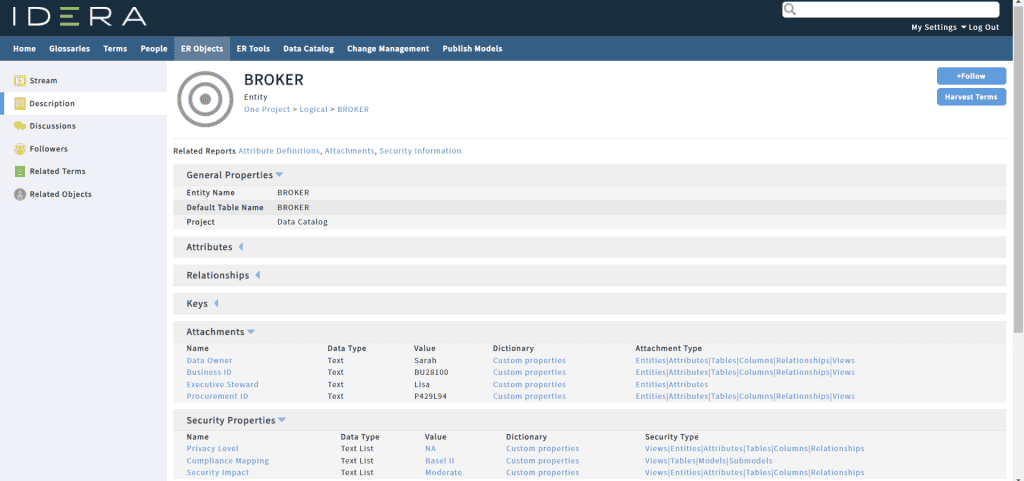
Moreover, from the Attachments and Data Security Information properties, we can see where they are bound and the values used by each object:
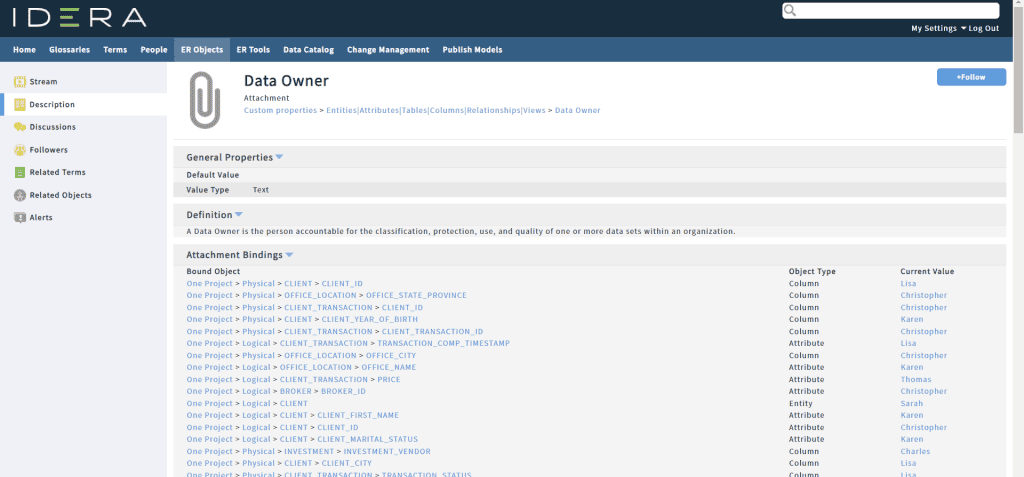

Finally, this post should conclude this trilogy where we have seen the 5 scripts evolve through successive updates.
As usual, feel free to modify the scripts to meet your expectations perfectly, or simply copy parts of these scripts into your own macros.




