We are excited to announce the release of ER/Studio 21.0, delivering meaningful enhancements for teams designing, documenting, and governing modern data ecosystems. As cloud platforms and distributed architectures continue to evolve, modeling tools must keep pace. ER/Studio 21.0 introduces practical innovations that help teams model more accurately, collaborate more securely, and maintain governance across increasingly complex environments.
Data architecture today extends far beyond physical tables. Organizations are building semantic layers, relying on external data sources, and adopting view driven warehouse designs to increase agility. At the same time, expectations for lineage visibility, governance, and cross team collaboration continue to grow. ER/Studio 21.0 addresses these realities directly with four major enhancements designed for modern enterprise modeling.
ER/Studio 21.0 addresses these needs directly through four key improvements:
Together, these enhancements reflect ER/Studio’s ongoing commitment to being the trusted foundation for enterprise data architecture.
One of the most important changes in today’s warehouse design is the growing reliance on views as first-class architectural building blocks. In many organizations, the primary logic that defines analytics and reporting does not live in base tables. Instead, it is encapsulated in curated view layers that support business domains, simplify downstream consumption, and provide abstraction over raw storage. These approaches are especially common in architectures that separate ingestion, refinement, and consumption into Bronze, Silver, and Gold layers.
However, modeling tools have historically struggled to keep up with this pattern, particularly when views reference external tables or upstream sources outside the core schema. This has often forced teams into workarounds where critical dependencies remain undocumented even though they are essential for governance and lineage.
ER/Studio 21.0 removes this barrier by introducing support for External Views across:
Teams can now reverse engineer databases containing views that reference external tables, and ER/Studio automatically captures upstream metadata associated with those sources.
A key part of this enhancement is ER/Studio’s ability to represent upstream external sources as lightweight replica objects. External sources often matter deeply for documentation, but they do not always belong inside a fully engineered physical model. Replica metadata objects allow teams to document dependencies cleanly while preserving clarity between engineered warehouse assets and referenced upstream structures.
This enhancement is especially valuable in modern data warehousing, where organizations are increasingly adopting medallion architectures with Bronze, Silver, and Gold layers.
Traditionally, many teams would physically replicate data at each layer. Raw data would be stored in Bronze tables, then copied into Silver tables, and then copied again into Gold tables for consumption. While effective, this approach increases storage costs and reduces agility, since each structural change requires moving and persisting additional data.
To reduce duplication and improve flexibility, many ER/Studio customers are now designing Gold and even Silver layers using views instead of materialized tables. In practice, this often means that a Gold database may contain curated business views that pull directly from Silver-layer tables stored in a separate database.
For example, imagine a warehouse environment with multiple databases:
In this scenario, a Gold view might pull data from tables that do not physically exist in the Gold database at all, but instead live in another database entirely. Historically, reverse engineering only the Gold database would capture the view definitions but would lose visibility into where the underlying tables came from.
With ER/Studio 21.0, when you reverse engineer the Gold views database, ER/Studio not only brings in the views themselves, but also detects the external source tables driving those views. It automatically creates replica objects representing those upstream tables, capturing enough metadata, such as column structure, to power modeling workflows and maintain documentation.
This allows teams to immediately see:
From there, architects can take the next step by reverse engineering the actual Silver database into a separate physical model and then using Compare and Merge to map the replica objects to the fully engineered source tables. This creates a navigable link between the Gold consumption layer and the Silver processing layer, supporting true cross-layer governance.
The result is a warehouse model that mirrors reality:
With External Views support, teams can now:
This makes ER/Studio 21.0 a significant upgrade for organizations building flexible, view-based cloud warehouse platforms.
Collaboration has become central to enterprise modeling. Data models are no longer isolated artifacts owned by individual architects. They are shared assets that support governance, change management, and organizational alignment across teams. This makes repository access more critical than ever, since repositories provide the structured environment needed to manage models consistently at scale.
At the same time, authentication can become a source of friction in enterprise environments. Organizations want repository access to align with identity standards, reduce password sprawl, and support consistent governance across systems.
ER/Studio 21.0 addresses this need by introducing Repository sign-in via SSO using Okta.
Okta SSO support helps organizations:
By reducing barriers to repository usage, Okta SSO makes collaboration easier to scale across the organization.
Data modeling is powerful, but it is also complex, and even experienced architects occasionally need quick answers while working. Whether the question is about configuring a workflow, locating a feature, or understanding the best way to apply a modeling concept, getting help often requires leaving the tool, searching documentation, or switching contexts into support channels.
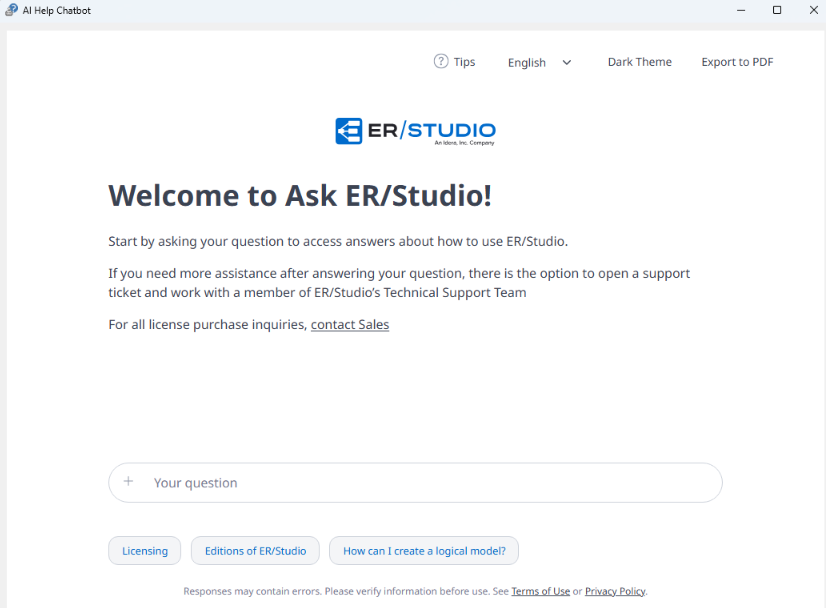
ER/Studio 21.0 introduces a new way to provide guidance directly inside the modeling environment through an in-product AI Help Chatbot.
Accessible from the Help menu, the chatbot opens in a dedicated dialog where users can ask natural language questions and receive immediate responses while continuing to work.
The AI Help Chatbot is designed to support productivity by:
ER/Studio also includes built-in AI terms and an initial disclaimer flow, ensuring responsible usage and transparency. Overall, this feature helps make expert-level modeling tools more supportive and efficient in daily practice.
Beyond features, the day-to-day experience of working in a modeling tool matters deeply. Interface clarity, visual consistency, readability, and modern usability all contribute to productivity, especially for architects who spend hours inside Data Architect.
ER/Studio 21.0 delivers a significant UI refresh designed to make the environment feel more current while preserving the workflows teams rely on.
This update includes refreshed fonts that are now adjustable, improved Explorer styling, and updated icon sets across dialogs and Explorer trees. Wizard workflows have also been modernized by removing large legacy graphics that reduced usable space, giving users a cleaner and more focused experience in common operations such as Reverse Engineering and Compare and Merge.
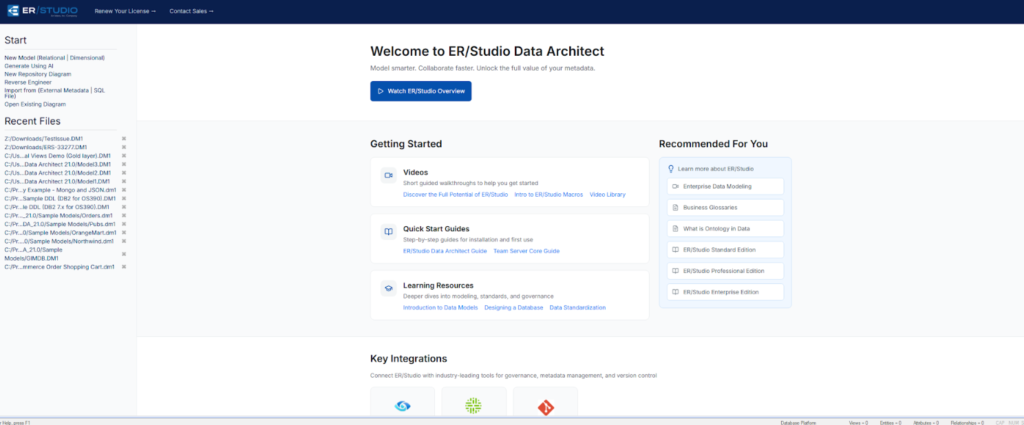
In addition to the visual updates, ER/Studio 21.0 introduces a redesigned Welcome Page that serves as a practical starting point for both new and experienced users. Beyond a cleaner layout, the Welcome Page now includes direct access to helpful video content, quick start guides, documentation resources, and other learning materials. Rather than searching externally for onboarding support or feature walkthroughs, users can immediately access curated resources from within the application. This makes it easier to get started, explore capabilities more deeply, and stay connected to best practices as modeling needs evolve.
UI improvements in 21.0 include:
Together, these updates improve usability and ensure ER/Studio feels aligned with modern expectations.
ER/Studio 21.0 is now available, and we invite teams to explore what’s new. Each enhancement was built to help your models remain trusted foundations for governance, documentation, and forward momentum across the modern data landscape.
If you would like to see ER/Studio 21.0 in action, schedule a personalized demo to learn how these improvements can support your organization’s modeling and governance strategy.
External Views are views that reference tables outside the current database, often pulling data from external tables or upstream databases. They are increasingly common in modern cloud data warehouse architectures where organizations use views to build agile Silver and Gold layers. ER/Studio 21.0 now supports External Views so teams can reverse engineer and model these dependencies while preserving documentation, lineage, and governance.
ER/Studio 21.0 introduces External Views support across three modern warehouse platforms:
– Microsoft SQL Server
– Azure Synapse Analytics
– Snowflake
This allows organizations to model view-based architectures across the systems most commonly used for enterprise analytics today.
When reverse engineering a database with External Views, ER/Studio automatically creates lightweight replica objects for upstream tables that exist in other databases. These replica objects capture core metadata such as column structure, enabling teams to document dependencies and maintain traceability without forcing external sources into fully engineered physical models.
ER/Studio 21.0 supports Repository sign-in through Single Sign-On (SSO) using Okta. This helps enterprise teams streamline authentication, reduce credential management overhead, and align ER/Studio access with organizational identity governance and security standards.
The AI Help Chatbot is a new in-product support feature available directly from the Help menu in Data Architect. Users can open a dedicated chatbot dialog, ask questions in natural language, and receive guidance without leaving the modeling environment. The chatbot runs alongside Data Architect, helping users stay productive while accessing answers quickly.




