
When organizations evaluate enterprise software, the discussion often centers on features, integrations, scalability, and price. Those factors are all important, but one differentiator is frequently overlooked: whether the application was built as a native Windows application or simply adapted to run on Windows.
For enterprise data architects, that distinction can have a meaningful impact on everyday productivity. Data modeling is a complex discipline that involves designing large schemas, documenting business definitions, comparing database structures, managing metadata, and collaborating across teams. Professionals often spend hours each day inside their modeling environment. An application that behaves consistently with the Windows operating system can reduce friction, improve usability, and help teams work more efficiently.
As organizations continue investing in data governance, analytics, and AI initiatives, the value of a native Windows experience deserves renewed attention.
A native Windows application is designed specifically for Microsoft Windows using Windows-native technologies and user interface conventions. Rather than relying on browser technologies or cross-platform frameworks, native applications are built to integrate directly with the operating system.
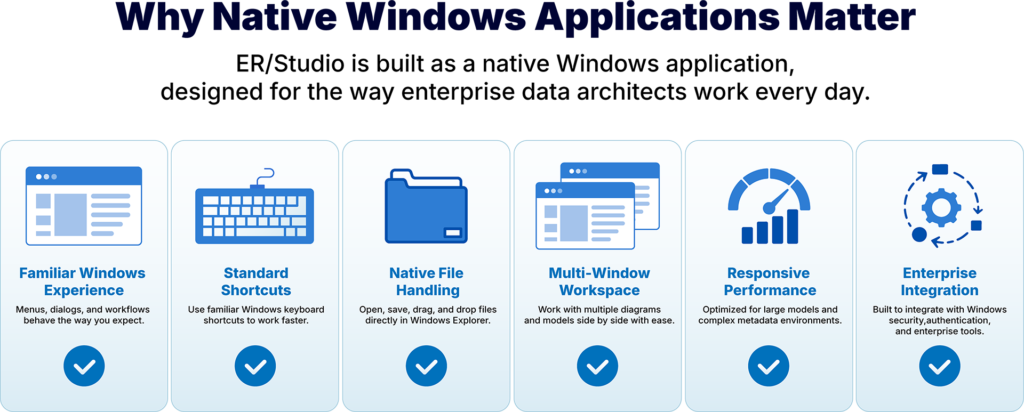
For users, this creates a familiar and consistent experience. Menus behave as expected. Keyboard shortcuts align with Windows standards. Dialog boxes, file handling, drag-and-drop operations, and window management all follow patterns users already know from other professional Windows applications.
The result is an interface that feels intuitive from the moment users begin working, allowing them to focus on designing data architectures rather than learning application-specific behaviors.
Data architecture projects are rarely simple. Enterprise models often contain hundreds or thousands of entities, relationships, business terms, and metadata assets. Architects regularly move between multiple diagrams, compare versions, review database changes, and document business rules while collaborating with governance and engineering teams.
In these environments, even small usability improvements compound over time.
A native Windows application helps create a smoother workflow by providing:
These may seem like subtle advantages individually, but over months and years of daily use, they contribute to a more productive experience.
Enterprise data models continue to grow in size and complexity. Organizations frequently manage thousands of database objects across multiple platforms, requiring modeling tools that remain responsive under demanding workloads.
Native Windows applications are designed to work directly with the operating system rather than introducing additional abstraction layers common in some browser-based or cross-platform applications.
For enterprise architects, this can translate into benefits such as:
While application performance depends on many factors, software built specifically for Windows is well positioned to take advantage of the platform’s capabilities.
Many enterprise organizations standardize on Windows desktops across architecture, database administration, development, and IT teams. Choosing software designed specifically for that environment can simplify both deployment and day-to-day operations.
Native Windows applications integrate naturally with common enterprise workflows, including:
These integrations reduce complexity for IT administrators while providing users with an experience that feels consistent across their technology stack.
As organizations prepare data for analytics and AI, architects need tools that encourage accuracy, consistency, and long-term productivity.
Building trusted data begins long before information reaches a semantic layer, governance platform, or large language model. It starts with well-designed data models, standardized business definitions, and metadata that accurately reflects the organization’s information assets.
When architects spend less time navigating unfamiliar interfaces and more time designing high-quality data structures, organizations benefit from stronger data foundations that support governance, analytics, and AI initiatives.
ER/Studio has long been built as a native Windows application, providing enterprise architects with an interface that aligns naturally with the Windows operating environment.
Rather than relying on browser technologies or cross-platform frameworks, ER/Studio offers a Windows-native experience designed for professional data architecture work. Architects benefit from familiar navigation, responsive interaction, and seamless integration with enterprise Windows environments while taking advantage of ER/Studio’s comprehensive data modeling, metadata management, and governance capabilities.
Combined with support for conceptual, logical, and physical data modeling, enterprise logical data models, centralized metadata management, broad SQL and NoSQL platform support, and integrations with leading governance platforms, ER/Studio provides organizations with a modern foundation for designing trusted, AI-ready data.
When evaluating enterprise data architecture platforms, organizations should consider more than feature checklists. The underlying application architecture influences how efficiently teams can work every day.
A native Windows application provides a familiar, consistent environment that helps reduce friction, supports enterprise workflows, and enables architects to focus on what matters most: designing high-quality data architectures that power analytics, governance, and AI.
For organizations committed to the Microsoft ecosystem, choosing a Windows-native platform like ER/Studio means investing in software designed to work with the operating environment rather than simply running on it.
Discover how ER/Studio combines native Windows performance with enterprise data modeling, metadata management, governance, and AI-ready semantic capabilities to help organizations design trusted data with confidence. Speak with our team today.
A native Windows application is software developed specifically for the Windows operating system using Windows-native technologies. It follows standard Windows interface conventions and integrates directly with the operating environment.
Native Windows applications provide a familiar user experience, integrate naturally with enterprise Windows environments, and support workflows that align with how Windows users expect professional desktop software to behave.
Yes. ER/Studio is built as a native Windows application, providing enterprise data architects with a consistent Windows experience while supporting advanced data modeling, metadata management, and governance capabilities.
While productivity depends on many factors, a native Windows application can reduce friction by providing familiar navigation, standard Windows behaviors, and efficient interaction with complex enterprise models.
Organizations that standardize on Microsoft Windows desktops, along with enterprise data architects, database administrators, data engineers, and governance teams, can benefit from software designed specifically for the Windows operating environment.




