Many different models and notations are supported by ER/Studio データアーキテクト. A model has one of these 2 model notations:
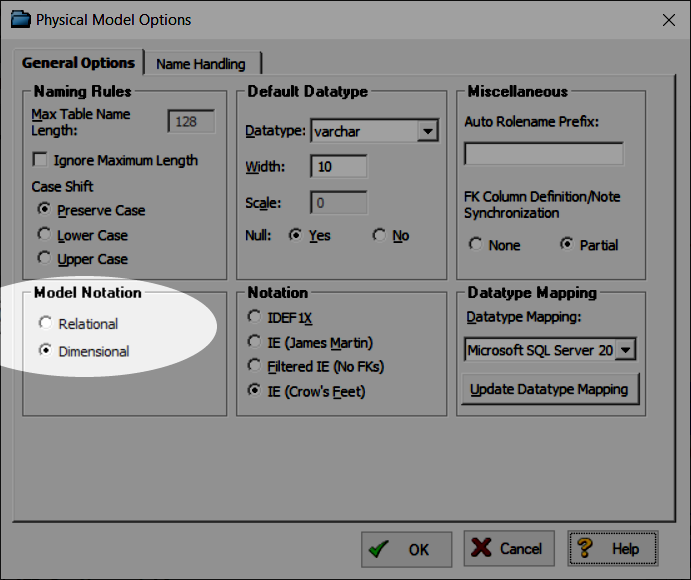
When we use a Dimensional diagram, there’s an additional tab available in the Table editor: Dimensional
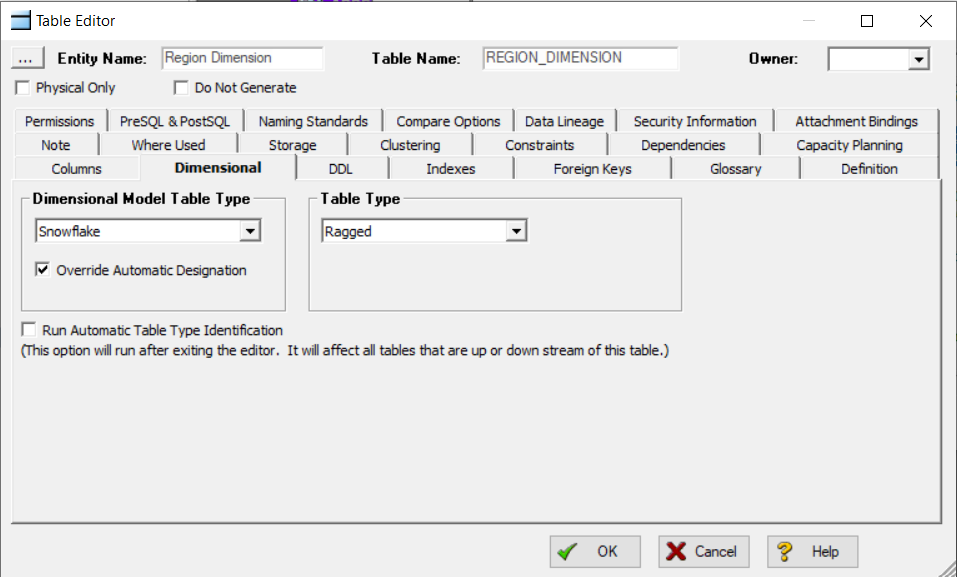
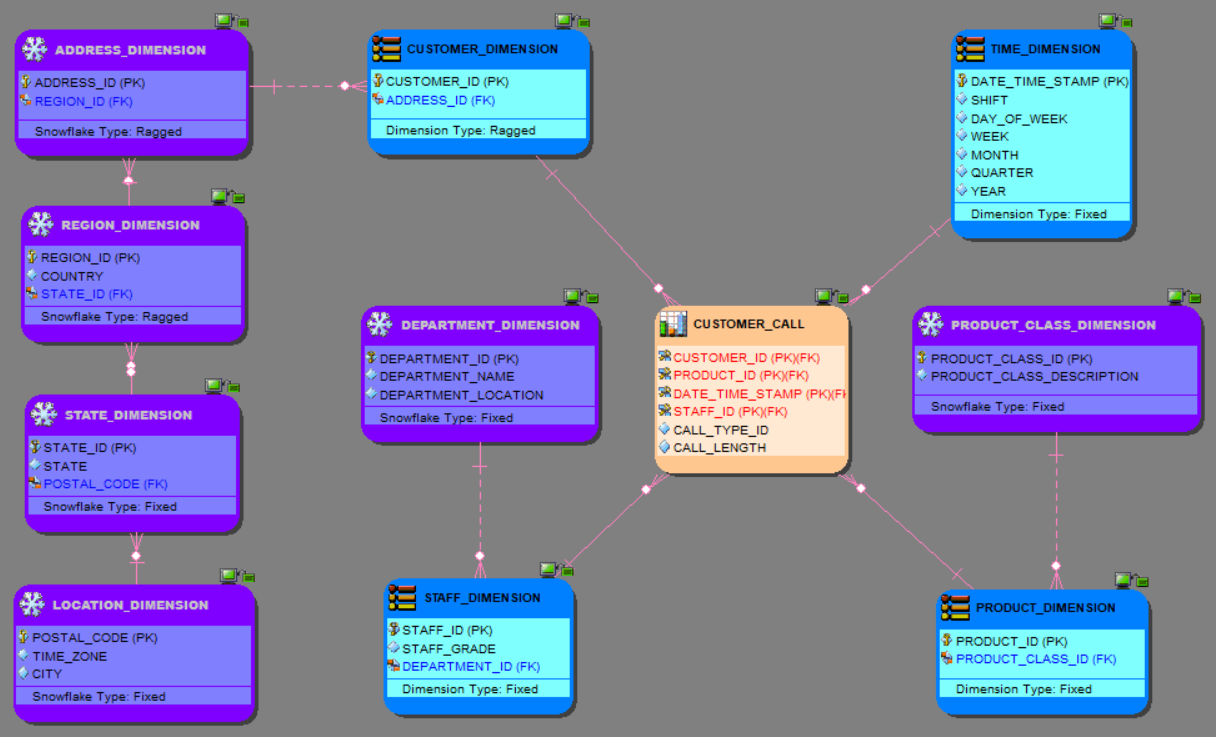
We can select the Dimensional Model Table Type and the Table Type and Data Architect updates how the diagram objects are displayed:
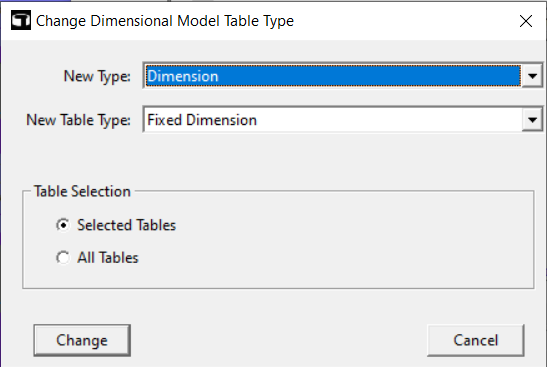
In this blog post, I’ll share a macro which replaces the Dimensional Model Table Type and the Table Type for all the Tables|Entities or a selected subset.
'#Language "WWB-COM"
'
' Macro: Change Dimensional Model Table Type and Table Type
'	for all or selected entities|tables
'
' Version: 1.0
'***********************************************************************************

オプション 明示的

コンスト TITLE$= "Change Dimensional Model Table Type and Table Type"

'ER.Studio variables
薄暗い theDiagram として ダイアグラム
薄暗い theModel として モデル
薄暗い theSubModel として SubModel
薄暗い optionTableSelection として Integer

Dim aType として Variant	' Dimensional Model Table Types
薄暗い aTType として Variant	' Table types for most Dimensional Model Table Types
薄暗い aFType として Variant	' Table types for Fact entities|tables
薄暗い aUType として Variant	' "Empty" table type for Undefined

'Array variable
薄暗い theSelectedTableCollection%()

サブ Main()

	' Dimensional Model Table Types
	aType = Array("Dimension","Fact","Snowflake","Bridge","Hierarchy Navigation","Undefined")
	aTType = Array("Fixed Dimension","Degenerate","Multi-Valued","Ragged","Shrunken","Slowly Changing Type 0","Slowly Changing Type 1","Slowly Changing Type 2","Slowly Changing Type 3","Slowly Changing Type 6")
	aFType = Array("Aggregate","Atomic","Cumulative","Snapshot","[none]")
	aUType = Array("")

	開始 Dialog UserDialog 500,210,"Change Dimensional Model Table Type",.DDLDialogFunc ' %grid:10,7,1,1
		Text 20,17,100,14,"New Type:",.tType,1
		DropListBox 130,14,370,119,aType(),.cbType
		Text 20,45,100,14,"New Table Type:",.tTType,1
		DropListBox 130,42,370,119,aTType(),.cbTType
		GroupBox 20,91,470,70,"Table Selection",.grpBoxTableSelection
		OptionGroup .opGroupBoxTableSelection
			OptionButton 50,112,220,14,"Selected Tables",.opSelectedTables
			OptionButton 50,133,90,14,"All Tables",.opAllTables
		PushButton 30,182,90,21,"Change",.btnChange
		CancelButton 390,182,90,21,.btnExit
	終了 Dialog

	Debug.クリア

	薄暗い dlg として ユーザーダイアログ

	セット theDiagram = DiagramManager.ActiveDiagram
	セット theModel = theDiagram.ActiveModel
	セット theSubModel = theModel.ActiveSubModel

   	もし Dialog(dlg) = 0 では
   		終了
   	終了 もし

終了 Sub

Function DDLDialogFunc(DlgItem$, Action%, SuppValue&) として ブーリアン

	薄暗い iType%, iTType%

	もし アクション% = 2 では	'値の変更またはボタンの押下
		Select Case DlgItem$
			Case "btnChange"
				iType = DlgValue("cbType")
				iTType = DlgValue "cbTType"
				optionTableSelection = DlgValue("opGroupBoxTableSelection")

				doGenerate(iType, iTType)

				DDLDialogFunc = False
			Case "btnExit"
				DDLDialogFunc = False
			Case "cbType"
				もし DlgValue("cbType") = 1 では
					DlgListBoxArray "cbTType",aFType
					DlgValue "cbTType", 0
				ElseIf DlgValue("cbType") = 5 では
					DlgListBoxArray "cbTType",aUType
					DlgValue "cbTType", 0
				その他
					DlgListBoxArray "cbTType",aTType
					DlgValue "cbTType", 0
				終了 もし

				DDLDialogFunc = 真
		終了 Select
	終了 もし

終了 Function

Function AddArrNoDup(theCollection() として 整数, value として 整数)

	薄暗い I として 整数
	薄暗い nCount として 整数
	薄暗い bFound として ブーリアン

	もし (value = 0) では
		出口 機能
	終了 もし

	エラー.クリア
	オン エラー Resume 次のページ
	nCount = UBound(theCollection)
	もし ( エラー.Number <> 0 ) では
		出口 機能
	終了 もし

	bFound = False
	について I = LBound(theCollection) へ nCount
		もし ( theCollection(I) = value ) では
			bFound = 真
			出口 について
		終了 もし
	次のページ I

	もし Not bFound では
		について I = LBound(theCollection) へ nCount
			もし (theCollection(I) = 0) では
				theCollection(I) = value
				出口 について
			終了 もし
		次のページ I
	終了 もし

終了 Function

Function GetIndexOf(collection() として 整数, value として 整数) として 整数

	薄暗い I として 整数
	薄暗い nCount として 整数

	GetIndexOf = -1

	エラー.クリア
	オン エラー Resume 次のページ
	nCount = UBound(collection)
	もし (エラー.Number <> 0) では
		出口 機能
	終了 もし

	について I = LBound(collection) へ nCount
		もし (collection(I) = value) では
			GetIndexOf = I
			出口 機能
		終了 もし
	次のページ I

終了 Function

Function AddToCollection(collection() として 整数, value として 整数)

	薄暗い nCount として 整数

	エラー.クリア
	オン エラー Resume 次のページ
	nCount = UBound(collection)
	もし (エラー.Number <> 0) では
		nCount = 1
		ReDim collection(nCount)
	その他
		nCount = nCount + 1
		ReDim Preserve collection(nCount)
	終了 もし
	collection(nCount) = value

終了 Function

Function ResizeCollection(theCollection として Variant)

	薄暗い I として 整数
	薄暗い nCount として 整数

	オン エラー Resume 次のページ
	もし (UBound(theCollection) < 1) では
		出口 機能
	終了 もし

	について I = LBound(theCollection) へ UBound(theCollection)
		もし ( (theCollection(I) = 0) あるいは (theCollection(I) = "") ) では
			nCount = I
			出口 について
		終了 もし
	次のページ I

	もし (nCount > 1) では
		ReDim Preserve theCollection(nCount - 1)
	終了 もし

終了 Function

Function GetSelectedTables()

	薄暗い theCurEntity として エンティティ
	薄暗い so として SelectedObject
	薄暗い nCount として 整数
	薄暗い I として 整数

	Select Case optionTableSelection
		Case 0
			について Each so In theSubModel.SelectedObjects
				もし (so.Type = 1) では
					セット theCurEntity = theModel.Entities(so.ID)
					AddArrNoDup(theSelectedTableCollection, theCurEntity.ID)
				終了 もし
			次のページ so
		Case 1
			について Each theCurEntity In theModel.Entities
				AddArrNoDup(theSelectedTableCollection, theCurEntity.ID)
			次のページ theCurEntity
	終了 Select

	ResizeCollection(theSelectedTableCollection)

終了 Function

Function doGenerate(iType%, iTType%)

	もし (theModel.Entities.Count > 0) では
		ReDim theSelectedTableCollection(theModel.Entities.Count)
		GetSelectedTables()
	終了 もし

	ChangeDimensionalModelTableType(iType, iTType)

終了 Function

Function UCFirst(txt として ストリング) として ストリング

	UCFirst = UCase(Left(txt, 1)) & LCase(Mid(txt, 2, Len(txt) - 1))

終了 Function

Function CleanDMTT(txt として ストリング) として ストリング

	CleanDMTT = UCFirst(txt)

	もし CleanDMTT = "Navigation" では
		CleanDMTT = "Hierarchy Navigation"
	終了 もし

終了 Function

Function DMTTValue(iType  として 整数) として ストリング

	DMTTValue = UCase(aType(iType))

	もし DMTTValue = "HIERARCHY NAVIGATION" では
		DMTTValue = "NAVIGATION"
	終了 もし

終了 Function

Function DTTValue$(iType, iTType)

	Select iType
		Case 1		' Fact
			DTTValue = UCase(aFType(iTType))
		Case 5		' Undefined
			DTTValue = ""
		Case その他	' Others
			DTTValue = UCase(aTType(iTType))
	終了 Select

	もし DTTValue = "FIXED DIMENSION" では
		DTTValue = "FIXED"
	ElseIf DTTValue = "MULTI-VALUED" では
		DTTValue = "MULTIVALUE"
	ElseIf DTTValue = "[NONE]" では
		DTTValue = "[none]"
	ElseIf Left(DTTValue, 6) = "SLOWLY" では
		DTTValue = "TYPE" & Mid(DTTValue, 22, 1)
	終了 もし

終了 Function

Function ChangeDimensionalModelTableType(iType%, iTType%)

	薄暗い I として 整数
	薄暗い theEntity として エンティティ
	薄暗い upperBound として 整数
	薄暗い cpt として 整数

	cpt = 0

	オン エラー Resume 次のページ

	upperBound = UBound(theSelectedTableCollection)

	もし (エラー.Number = 0) では

		について I = LBound(theSelectedTableCollection) へ upperBound

			セット theEntity = theModel.Entities(theSelectedTableCollection(I))

			もし Not theEntity そうなのか? 何もない では

				デバッグ。.プリント theEntity.TableName & ": " & CleanDMTT(theEntity.DimModelTableType) & " -> " & aType(iType)
				theEntity.DimModelTableType = DMTTValue(iType)
				theEntity.DimensionTableType = DTTValue(iType, iTType)

				cpt += 1

			終了 もし

		次のページ I

	終了 もし

	MsgBox "Dimensional Model Table Type and Table Type changed" & vbCrLf & cpt, vbInformation, TITLE

終了 機能
As usual, feel free to update the code to get your custom requirements.
A ショートビデオ ER/Studio Data Architectでスクリプトからマクロを作成する方法を説明します:




