Using the data modeling features of ER/Studio データアーキテクト we can create automatic and customized data model diagrams. ER/Studio Data Architect provides functionality such as automatic layouts, custom colors and fonts for our objects, and relationship line control.
To make our model more attractive and easier to read, we can change the background, outline, and font colors along with the font type entities/tables, attributes/columns, views, and relationships in our data model. We can use specific colors and/or fonts to help us organize our data model.
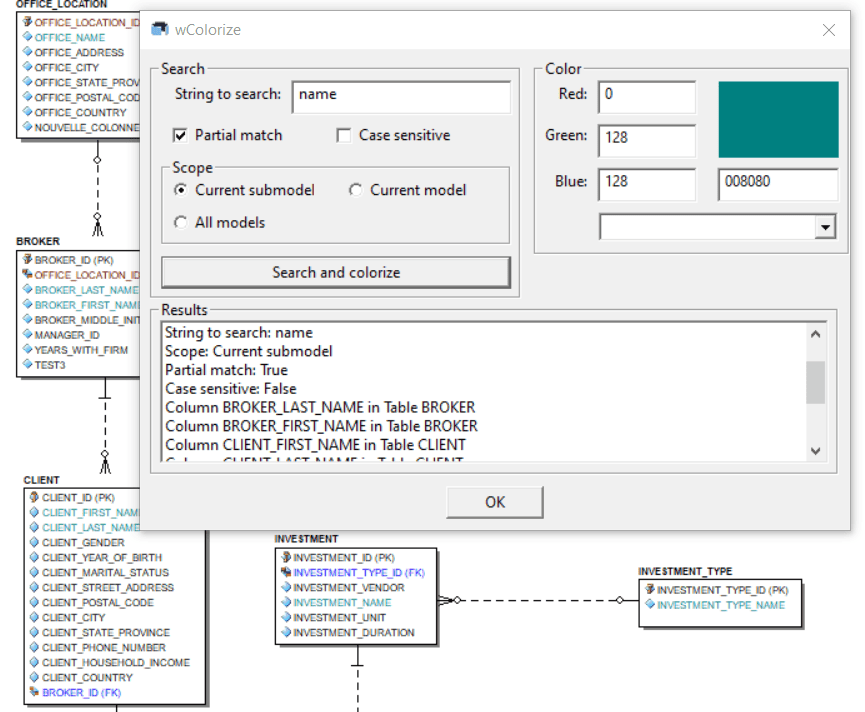
In this blog post, I’ll share a macro which shows how to manage the colors from a script. With this macro, we can search for a string and colorize the attributes and columns which match the string.

If we want to search in other properties or objects, it would be quite easy to update the script to get exactly what we need.
First, we’ll need to create the macro within our ER/Studio Data Architect. If we’re unsure how to do this, a tutorial video is provided at the end of this post, demonstrating the process.
Then, we select the model which contains the Attributes and/or Columns we want to change their colors.
Finally we run the macro and we use the provided UI:
'#Language "WWB-COM"
''MACRO TITLE: wColorize
' MACRO VERSION: 1.0
'
'This macro looks for a string within Attributes and Columns Names and
'	colorizes the matching ones with the chosen color
'
' Release notes
' 1.0 Initial version
'---------------------------------------------------------------------------

オプション 明示的

コンスト TITLE$ = "wColorize"

薄暗い bmpFile$	' Image used to display the color

薄暗い laLogs$()	' Array of strings for the logs
薄暗い laColors$()	' Array of strings for the different colors

薄暗い sParent$, sChild$	' Strings for logs

' ERObjects
薄暗い MyDiagram として ダイアグラム
薄暗い MyModel として モデル
薄暗い bLogical として Boolean
Dim MySubModel として SubModel

サブ メイン

	薄暗い iLoop%

	bmpFile = MacroDir & "\wColoredPixel.bmp"

	セット MyDiagram = DiagramManager.ActiveDiagram

	もし MyDiagram そうなのか? 何もない では

		MsgBox "A project should be opened!", vbExclamation, TITLE

		出口 サブ

	終了 もし

	セット MyModel = MyDiagram.ActiveModel
	bLogical = MyModel.Logical

	セット MySubModel = MyModel.ActiveSubModel

	ReDim laLogs(2)
	laLogs(1) = "Project: " & MyDiagram.ProjectName
	laLogs(2) = "Current submodel: " & MySubModel.Name

	laColors = Split(",Black,Blue,Green,Cyan,Red,Magenta,Yellow,White,Gray,Light Blue,Light Green,Light Cyan,Light Red,Light Magenta,Light Yellow,Bright White", ",")

	開始 Dialog UserDialog 650,308,TITLE,.dfColor ' %grid:10,7,1,1
		GroupBox 10,7,340,154,"Search",.gbSearch
		Text 20,23,110,14,"String to search:",.tSearch,1
		TextBox 140,21,200,21,.tbSearch
		CheckBox 30,49,130,14,"Partial match",.cbSearchSub
		CheckBox 180,49,150,14,"Case sensitive",.cbCaseSensitive
		GroupBox 20,70,320,56,"Scope",.gbScope
		OptionGroup .gScope
			OptionButton 30,84,130,14,"Current submodel",.obCurrent
			OptionButton 190,84,140,14,"Current model",.obModel
			OptionButton 30,105,130,14,"All models",.obAll
		PushButton 20,133,320,21,"Search and colorize",.pbSearchColorSet
		GroupBox 10,161,630,112,"Results",.gbResults
		MultiListBox 20,175,610,91,laLogs(),.mlbLogs,1
		GroupBox 360,7,290,126,"Color",.gbColor
		Text 370,23,40,14,"Red:",.tRed,1
		TextBox 420,21,90,21,.tbR
		Text 370,49,40,14,"Green:",.tGreen,1
		TextBox 420,49,90,21,.tbG
		Text 370,79,40,14,"Blue:",.tBlue,1
		TextBox 420,77,90,21,.tbB
		Picture 530,21,110,49,"",0,.pColor
		TextBox 530,77,110,21,.tbHexa
		DropListBox 420,105,220,70,laColors(),.dlbColor
		OKButton 280,280,90,21
	終了 ダイアログ
	薄暗い dlg として UserDialog
	Dialog dlg

	' Remove the generated image to display the color
	もし Dir(bmpFile) <> "" では

		Kill(bmpFile)

	終了 もし

終了 サブ

プライベート 機能 dfColor(DlgItem として ストリング, Action として 整数, SuppValue として PortInt) として ブーリアン

	薄暗い s$, l&
	薄暗い selectedAttributes%(), iLoop%

	Select Case Action
	Case 1 ' Dialog box initialization

		DlgValue("dlbColor", 1)
'		DlgValue("cbSearchSub", True)
'		DlgValue("cbCaseSensitive", True)

		DlgText("tbR", "0")
		DlgText("tbG", "0")
		DlgText("tbB", "0")

		DlgText("tbHexa", "000000")

		UpdateColorPreview()

		DlgEnable("pbSearchColorSet", False)

	Case 2 '値の変更またはボタンの押下

		もし DlgItem = "dlbColor" では

			DlgText("tbHexa", GetHexValueFromDefaultColor(DlgValue("dlbColor") - 1))
			SetColorsFromHexField()
			UpdateColorPreview()
			dfColor = 真	' Prevent button press from closing the dialog box

		ElseIf DlgItem = "mlbAttributes" では

			selectedAttributes = DlgValue "mlbAttributes"

			DlgEnable("pbColorSet", UBound(selectedAttributes) <> -1)

		ElseIf DlgItem = "pbSearchColorSet" では

			SearchAndColorize(DlgText("tbSearch"), DlgValue("gScope"), DlgValue("cbSearchSub"), DlgValue("cbCaseSensitive"))

			' Prevent button press from closing the dialog box
			dfColor = 真

		終了 もし

	Case 3 ' TextBox or ComboBox text changed

		CheckValues()
		Select Case DlgItem
			Case "tbR", "tbG", "tbB"
				' Convert Bytes to Hexa
				DlgText("tbHexa", GetHexValue("tbR") & GetHexValue("tbG") & GetHexValue("tbB"))
			Case "tbHexa"
				SetColorsFromHexField()
			Case "tbSearch"
				DlgEnable("pbSearchColorSet", トリム(DlgText("tbSearch")) <> "")
		終了 Select
		Select Case DlgItem
			Case "tbR", "tbG", "tbB", "tbHexa"
				' Custom color
				DlgValue("dlbColor", 0)
				' Show the color
				UpdateColorPreview()
		終了 Select

	Case 4 ' Focus changed
	Case 5 ' Idle
		Rem Wait .1 : dfColor = True ' Continue getting idle actions
	Case 6 ' Function key
	終了 Select
End 機能

プライベート サブ SearchAndColorize(ByVal search$, ByVal scope%, ByVal PartialMatch として ブーリアン, ByVal CaseSensitive として ブーリアン)

	薄暗い MyEntity として エンティティ
	薄暗い MyEntityDisplay として EntityDisplay
	薄暗い iLog%, iNbFound%

	iLog = UBound(laLogs) + 1

	ReDim Preserve laLogs(iLog + 4)
	laLogs(iLog) = " "
	laLogs(iLog + 1) = "String to search: " & search
	laLogs(iLog + 2) = "Scope: " & IIf(scope = 1, "Current model", IIf(scope = 2, "All models", "Current submodel"))
	laLogs(iLog + 3) = "Partial match: " & PartialMatch
	laLogs(iLog + 4) = "Case sensitive: " & CaseSensitive

	' Update the display
	DlgListBoxArray("mlbLogs", laLogs)

	セット MyModel = MyDiagram.ActiveModel
	bLogical = MyModel.Logical

	もし bLogical では

		sParent = "Entity"
		sChild = "Attribute"

	その他

		sParent = "Table"
		sChild = "Column"

	終了 もし

	セット MySubModel = MyModel.ActiveSubModel

	iNbFound = 0

	Select Case scope
	Case 1 ' Current model
		について Each MyEntity In MyModel.Entities

			iNbFound = iNbFound + CheckEntity(MyEntity, search$, PartialMatch , CaseSensitive)

		次のページ MyEntity
	Case 2 ' All models
		について Each MyModel In MyDiagram.Models

			bLogical = MyModel.Logical

			もし bLogical では

				sParent = "Entity"
				sChild = "Attribute"

			その他

				sParent = "Table"
				sChild = "Column"

			終了 もし

			について Each MyEntity In MyModel.Entities

				iNbFound = iNbFound + CheckEntity(MyEntity, search$, PartialMatch , CaseSensitive)

			次のページ MyEntity

		次のページ MyModel
	Case その他 ' Current submodel
		について Each MyEntityDisplay In MySubModel.EntityDisplays

			セット MyEntity = MyEntityDisplay.ParentEntity

			iNbFound = iNbFound + CheckEntity(MyEntity, search$, PartialMatch , CaseSensitive)

		次のページ MyEntityDisplay
	終了 Select

	iLog = UBound(laLogs) + 1

	ReDim Preserve laLogs(iLog + 1)
	laLogs(iLog) = " "
	laLogs(iLog + 1) = "Colorized " & IIf(scope = 2, "Attributes and Column", sChild) & "s: " & iNbFound

	' Update the display
	DlgListBoxArray("mlbLogs", laLogs)

終了 サブ

プライベート 機能 IsMatch(ByVal source$, ByVal search$, ByVal PartialMatch として ブーリアン, ByVal CaseSensitive として ブーリアン) として ブーリアン

	薄暗い res として ブーリアン

	もし Not CaseSensitive では

		source = UCase(source)
		search = UCase(search)

	終了 もし

	もし PartialMatch では

		res = InStr(source, search) <> 0

	その他

		res = (source = search)

	終了 もし

	IsMatch = res

終了 機能

プライベート 機能 CheckEntity(ByRef MyEntity として Entity, ByVal search$, ByVal PartialMatch として ブーリアン, ByVal CaseSensitive として ブーリアン) として 整数

	薄暗い MyAttribute として AttributeObj
	薄暗い iNbFound%

	iNbFound = 0

	' Check Attributes
	について Each MyAttribute In MyEntity.Attributes

		もし IsMatch(MyAttribute.AttributeName, search, PartialMatch, CaseSensitive) あるいは IsMatch(MyAttribute.ColumnName, search, PartialMatch, CaseSensitive) では

			MyAttribute.Color = RGB(CByte(DlgText("tbR")), CByte(DlgText("tbG")), CByte(DlgText("tbB")))
			ReDim Preserve laLogs(UBound(laLogs) + 1)
			laLogs(UBound(laLogs)) = sChild & " " & IIf(bLogical, MyAttribute.AttributeName, MyAttribute.ColumnName) & " in "  & sParent & " " & IIf(bLogical, MyEntity.EntityName, MyEntity.TableName)
			iNbFound = iNbFound + 1

			' Update the display
			DlgListBoxArray("mlbLogs", laLogs)

		終了 もし

	次のページ MyAttribute

	CheckEntity = iNbFound

終了 機能

プライベート サブ UpdateColorPreview()

	CreateColoredPixelBitmap(CByte(DlgText("tbR")), CByte(DlgText("tbG")), CByte(DlgText("tbB")))
	DlgSetPicture("pColor", bmpFile, 0)

終了 サブ

プライベート サブ SetColorsFromHexField()

	薄暗い s$, l&

	' Convert Hexa to bytes/colors
	s = DlgText("tbHexa")
	l = Val("&H" & Mid(s, 1, 2))
	DlgText("tbR", "" & l)
	l = Val("&H" & Mid(s, 3, 2))
	DlgText("tbG", "" & l)
	l = Val("&H" & Mid(s, 5, 2))
	DlgText("tbB", "" & l)

終了 サブ

プライベート 機能 BGR2RGB(bgr$) として ストリング

	薄暗い res$

	res = bgr

	While Len(res) < 6
		res = "0" & res
	Wend

	res = Mid(res, 5, 2) & Mid(res, 3, 2) & Mid(res, 1, 2)

	BGR2RGB = res

終了 機能

プライベート 機能 GetHexValueFromDefaultColor(colorIndex%) として ストリング

	GetHexValueFromDefaultColor = BGR2RGB(Hex(QBColor(colorIndex)))

終了 機能

プライベート 機能 GetHexValue(tbSource$) として ストリング

	薄暗い res$

	res = Hex$(DlgText(tbSource))
	もし Len(res) = 1 では
		res = "0" & res
	終了 もし

	GetHexValue = res

終了 機能

プライベート サブ CheckValues()

	コンスト tbSources = Array("tbR", "tbG", "tbB")

	薄暗い s$, i%, l&

	オン エラー GoTo e

	について Each s In tbSources

		DlgText(s, CStr(CInt(DlgText(s))))

		i% = CInt(DlgText(s))

		もし i < 0 あるいは i > 255 では

			DlgText(s, "128")

		終了 もし

	次のページ

	オン エラー GoTo eh
	s = DlgText("tbHexa")
	もし (Left(s, 1) = "#") そして (Len(s) > 1) では
		s = Right(s, Len(s) - 1)
	終了 もし
	もし Len(s) = 3 では
		s = Left(s, 1) & Left(s, 1) & Mid(s, 2, 1) & Mid(s, 2, 1) & Right(s, 1) & Right(s, 1)
	終了 もし
	もし Len(s) > 6 では
		s = Left(s, 6)
	終了 もし
	l = Val("&H" & s)
	s = Hex(l)
	While Len(s) < 6
		s = "0" & s
	Wend
	DlgText("tbHexa", s)

	出口 サブ

	e:
		DlgText(s, "0")
		エラー.クリア
		Resume 次のページ

	eh:
		DlgText("tbHexa", GetHexValue("tbR") & GetHexValue("tbG") & GetHexValue("tbB"))
		エラー.クリア
		Resume Next

End サブ

プライベート サブ CreateColoredPixelBitmap(r として Byte, g として Byte, b として Byte)

	' Create a BMP of 1 pixel with a specific color
	薄暗い fileNum として 整数
	薄暗い v%, l&, by として Byte	' 2|4|1 bits

	オン エラー Resume 次のページ
	もし Dir(bmpFile) <> "" では

		Kill(bmpFile)

	終了 もし

	fileNum = FreeFile()
	オープン bmpFile について Binary として #fileNum

	l = 3820866
	Put #fileNum, , l

	l = 268435456
	l = 0
	Put #fileNum, , l

	l = 3538944
	Put #fileNum, , l

	l = 2621440
	Put #fileNum, , l

	l = 65536
	Put #fileNum, , l
	Put #fileNum, , l
	Put #fileNum, , l

	l = 24
	Put #fileNum, , l

	l = 262144
	Put #fileNum, , l

	l = 0
	Put #fileNum, , l
	Put #fileNum, , l
	Put #fileNum, , l
	Put #fileNum, , l
	v = 0
	Put #fileNum, , v

	Put #fileNum, , b
	Put #fileNum, , g
	Put #fileNum, , r

	by = 0
	Put #fileNum, , by

	閉じる #fileNum

終了 サブ
As usual, feel free to modify the script so that it perfectly meets your expectations, or just copy the parts of this one to your own macros.
A ショートビデオ ER/Studio Data Architectでスクリプトからマクロを作成する方法を説明します:




