ER/Studio Data Architect provides various sample macros to accomplish different tasks. Among these macros, one is utilized for switching from one domain to another:
In this post, I’ll be sharing a macro based on this sample, updated to switch the bindings for all the domains included in the source dictionary and available in the target data dictionary (with the same name). If there’s no domain with the same name in the target data dictionary, the domain binding will remain unchanged.
For instance, if you intend to replace the domain bindings from the local data dictionary with those included in an Enterprise Data Dictionary.
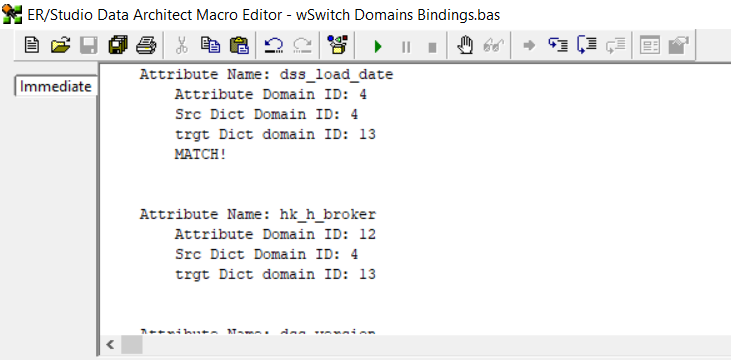
When you run the macro, I strongly recommend to edit the macro to view the Macro Editor and being able to view the Immediate window and the messages sent by the macro when it runs.
First, you’ll need to create the macro within your ER/Studio Data Architect. If you’re unsure how to do this, a tutorial video is provided at the end of this post, demonstrating the process.
Next, open a project (dm1 file) that has been shared via the Repository, allowing you to access multiple data dictionaries.
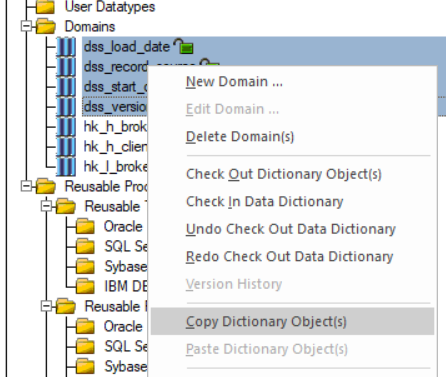
Ensure that the domain bindings you intend to switch from the source data dictionary to the target data dictionary are present in both data dictionaries. You can copy dictionary objects using the contextual menu from one dictionary to another.
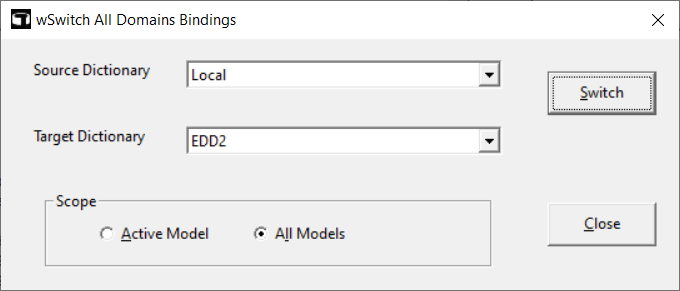
Finally, execute the macro and select the various options (source, target, scope).
'#Language "WWB-COM"
'TITLE:  SWITCH ALL DOMAINS BINDINGS
'DESCRIPTION:  This macro scans all the columns and attributes in the active model or all models
'	and switches the domain bindings from the source dictionary domains to the target dictionary
'	domains.  The information for each bound column will be updated with the target domains.
'	Any domain overrides will be preserved.

'LAST UPDATE:  20/12/2023

Option Explicit

Const TITLE = "wSwitch All Domains Bindings"
Const DISPLAY_ONLY_ATTR_WITH_DOMAIN_IN_OUTPUT = False

Dim attr As AttributeObj
Dim ent As Entity
Dim mdl As Model
Dim diag As Diagram
Dim dict As Dictionary
Dim target_dom As Domain
Dim source_dom As Domain
Dim target_dict As Dictionary
Dim source_dict As Dictionary

'dialog variables and arrays
Dim dictionary_list() As String

Dim target_dict_index As Integer
Dim source_dict_index As Integer

Dim cpt&, missing&

Sub Main

	Set diag = DiagramManager.ActiveDiagram
	Set mdl = diag.ActiveModel

	Begin Dialog UserDialog 620,161,TITLE,.dom_handler ' %GRID:10,7,1,1
		DropListBox 170,14,290,112,dictionary_list(),.source_dict_list
		DropListBox 170,56,290,91,dictionary_list(),.target_dict_list
		GroupBox 40,98,410,49,"Scope",.GroupBox1
		Text 30,14,140,14,"Source Dictionary",.Text1
		Text 30,56,130,14,"Target Dictionary",.Text2
		OptionGroup .modelscope
			OptionButton 90,119,120,14,"&Active Model",.optionbutton1
			OptionButton 230,119,130,14,"A&ll Models",.OptionButton2
		PushButton 500,21,100,28,"&Switch",.switch
		CancelButton 500,105,100,28
		PushButton 500,105,100,28,"&Close",.Close_dialog
	End Dialog

	Dim dlg As UserDialog

	init_dictionary_list
	dlg.modelscope = 1
	Set source_dict = diag.Dictionary
	Set target_dict = diag.Dictionary

	If Dialog(dlg) = -1 Then
	End If

End Sub

'initialize the dictionary drop down list
Sub init_dictionary_list

	Dim i%

	ReDim dictionary_list (0 To diag.EnterpriseDataDictionaries.Count) As String

	dictionary_list (0) = "Local"
	i = 1

	For Each dict In diag.EnterpriseDataDictionaries

		dictionary_list (i) = dict.Name
		i = i + 1

	Next

End Sub

Sub switch_domains

	Debug.Print "Switch Domains for model: " & mdl.Name

	For Each source_dom In source_dict.Domains

		Set target_dom = target_dict.Domains.Item(source_dom.Name)

		If Not (target_dom Is Nothing) Then

			Debug.Print "Switch - source dom: " & source_dom.Name
			Debug.Print "Switch - target dom: " & target_dom.Name

			' Loop Entities|Tables
			For Each ent In mdl.Entities

				Debug.Print vbCrLf

				If mdl.Logical Then

					Debug.Print "Entity Name: " & ent.EntityName

				Else

					Debug.Print "Table Name: " & ent.TableName

				End If

				' Loop Attributes|Columns
				For Each attr In ent.Attributes

					If (attr.DomainId <> 0) Or (Not DISPLAY_ONLY_ATTR_WITH_DOMAIN_IN_OUTPUT) Then

						Debug.Print vbCrLf

						If mdl.Logical Then

							Debug.Print vbTab &  "Attribute Name: " & attr.AttributeName

						Else

							Debug.Print vbTab &  "Column Name: " & attr.ColumnName

						End If
						Debug.Print vbTab &  vbTab & IIf(mdl.Logical, "Attribute", "Column") & " Domain ID: " & attr.DomainId
						Debug.Print vbTab &  vbTab & "Src Dict Domain ID: " & source_dom.ID
						Debug.Print vbTab &  vbTab & "trgt Dict domain ID: " & target_dom.ID

					End If

					' Match domain id with attribute domain
					If attr.DomainId = source_dom.ID Then

						Debug.Print vbTab & vbTab & "MATCH!"

						' Set attribute|column domain id to target domain
						attr.DomainId = target_dom.ID

						cpt = cpt + 1

					End If

				Next

			Next

		Else

			Debug.Print vbCrLf & "Target domain """ & source_dom.Name & """ not found in Dictionary: " & target_dict.Name

			missing = missing + 1

		End If

	Next

End Sub

Rem See DialogFunc help topic for more information.
Private Function dom_handler(DlgItem$, Action%, SuppValue&) As Boolean
	Select Case Action%
	Case 1 ' Dialog box initialization

		DlgVisible "Cancel", False

	Case 2 ' Value changing or button pressed

		If DlgItem = "switch" Then

			Debug.Clear

			Debug.Print "Source Dictionary:  " & source_dict.Name
			Debug.Print "Target Dictionary: " & target_dict.Name

			If source_dict.Name = target_dict.Name Then

				MsgBox("Source and target must be different!", vbExclamation, TITLE)

			Else

				cpt = 0
				missing = 0

				If DlgValue("modelscope") = 0 Then

					Debug.Print "Active Model."

					'only update domain bindings in current model
					switch_domains

				Else

					Debug.Print "All Models."

					'update all models
					For Each mdl In diag.Models

						switch_domains

					Next

				End If

				' Missing domains: number of times a domain has not been replaced because the domain was missing.
				MsgBox("Domains replaced: " & cpt & vbCrLf & "Missing domains: " & missing, vbInformation, TITLE)

			End If

			dom_handler = True ' Prevent button press from closing the dialog box

		ElseIf DlgItem = "source_dict_list" Then

			source_dict_index = SuppValue

			If dictionary_list(SuppValue) = "Local" Then

				Set source_dict = diag.Dictionary

				dom_handler = True

			Else

				Set source_dict = diag.EnterpriseDataDictionaries.Item(dictionary_list(SuppValue))

				dom_handler = True

			End If

		ElseIf DlgItem = "target_dict_list" Then

			target_dict_index = SuppValue

			If dictionary_list(SuppValue) = "Local" Then

				Set	target_dict = diag.Dictionary

				dom_handler = True

			Else

				Set target_dict = diag.EnterpriseDataDictionaries.Item(dictionary_list(SuppValue))

				dom_handler = True

			End If

		End If

		Rem dom_handler = True ' Prevent button press from closing the dialog box
	Case 3 ' TextBox or ComboBox text changed
	Case 4 ' Focus changed
	Case 5 ' Idle
		Rem dom_handler = True ' Continue getting idle actions
	Case 6 ' Function key
	End Select
End Function
As usual, feel free to modify the script so that it perfectly meets your expectations.
A short video which shows how to create a macro from a script in ER/Studio Data Architect:




