Within ER/Studio Data Architect, we have the option to view one tab for each opened project or to hide these tabs.


There are various methods to switch between projects:
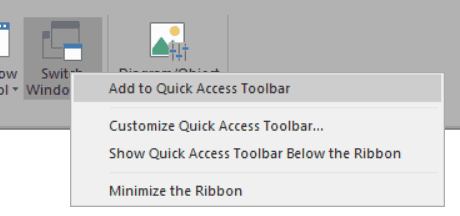
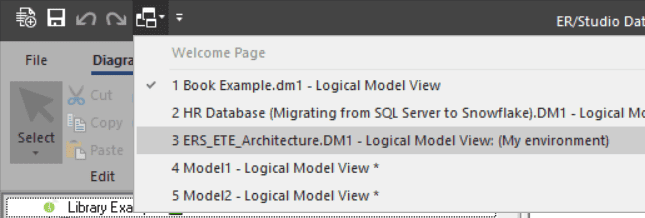
In this post, I’ll share a macro that allows us to toggle the display of project tabs.
⚠️ Please save or, ideally, close all currently open projects before using this macro, as it will abruptly shut down ER/Studio Data Architect.
'#Language "WWB-COM"
''MACRO TITLE: wStyle
' MACRO VERSION: 1.0
'This macro allows to display or not tabs for the different projects.
'	Without tabs, you can switch from one project to another one using the
'	Switch Windows button in the Diagram ribbon
'
'Save your current projects before using this macro: Data Architect will
'	close if you change your settings
'
' Release notes
' 1.0 Initial version
'---------------------------------------------------------------------------

Option Explicit

Const TITLE$ = "wStyle"
Const PATH$  = "\Application\Use OneNote-style Tabs"

Dim sh, iInitialValue%, sPath$

Sub Main

	Debug.Clear

	sPath$ = DiagramManager.GetRegistryKey & PATH
	Set sh = CreateObject("WScript.Shell")

	iInitialValue = sh.RegRead(sPath)

	Begin Dialog UserDialog 180,112,TITLE,.dlgFunction ' %GRID:10,7,1,1
		GroupBox 20,7,150,63,"Display projects tabs",.gbTabs
		OptionGroup .gONS
			OptionButton 40,28,90,14,"Yes",.obYes
			OptionButton 40,49,90,14,"No",.obNo
		OKButton 40,84,90,21,.bOk
	End Dialog

	Dim dlg As UserDialog

	Dialog dlg
End Sub

Rem See DialogFunc help topic for more information.
Private Function dlgFunction(DlgItem As String, Action As Integer, SuppValue As PortInt) As Boolean
	Select Case Action
	Case 1 ' Dialog box initialization

		If sh.RegRead(sPath) = 1 Then

			DlgValue "gONS", 0

		Else

			DlgValue "gONS", 1

		End If

	Case 2 ' Value changing or button pressed
		If DlgItem = "gONS" Then

			sh.RegWrite(sPath, CInt(1 - DlgValue "gONS"), "REG_DWORD")
			Debug.Print "Registry updated"

		ElseIf (DlgItem = "bOk") And (iInitialValue <> sh.RegRead(sPath)) Then

			MsgBox "Registry has been updated." & vbCrLf & "ER/Studio Data Architect will stop now!", vbInformation, TITLE
			Shell("TASKKILL /F /IM ERSTUDIO.exe", vbHide)

		End If
	End Select
End Function
As usual, feel free to modify the script so that it perfectly meets your expectations, or just copy the parts of this one to your own macros.
A short video which shows how to create a macro from a script in ER/Studio Data Architect:




