In this previous post, we have seen how to schedule a reverse engineering of a database using a macro and a quick launch file.
Likewise, I’ll share a macro which also uses the reverse engineer function, through the DiagramManager.ReverseEngineerObject.
However, instead of using a quick launch file, the macro directly extracts the connection settings from an Excel workbook.
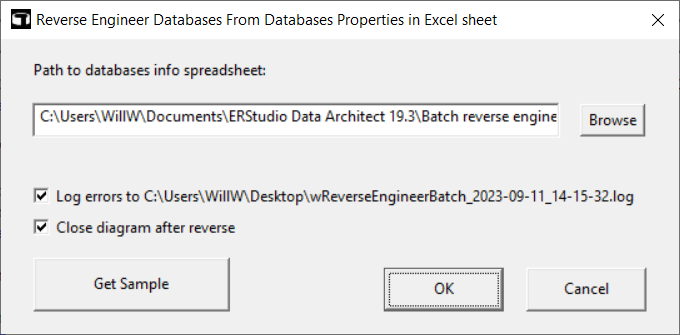
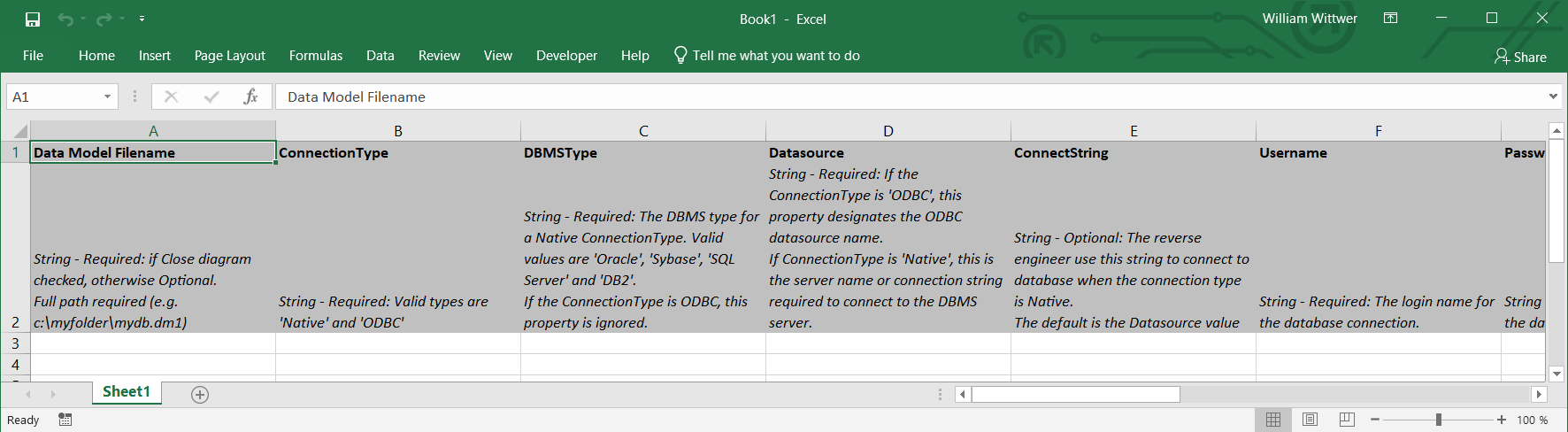
The macro can also generate a Sample spreadsheet which should be filled up with your connection settings.
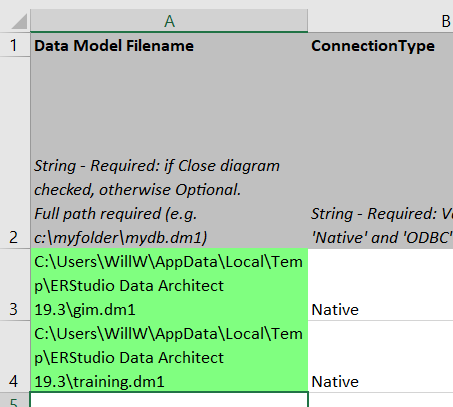
When you run the macro, the background color of the first column in your workbook, is updated to let the user knows if the reverse engineering operations have been successfully done.
As usual, feel free to update the code to get your custom requirements. The macro doesn’t implement all the Members of the ReverseEngineer Object. If you need a specific one, add the needed column in your worksheet and the required code in your macro.
'#Language "WWB-COM"
'TITLE:  wREVERSEENGINEERBATCH.BAS
'DESCRIPTION:  This macro reverse engineers databases from Databases properties in Excel.
'	Each record in the Excel sheet should reference a database connection.
'   All the Members of the ReverseEngineer Object are not implemented.
'	Feel free to extend this macro if you need to.
'
'	To get a sample of the spreadsheet, run the macro and select "Get Sample Sheet".
'
'-----------------------------------------------------------------------------------------

Option Explicit

Const LOG_FILENAME$ = "wReverseEngineerBatch"
Const TITLE$ = "wReverseEngineerBatch"

'ER/Studio Variables
Dim rvo As ReverseEngineer

Dim diag As Diagram
Dim mdl As Model
Dim ents As Entities

Dim error_log$
Dim sLogPath$
Dim iSuccess%
Dim iRows%

' Dim MS Excel variables.
Dim Excel As Object
Dim sheet As Object
Dim range As Object
Dim curRow%
Dim curCol%

Public Const CLR_GREY   = RGB(192, 192, 192)
Public Const CLR_RED    = RGB(255, 128, 128)
Public Const CLR_GREEN  = RGB(128, 255, 128)
Public Const CLR_YELLOW = RGB(255, 255, 128)

Sub Main

	On Error GoTo Error_handle

	Dim Excel As Object

	Debug.Clear

	sLogPath = Environ("USERPROFILE") & "\Desktop\" & LOG_FILENAME & "" & Format(Now, "_yyyy-mm-dd_HH-mm-ss") & ".log"
	iSuccess = 0
	iRows    = 0

	Begin Dialog UserDialog 620,189,"Reverse Engineer Databases From Databases Properties in Excel sheet",.DialogFunc ' %GRID:10,7,1,1
		Text 30,14,330,14,"Path to databases info spreadsheet:",.Text1
		TextBox 30,42,480,21,.Path
		PushButton 530,42,60,21,"Browse",.Browse
		CheckBox 30,91,580,21,"Log errors to " & sLogPath,.log_errors_chbx
		CheckBox 30,111,320,21,"Close diagram after reverse",.close_diagram_chbx
		PushButton 30,140,180,35,"Get Sample",.getsample
		OKButton 350,147,110,28
		CancelButton 480,147,110,28
	End Dialog

	Dim dlg As UserDialog

	'initialize dialog defaults, 0 = unchecked, 1 = checked
	dlg.log_errors_chbx = 1
'	dlg.close_diagram_chbx = 1

	'start dialog
	If Dialog(dlg) = -1 Then

		'initialize excel object and make visible
		Set Excel = CreateObject("Excel.Application")
		Excel.Visible = True

		Excel.workbooks.Open dlg.Path

		'range variables for loop
		Dim db_count As Integer
		Dim start_range As Integer

		'get sheet info from excel object
		Set sheet = Excel.worksheets(1)
		Set range = sheet.usedrange

		db_count = range.rows.Count	' get count for loop
		start_range = 3				' ignore header rows of sheet
		curCol = 1  				' start at the first column of the spread sheet

		error_log = ""

		Dim i%
		Dim sDB$
		Dim sDM1Path$
		Dim sDatasource$

		iRows = db_count - start_range + 1

		For i = start_range To db_count

			Set rvo = Nothing
			Set rvo = DiagramManager.ReverseEngineerObject

			curCol = 1
			curRow = i

			Excel.Range("A" & i & ":A" & i).interior.Color = CLR_RED

			' initialize variables with data from spread sheet.
			sDM1Path		   = GetStringCell(range, curRow, curCol, 0, 1)
			rvo.ConnectionType = GetStringCell(range, curRow, curCol, 0, 1)
			rvo.DBMSType       = GetStringCell(range, curRow, curCol, 0, 1)
			sDatasource		   = GetStringCell(range, curRow, curCol, 0, 1)
			rvo.Datasource     = sDatasource
			rvo.ConnectString  = GetStringCell(range, curRow, curCol, 0, 1)
			rvo.Username       = GetStringCell(range, curRow, curCol, 0, 1)
			rvo.Password       = GetStringCell(range, curRow, curCol, 0, 1)
			sDB = GetStringCell(range, curRow, curCol, 0, 1)
			rvo.Database       = sDB
			rvo.ObjectOwner    = GetStringCell(range, curRow, curCol, 0, 1)
			rvo.UserTables     = GetBooleanCell(range, curRow, curCol, 0, 1)
			rvo.SystemTables   = GetBooleanCell(range, curRow, curCol, 0, 1)
			rvo.UserViews      = GetBooleanCell(range, curRow, curCol, 0, 1)
			rvo.SystemViews    = GetBooleanCell(range, curRow, curCol, 0, 1)
			rvo.InferPK        = GetBooleanCell(range, curRow, curCol, 0, 1)
			rvo.InferFKByName  = GetBooleanCell(range, curRow, curCol, 0, 1)
			rvo.InferDomains   = GetBooleanCell(range, curRow, curCol, 0, 1)

			' if ObjectOwner is not defined, use the Username
			If rvo.ObjectOwner = "" Then

				rvo.ObjectOwner = rvo.Username

			End If

			' if ConnectString is not defined, use the Datasource
			If rvo.ConnectString = "" Then

				rvo.ConnectString = rvo.Datasource

			End If

			Debug.Print "ConnectionType: " & rvo.ConnectionType
			Debug.Print "DBMSType: " & rvo.DBMSType
			Debug.Print "Datasource: " & rvo.Datasource
			Debug.Print "ConnectString: " & rvo.ConnectString
			Debug.Print "Username: " & rvo.Username
'			Debug.Print "Password: " & rvo.Password
			Debug.Print "Database: " & rvo.Database
			Debug.Print "ObjectOwner: " & rvo.ObjectOwner
			Debug.Print "UserTables: " & rvo.UserTables
			Debug.Print "SystemTables: " & rvo.SystemTables
			Debug.Print "UserViews: " & rvo.UserViews
			Debug.Print "SystemViews: " & rvo.SystemViews
			Debug.Print "InferPK: " & rvo.InferPK
			Debug.Print "InferFKByName: " & rvo.InferFKByName
			Debug.Print "InferDomains: " & rvo.InferDomains

			If rvo Is Nothing Then

				error_log = error_log & "Row < " & i & " > -  Datasource  <" & sDatasource & "> could not be reversed. ERROR: " & DiagramManager.GetLastErrorString & vbCrLf & vbCrLf

			Else

				Set diag = rvo.DoReverseEngineer

				After:

				If diag Is Nothing Then

					error_log = error_log & "Row < " & i & " > -  Datasource  <" & sDatasource & "> could not be reversed. ERROR: " & DiagramManager.GetLastErrorString & vbCrLf & vbCrLf

				Else

					Set mdl = diag.ActiveModel

					If mdl Is Nothing Then

						error_log = error_log & "Row < " & i & " > -  Datasource  <" & sDatasource & "> could not be reversed. ERROR: " & DiagramManager.GetLastErrorString & vbCrLf & vbCrLf

					Else

						Set ents = mdl.Entities

						If ents Is Nothing Then

							error_log = error_log & "Row < " & i & " > -  Datasource  <" & sDatasource & "> could not be reversed. ERROR: " & DiagramManager.GetLastErrorString & vbCrLf & vbCrLf

						Else

							Debug.Print "Row < " & i & " > -  Datasource  <" & rvo.Datasource & "> has been reversed. # entities retrieved: " & ents.Count & vbCrLf & vbCrLf
							error_log = error_log & "Row < " & i & " > -  Datasource  <" & sDatasource & "> has been reversed. # entities retrieved: " & ents.Count & vbCrLf & vbCrLf
							iSuccess = iSuccess + 1
							Excel.Range("A" & i & ":A" & i).interior.Color = CLR_GREEN

							If sDM1Path <> "" Then

								' Save model to file
								diag.SaveFile(sDM1Path)

								If dlg.close_diagram_chbx = 1 Then

									' Close the model if it has been saved
									DiagramManager.CloseDiagram(diag.FileName)

								End If

							Else

								error_log = error_log & "Row < " & i & " > -  Datasource  <" & sDatasource & "> cannot be saved." & ents.Count & vbCrLf & vbCrLf
								Excel.Range("A" & i & ":A" & i).interior.Color = CLR_YELLOW

							End If

						End If

					End If

				End If		  'diagram existence check

			End If

		Next i

		' I keep the Excel file opened to allow the user to check the colors in the 1st column
'		Excel.workbooks.Close
'		Excel.visible = False

		' Write logs
		If dlg.log_errors_chbx = 1 Then

			Open sLogPath For Output As #1
'			Print #1, Format(Now, "yyyy/mm/dd HH:mm:ss")
			Print #1, error_log
			Close #1

		End If

		MsgBox "Reverse engineering complete." & vbCrLf & vbCrLf & "Success: " & iSuccess & vbCrLf & "Failure: " & (iRows - iSuccess), vbInformation, TITLE

		Exit Sub

		Error_handle:

			Debug.Print "An error occured:" & vbCrLf & DiagramManager.GetLastErrorString & vbCrLf & vbCrLf
			Err.Clear
'			Resume Next
			GoTo After

	End If

End Sub

Private Sub PrintSampleSheet()

	curRow = 1
	curCol = 1

	PrintCell "Data Model Filename", curRow, curCol, 0, 1
	PrintCell "ConnectionType", curRow, curCol, 0, 1
	PrintCell "DBMSType", curRow, curCol, 0, 1
	PrintCell "Datasource", curRow, curCol, 0, 1
	PrintCell "ConnectString", curRow, curCol, 0, 1
	PrintCell "Username", curRow, curCol, 0, 1
	PrintCell "Password", curRow, curCol, 0, 1
	PrintCell "Database", curRow, curCol, 0, 1
	PrintCell "ObjectOwner", curRow, curCol, 0, 1

	PrintCell "UserTables", curRow, curCol, 0, 1
	PrintCell "SystemTables", curRow, curCol, 0, 1
	PrintCell "UserViews", curRow, curCol, 0, 1
	PrintCell "SystemViews", curRow, curCol, 0, 1
	PrintCell "InferPK", curRow, curCol, 0, 1
	PrintCell "InferFKByName", curRow, curCol, 0, 1
	PrintCell "InferDomains", curRow, curCol, 0, 1

	curRow = 2
	curCol = 1

	PrintCell "String - Required: if Close diagram checked, otherwise Optional." & vbCrLf & "Full path required (e.g. c:\myfolder\mydb.dm1)", curRow, curCol, 0, 1
	PrintCell "String - Required: Valid types are 'Native' and 'ODBC'", curRow, curCol, 0, 1
	PrintCell "String - Required: The DBMS type for a Native ConnectionType. Valid values are 'Oracle', 'Sybase', 'SQL Server' and 'DB2'." & vbCrLf & "If the ConnectionType is ODBC, this property is ignored.", curRow, curCol, 0, 1
	PrintCell "String - Required: If the ConnectionType is 'ODBC', this property designates the ODBC datasource name." & vbCrLf & "If ConnectionType is 'Native', this is the server name or connection string required to connect to the DBMS server.", curRow, curCol, 0, 1
	PrintCell "String - Optional: The reverse engineer use this string to connect to database when the connection type is Native." & vbCrLf & "The default is the Datasource value", curRow, curCol, 0, 1
	PrintCell "String - Required: The login name for the database connection.", curRow, curCol, 0, 1
	PrintCell "String - Required: The password for the database connection.", curRow, curCol, 0, 1
	PrintCell "String - Required: The database to be reverse-engineered." & vbCrLf & "It applies only if the source DBMS is SQL Server or Sybase.", curRow, curCol, 0, 1
	PrintCell "String - Optional: The owner of the objects. The default is UserName.", curRow, curCol, 0, 1

	PrintCell "Boolean - Optional: Specifies whether or not to reverse-engineer user tables." & vbCrLf & "Default is TRUE.", curRow, curCol, 0, 1
	PrintCell "Boolean - Optional: Specifies whether or not to reverse-engineer system tables." & vbCrLf & "Default is FALSE.", curRow, curCol, 0, 1
	PrintCell "Boolean - Optional: Specifies whether or not to reverse-engineer user views." & vbCrLf & "Default is FALSE.", curRow, curCol, 0, 1
	PrintCell "Boolean - Optional: Specifies whether or not to reverse-engineer system views." & vbCrLf & "Default is FALSE.", curRow, curCol, 0, 1
	PrintCell "Boolean - Optional: Specifies whether or not to infer Primary Keys." & vbCrLf & "Default is FALSE.", curRow, curCol, 0, 1
	PrintCell "Boolean - Optional: Specifies whether or not to infer Foreign Keys from Names." & vbCrLf & "Default is FALSE.", curRow, curCol, 0, 1
	PrintCell "Boolean - Optional: Specifies whether or not to infer domains." & vbCrLf & "Default is FALSE.", curRow, curCol, 0, 1

	Excel.Range("A1:P2").interior.Color = CLR_GREY

	Excel.Columns("A:P").columnwidth = 30
	Excel.Columns("A:P").WrapText = True

	Excel.Rows("1:1").Font.Bold = True
	Excel.Rows("2:2").Font.Italic = True

	Excel.Columns("G:G").NumberFormat = "**;**;**;**"
	Excel.Range("G1:G2").NumberFormat = "General"

End Sub

Private Function GetStringCell (range As Object, row As Integer, col As Integer, rowInc As Integer, colInc As Integer) As String

	GetStringCell = Trim(range.cells(row,col).Value)
	curRow = curRow + rowInc
	curCol = curCol + colInc

End Function

Private Function GetBooleanCell (range As Object, row As Integer, col As Integer, rowInc As Integer, colInc As Integer) As Boolean

	Dim sValue As String

	sValue = LCase(Trim(range.cells(row,col).Value))

	' Manage defaults
	If sValue = "" Then

		If col = 10 Then ' UserTables: Default is TRUE

			sValue = "true"

		Else

			sValue = "false"

		End If

	End If

	GetBooleanCell = (sValue = "true") Or (Trim(range.cells(row,col).Value) = "1")
	curRow = curRow + rowInc
	curCol = curCol + colInc

End Function

' Print a cell
Private Sub PrintCell(value As String, row As Integer, col As Integer, rowInc As Integer, colInc As Integer)

	Excel.Cells(row, col).Value = value

	curRow = curRow + rowInc
	curCol = curCol + colInc

End Sub

Rem See DialogFunc help topic for more information.
Private Function DialogFunc(DlgItem$, Action%, SuppValue&) As Boolean

	' Value changing or button pressed
	If Action% = 2 Then

		If DlgItem = "Browse" Then

			'browse to excel file if used pushes browse button.  Put path in text box.
			DlgText "path", GetFilePath(,"All Excel Files (*.xlsx;*.xls;*.xlsm)|*.xlsx;*.xls;*.xlsm|Excel Workbook (*.xlsx)|*.xlsx|Excel Macro-enabled Workbook (*.xslm)|*.xslm|Excel 97-2003 Workbook (*.xls)|*.xls|All Files (*.*)|*.*",,"Open SpreadSheet", 0)
			DialogFunc = True

		ElseIf DlgItem = "OK" And DlgText("path") = "" Then

			'don't exit dialog if a path is not specified
			MsgBox "Please enter a valid path.", vbExclamation, TITLE
			DialogFunc = True

		ElseIf DlgItem = "getsample" Then

			Set Excel = CreateObject("Excel.Application")
			Excel.Visible = True
			Excel.Workbooks.Add
			PrintSampleSheet
			DialogFunc = True

		End If

	End If

End Function
In this blog post, we used:
A short video which shows how to create a macro from a script in ER/Studio Data Architect:




