
Every data architect, DBA, or data engineer eventually encounters the same challenge.
You’re asked to modify a database that no one fully understands.
The original developers have moved on. Documentation is missing or years out of date. Hundreds, or even thousands, of tables have evolved over time through application updates, quick fixes, and changing business requirements. Before you can optimize performance, migrate to a new platform, or build new functionality, you first need to answer a simple question:
What does this database actually look like?
Unfortunately, that answer often isn’t found in a Visio diagram, a spreadsheet, or an outdated design document.
It’s buried inside the database itself.
This is where リバースエンジニアリング becomes one of the most valuable capabilities in a professional data modeling tool. Rather than manually documenting an existing database from scratch, reverse engineering automatically transforms a live database or DDL script into an accurate, editable data model, giving architects immediate visibility into the structures, relationships, and metadata that drive their applications.
Most organizations don’t intentionally neglect documentation. It simply falls behind.
A database that was carefully documented during its initial design often changes dozens or hundreds of times throughout its life. New tables are added. Existing columns are modified. Relationships evolve. Indexes change. Business requirements shift.
Over time, the documentation no longer reflects reality.
This creates challenges that affect nearly every data project:
Without an accurate representation of the current database, every project starts with detective work.
Many organizations use diagramming applications to visualize databases.
These tools are excellent for creating illustrations, whiteboard sketches, and conceptual discussions. But they’re not designed to understand or document an existing database.
A drawing tool can only display what someone manually enters.
It cannot:
Every table, relationship, and annotation must be created and maintained manually.
As databases grow larger and more complex, that quickly becomes impractical.
A professional data modeling tool takes a fundamentally different approach. Instead of drawing the database, it discovers it.
| Task | Manual Documentation & Drawing Tools | ER/Studio Reverse Engineering |
| Capture existing database structure | Manually recreate tables and relationships | Automatically generates models from live databases or DDL scripts |
| Discover relationships | Manually identify primary and foreign keys | Automatically detects relationships, keys, and constraints |
| Database documentation | Time-consuming to create and maintain | Generates accurate, editable documentation from existing schemas |
| Understand legacy systems | Requires reviewing SQL scripts and database objects individually | Provides a complete visual representation of the database in minutes |
| Database modernization | Limited visibility into existing structures | Creates a trusted foundation for migration and modernization projects |
| Schema validation | Manual comparisons and reviews | Compare reverse-engineered models to identify changes and schema drift |
| Ongoing maintenance | Diagrams quickly become outdated | Models can be updated, refined, and synchronized as databases evolve |
Reverse engineering automatically analyzes an existing database and builds an accurate visual representation of its structure.
Rather than spending hours reading SQL scripts or browsing database objects one at a time, architects can see the entire schema represented as an intelligent data model that is ready for analysis, refinement, and documentation.
With ER/Studio Data Architect, you can reverse engineer databases using either native database connections or DDL scripts. The resulting model includes far more than tables and columns. ER/Studio captures the structural information needed to understand how the database actually works, including:
Because the generated model remains fully editable, it becomes the starting point for future development rather than simply a static snapshot of the database.
Reverse engineering isn’t only useful for documenting legacy systems. It solves everyday challenges that data professionals encounter throughout the database lifecycle.
Many organizations continue to rely on applications that have been in production for years or even decades.
When documentation no longer exists, リバースエンジニアリング provides an accurate picture of the current database, allowing architects to understand existing structures before making changes.
Instead of spending days tracing relationships through SQL scripts, they can begin working from a complete visual model.
Whether you’re moving from SQL Server to PostgreSQL, modernizing an Oracle environment, or migrating to a cloud platform like Snowflake, understanding the source database is essential.
Reverse engineering gives architects a reliable foundation for planning migrations while helping identify relationships, dependencies, and structures that need to be preserved throughout the modernization process.
Few projects truly begin with a blank slate.
Many involve extending existing applications or integrating with established databases. Reverse engineering allows architects to build on proven database structures instead of recreating them manually, reducing effort while maintaining consistency with existing designs.
Organizations frequently inherit databases through acquisitions, vendor applications, or externally developed systems.
Rather than relying on incomplete documentation, reverse engineering reveals exactly how the database is organized, making integration projects faster and significantly less risky.
Documentation should reflect reality, not someone’s memory of how the database was originally designed.
Reverse engineering creates models directly from the database itself, giving organizations an accurate, up-to-date foundation for documentation, analysis, and future development.
Generating a model is only the first step.
The real value comes from what architects can do with that model afterward.
Because reverse-engineered models become native ER/Studio data models, they can be refined, standardized, and extended as development continues. Architects can compare models against existing databases, generate DDL for future changes, apply naming standards, document metadata, and maintain a consistent design throughout the database lifecycle.
Unlike static diagrams, these models continue evolving alongside the database.
That means the work invested in understanding today’s environment becomes the foundation for tomorrow’s projects.
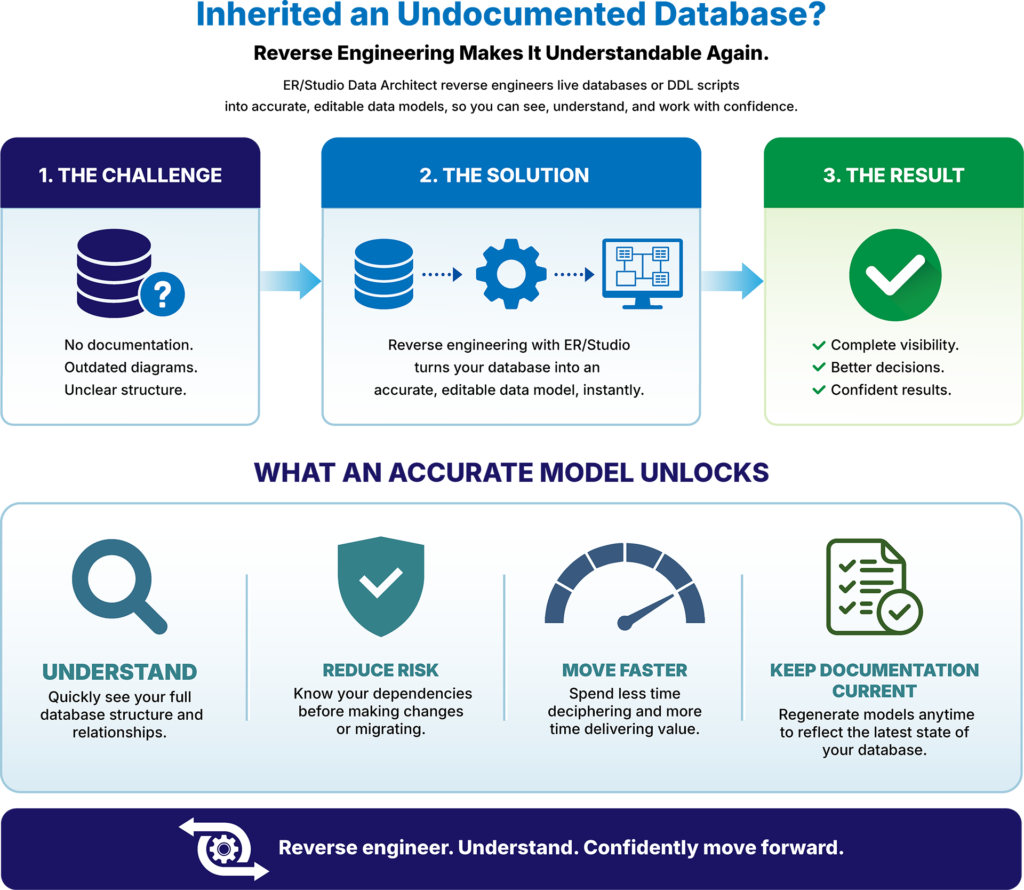
Imagine a company preparing to modernize an aging SQL Server application.
The database has been supporting the business for more than fifteen years. Multiple development teams have modified it over time, but the original documentation no longer exists. Hundreds of tables, relationships, and stored procedures make it difficult to understand where to begin.
Using ER/Studio’s Data Architect, the team connects directly to the existing database and reverse engineers the schema into a complete visual data model in minutes.
Instead of examining SQL scripts one object at a time, architects immediately gain visibility into the database structure, relationships, keys, and dependencies. With an accurate model in place, they can document the environment, standardize naming conventions, compare future changes, and confidently begin planning the modernization effort.
One of the biggest misconceptions about reverse engineering is that it simply creates a picture of a database.
It does much more than that.
ER/Studio transforms existing databases into intelligent, reusable data models that support ongoing development, documentation, database engineering, and modernization efforts.
That’s the difference between a drawing tool and a professional data modeling platform.
A drawing captures what someone already knows.
A データモデリングツール helps you discover what you don’t.
Understanding an existing database shouldn’t require weeks of reading SQL code, chasing outdated documentation, or manually recreating diagrams.
Reverse engineering gives architects an accurate starting point by automatically transforming existing databases into visual, editable data models.
Whether you’re documenting a legacy application, preparing for a cloud migration, validating a third-party database, or simply trying to understand an unfamiliar environment, reverse engineering eliminates guesswork and helps you move forward with confidence.
With ER/Studio Data Architect, you spend less time deciphering existing databases and more time improving them.
See how quickly you can turn existing databases into accurate, editable data models with a free trial of ER/Studio Data Architect.
Reverse engineering is the process of automatically creating a visual data model from an existing database or DDL script. Instead of manually documenting tables, relationships, keys, and other database objects, ER/Studio analyzes the existing schema and generates an accurate, editable model that can be used for documentation, analysis, and future development.
ER/Studio supports reverse engineering for virtually every major relational database platform, including SQL Server, Oracle, PostgreSQL, MySQL, DB2, Snowflake, Amazon Redshift, Google BigQuery, and many others. Models can be generated directly from live database connections or DDL scripts.
Drawing tools require you to manually create and maintain diagrams. Reverse engineering automatically discovers tables, relationships, keys, constraints, indexes, and metadata directly from an existing database, creating an intelligent data model that can be edited, compared, documented, and used throughout the database development lifecycle.
Reverse engineering is especially valuable when documenting legacy databases, planning cloud migrations, onboarding new team members, integrating third-party applications, validating existing schemas, or modernizing databases that lack accurate documentation. It provides a reliable starting point before making changes to production systems.
Once a database has been reverse-engineered, the resulting model becomes a working design rather than a static diagram. You can refine the model, apply naming standards, compare it with future database versions, generate DDL, document metadata, and use it as the foundation for ongoing database design and development.





