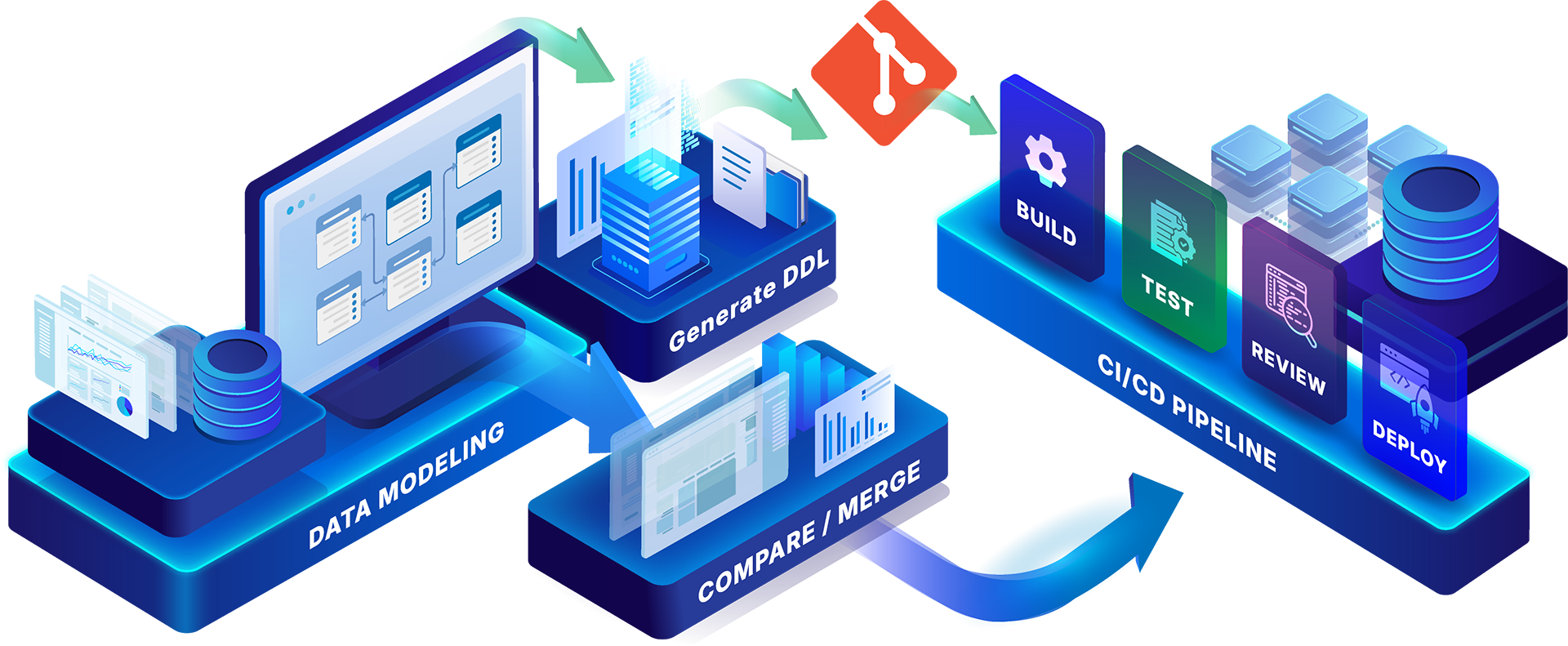
Application development has changed dramatically with the adoption of Git, DevOps, and CI/CD. Code changes can be versioned, reviewed, tested, and moved through controlled deployment processes before reaching production.
Database design does not always follow the same path.
Data architects may carefully design and validate changes within a data model, but translating those changes into database updates can introduce manual steps between modeling and development. Scripts need to be generated, versions need to be tracked, and development teams need to understand exactly what has changed before those updates reach a database.
ER/Studio helps close that gap by integrating data modeling directly with Git repositories.
With Git integration in ER/Studio Data Architect Enterprise Edition, teams can generate database scripts from physical data models, commit them directly to Git, compare models against previous DDL versions, and generate ALTER scripts that can become part of established development workflows.
The result is a stronger connection between data architecture, database development, version control, and DevOps.
Git has become fundamental to software development because it provides a versioned history of changes and enables multiple contributors to work within a controlled development process. Commits create snapshots of changes, while branches allow teams to develop and evaluate changes without immediately modifying production code.
Those principles are just as valuable for database development.
A database schema changes continuously. Tables are added. Columns change. Relationships evolve. Indexes are introduced. Business requirements require modifications to existing structures.
The data model often provides the blueprint for those changes, but the database itself ultimately needs executable SQL.
That creates an important question:
How do you move from a carefully designed model to a controlled, traceable database change?
ER/Studio’s Git integration helps create that bridge.
ER/Studio Data Architect can generate CREATE DDL from a physical data model and push the resulting script directly to a Git repository. Users can select the appropriate Git branch, enter a commit message, and push the generated file as part of the DDL generation workflow.
Instead of treating database scripts as an output that needs to be manually transferred into another process, ER/Studio makes Git part of the modeling workflow itself.
Consider a data architect who needs to add several attributes and relationships to an existing database design.
The architect can make those changes within ER/Studio, validate how they affect the physical model, generate the appropriate SQL, and commit the resulting DDL to the team’s Git repository.
From there, the script can participate in the organization’s existing development processes.
This creates a cleaner handoff between the people designing the database and the teams responsible for building and deploying it.
The connection becomes especially valuable for organizations using continuous integration and continuous delivery or deployment.
CI/CD pipelines automate stages of the software delivery process, including building, testing, and deploying changes. GitLab, for example, describes pipelines as sequences of jobs and stages that can automatically run in response to events such as commits or merge requests.
ER/Studio does not replace those CI/CD systems. Instead, it helps database designs participate in them.
A simplified workflow could look like this:
Model → Generate DDL → Commit to Git → Review/Test → CI/CD Pipeline → Database
That connection is important.
Database design is no longer isolated from the processes development teams already use to manage application code. Database scripts generated from an approved physical model can enter the same broader version-control and deployment ecosystem.
For organizations adopting DevOps practices, this helps bring application development and database development closer together.
Version control becomes even more useful when teams can understand the meaning of the differences between versions.
ER/Studio extends its Git integration into its Compare/Merge capabilities. A physical data model can be compared against a CREATE DDL file stored in Git, including a selected previous version of that file. ER/Studio imports the selected SQL and compares it with the current physical model.
This gives data professionals a model-aware way to evaluate database changes.
Instead of simply knowing that two SQL files contain different text, teams can examine differences in the context of the database structures those scripts represent.
That can make questions such as these easier to answer:
For complex databases, understanding the meaning of a change can be considerably more useful than simply identifying lines of SQL that changed.
Identifying a difference is only part of the process. Teams also need a reliable way to implement it.
ER/Studio’s Compare/Merge workflow can be used to generate the ALTER SQL required to reconcile differences. Those ALTER scripts can then be committed to Git, creating a traceable artifact for the database change.
Imagine that a production database is based on an earlier version of a physical model.
The model continues to evolve as new requirements are introduced. Rather than manually determining every SQL statement necessary to update the database, the team can compare the current model with the appropriate DDL version from Git and use ER/Studio to generate the required ALTER script.
That script can then move into the organization’s established review, testing, and deployment processes.
This helps create a more controlled progression:
Design the change → Understand the difference → Generate the SQL → Version the change → Review and deploy
The model remains central to the design process while Git provides the versioned artifacts needed downstream.
Git integration also creates something valuable beyond automation: history.
When CREATE DDL and ALTER scripts are committed to Git, teams can maintain a record of how database definitions have changed over time. Git repositories inherently maintain revision history through commits, giving teams a way to inspect previous states and understand how a project evolved.
For database teams, that means changes do not have to exist only as modifications to a live database or as files scattered across individual machines.
They can become versioned development artifacts.
A commit message can provide context around why a change was made. Previous versions can be referenced when investigating an issue. Database definitions can be associated more closely with the development work occurring around them.
This improves traceability while providing teams with greater visibility into database evolution.
Data architects and application developers frequently approach the same system from different perspectives.
The data architect is concerned with structure, relationships, standards, reuse, and the long-term integrity of the data architecture.
The developer is often focused on implementing the changes required to deliver an application or feature.
Git can provide common ground.
By placing database scripts generated from ER/Studio into repositories already used within development processes, database changes become more accessible to the broader engineering workflow.
Developers can work with familiar Git-based processes while data architects continue designing within a purpose-built data modeling environment.
Neither group has to abandon the tools designed for its work.
Instead, ER/Studio provides a connection between them.
Organizations have different standards for source control and DevOps, so ER/Studio is not limited to a single Git provider.
ER/Studio Data Architect currently supports integration with:
These integrations are supported directly within ER/Studio’s Git functionality.
That flexibility is important for larger organizations where development standards are already established. A data architecture team does not need to introduce a separate version-control platform simply to manage database scripts generated from its models.
ER/Studio can instead fit into the Git environment the organization already uses.
The real value of Git integration is not simply the ability to put a SQL file into a repository.
It is the ability to connect intentional database design with controlled database implementation.
ER/Studio provides the modeling environment where architects can understand structures, relationships, standards, and dependencies before making changes. Git provides the version-control foundation used throughout modern development. CI/CD systems provide the processes that can test and move those changes toward deployment.
Connecting those pieces helps organizations create a more complete database development lifecycle.
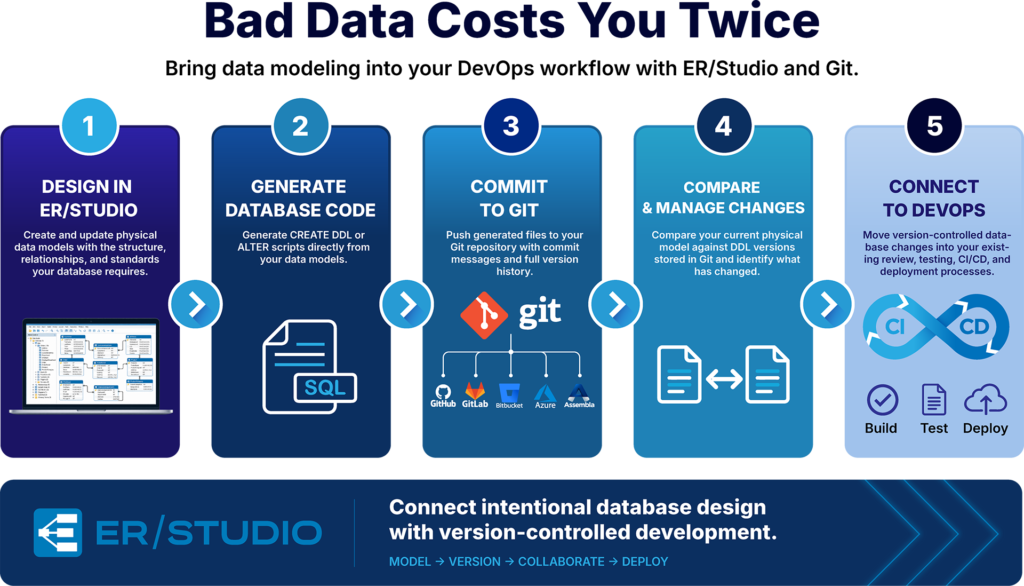
Design in ER/Studio. Generate the required DDL. Commit it to Git. Compare changes against previous versions. Generate ALTER scripts. Move those artifacts through established development and deployment processes.
That is a much different approach from treating a data model as a diagram that ends when the design work is finished.
The model becomes an active part of how the database is built and maintained.
Data modeling and DevOps solve different parts of the same problem.
One defines what the database should look like. The other helps organizations control how changes make their way into production.
ER/Studio’s Git integration connects those workflows so data architects can maintain the rigor of model-driven database design while engineering teams continue using the version-control and CI/CD practices already built into their development processes.
For organizations trying to improve collaboration between architecture, database, and development teams, that connection can help turn data models into something more than documentation.
It makes them part of the development lifecycle.
See how ER/Studio connects data modeling with Git and modern database development. Request a demo or start a free trial.
Yes. ER/Studio Data Architect Enterprise Edition integrates with Git repositories, allowing teams to generate and commit CREATE DDL and JSON files from physical data models. ER/Studio can also work with DDL versions stored in Git during Compare/Merge workflows and commit generated ALTER scripts.
ER/Studio supports major Git repository platforms including GitHub, GitLab, Atlassian Bitbucket, Azure Repos, and Assembla. This allows data modeling and database development workflows to connect with source-control environments already used by development teams.
ER/Studio can generate database DDL from physical data models and commit those files to Git, where they can become part of existing development and CI/CD processes. This connects model-driven database design with the version control, testing, review, and deployment workflows used by development teams.
Yes. ER/Studio’s Compare/Merge functionality can compare a physical data model against CREATE DDL stored in Git, including previous versions. Teams can use the comparison to identify schema differences and generate the ALTER SQL required to reconcile them.
Using Git for database development provides a versioned history of database changes, improves traceability, supports collaboration, and makes database artifacts available to established DevOps processes. Combined with ER/Studio, teams can connect intentional data modeling with version-controlled database implementation.


